Most leads are not lost on price or pitch. They are lost in the gap between the form submission and the first reply. AI lead follow-up tools exist to close that gap, and the good ones do it in seconds.
This guide explains what AI follow-up actually does, which tools do which job (with October 2026 pricing), and a five-step setup you can finish in an hour. It is written for small businesses and sales teams running lead generation on Facebook, Instagram, Google, LinkedIn or TikTok, where the leads arrive at all hours and there is no SDR team waiting.
What Is AI Lead Follow-Up?
AI lead follow-up is software that replies to, qualifies or nurtures a new lead automatically, using rules or a language model instead of a person starting every conversation. It ranges from a simple instant text (“Thanks, calling you in five minutes”) to a chatbot that answers product questions and books a meeting, to a sequence that keeps emailing until the lead replies.
The useful way to think about it is four layers, cheapest and most effective first:
| Layer | What it does | Example tools | Cost |
|---|---|---|---|
| 1. Instant alerts | Gets the lead to a human in seconds by SMS, WhatsApp, email or CRM | LeadSync | From $24/mo |
| 2. Autoresponders | Sends the first reply automatically, by email, SMS or WhatsApp | MailerLite, ActiveCampaign, Twilio via LeadSync | Free to $50/mo |
| 3. AI conversation | Answers questions, asks qualifying questions, books time | WhatsApp Flows, Chatbase, CINC AI, 1mind | $20 to quote |
| 4. Sales sequences | Multi-step follow-up across email, phone and SMS until the lead responds | Saleshandy, Klenty, HubSpot, GoHighLevel | $41 to $99/user/mo |
Why Speed Matters More Than the AI
The research on lead response time has not changed in a decade, and it is brutal. When the first call comes at 30 minutes instead of 5, the odds of reaching the lead are 100 times lower and the odds of qualifying it 21 times lower. Most businesses take far longer than five minutes. The sources are in our speed-to-lead guide.
Our own delivery data makes the problem concrete: across 1.7 million lead ad leads, three quarters arrived outside 9 to 5, with 9pm the peak hour and Sunday the busiest day. The leads come in when nobody is at a desk. That is the gap AI follow-up closes, and it is why layer 1 and 2 matter more than any model.
The Tools, by Job

Instant Alerts: LeadSync
Ad platforms hold your leads in their own dashboards (Meta deletes them after 90 days). LeadSync connects to Facebook, Instagram, Google, LinkedIn and TikTok lead forms and delivers every lead within seconds to your CRM and to your phone by SMS or WhatsApp, with the lead’s answers in the message and one-tap call and reply buttons. Plans from $24 a month. This is not AI; it is plumbing, and it is the layer every other tool depends on.
Autoresponders: MailerLite, ActiveCampaign, SMS
The first reply does not need to be clever, it needs to be immediate. An email automation triggered when the lead lands in a group (free on MailerLite, included on ActiveCampaign) sends the brochure or booking link within a minute. An SMS autoresponder does the same with a 98% open rate. Our guide to email autoresponders for Facebook leads covers the templates.
AI Conversation: WhatsApp Flows, Chatbase, CINC AI, 1mind
This is where the language models earn their keep.
- WhatsApp Flows let you ask structured qualifying questions (budget, timeframe, location) inside WhatsApp the moment the lead arrives, with the answers written back to your CRM. See lead qualification with WhatsApp Flows.
- Chatbase and similar builders train a chatbot on your website and documents so it can answer product questions and collect contact details 24/7. Compared in AI chatbot tools for lead generation.
- CINC AI is the real estate version: 24/7 text conversations with new leads and behavioural messages triggered by what the lead does on your site (CINC, 2026).
- 1mind replaced Drift. Salesloft retired Drift in 2026 and moved its conversational AI into 1mind, which runs website chat, qualifies visitors and books meetings inside the Salesloft platform (Salesloft, 2026). It is an enterprise product; small teams should look at Chatbase or their CRM’s chat.
Sales Sequences: Saleshandy, Klenty, CRM-Native
For leads who do not reply to the first touch, a sequence keeps going without you remembering to.
- Saleshandy is the small-team pick: Starter is $41 a month (or $34 billed yearly) for 6,000 emails a month to 2,000 active prospects with unlimited sending accounts, AI reply categorisation and CRM sync (Saleshandy, 2026).
- Klenty adds phone and SMS to email: Starter is $50 a month for email only, Growth $70 per user per month for email, phone (200 minutes) and SMS, Plus $99 with 1,000 minutes (Klenty, 2026). Its AI Cadences write the sequence for you.
- CRM-native: HubSpot’s Breeze agents and GoHighLevel’s workflows do sequences inside the CRM, which is simpler if you already live there. Real estate teams get the same from Follow Up Boss.
Setting Up AI Lead Follow-Up in Five Steps

- Connect the lead source. Link every lead form (Facebook, Instagram, Google, LinkedIn, TikTok, your website) to one delivery tool so nothing sits in a dashboard. With LeadSync this is a five-minute OAuth connection per platform.
- Route and alert. Send each lead into the CRM and to the right person’s phone. Route by form, product or area if you have a team.
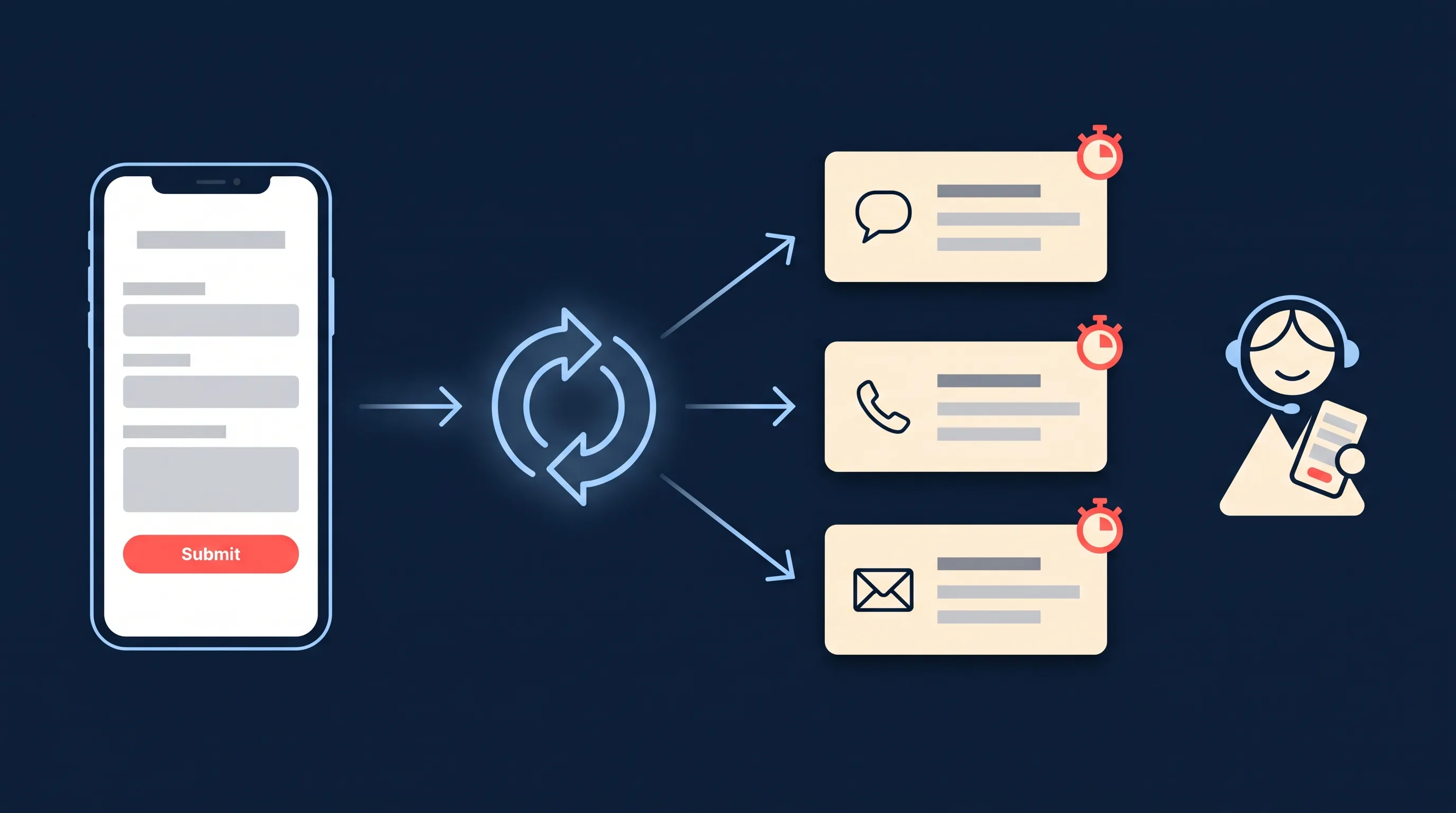
- Send the first reply automatically. An SMS, WhatsApp message or email within 60 seconds that confirms receipt and sets the expectation of a call. Keep it short and human; do not pretend it is not automated.
- Qualify while you wait. A WhatsApp Flow or chatbot asks three to five questions. The answers land in the CRM before the call.
- Sequence the non-responders. Leads who do not pick up go into a cadence: call again, text, email, over 7 to 14 days. Our data on how often to follow up leads gives the timing.
Then measure one number: median time from lead submission to first human contact. Get it under five minutes in business hours and under one minute for the automated reply, and most “lead quality” complaints disappear.
Best Practices

- Disclose automation. “This is an automated message, Sarah will call you shortly” converts better than a bot pretending to be Sarah, and it keeps you on the right side of consent rules.
- Respect channel rules. WhatsApp requires an opt-in and template messages for the first touch; SMS needs consent and a stop keyword. Our WhatsApp rules for following up Facebook leads covers the specifics.
- Segment by intent, not just source. A lead who asked for a quote gets a different sequence from one who downloaded a guide. Score them (lead scoring tools) and route the hot ones to a call first.
- Test cadence, not copy. The gap between touches moves conversion more than the wording. A/B test day 1/2/4/7 against day 1/3/7/14 before rewriting messages.
- Keep a human in the loop. AI qualifies; a person closes. The hand-off should happen the moment a lead shows buying intent, not at the end of a sequence.
Common Problems
| Problem | Likely cause | Fix |
|---|---|---|
| Leads say they never heard from you | Alert went to a dashboard nobody checks | Add SMS or WhatsApp alerts to a phone that is answered |
| Autoresponder lands in spam | Unauthenticated sending domain | Set up SPF, DKIM and DMARC in your email tool |
| Chatbot gives wrong answers | Trained on thin or outdated content | Retrain on current pages and FAQs; restrict it to topics it knows |
| Sequence annoys good leads | Same cadence for everyone | Stop the sequence on any reply; shorten it for high-intent leads |
| AI replies at 2am, nobody follows up at 9am | No hand-off rule | Create a “qualified, awaiting call” list the team works first thing |
Wrapping Up
AI lead follow-up is four layers, and the cheap ones carry most of the weight: get the lead to a human in seconds, send an automated first reply, qualify with a flow or chatbot, and sequence the rest. Build it in that order. The AI conversation tools are worth it once the plumbing is in, not instead of it.
If your leads come from Facebook, Instagram, Google, LinkedIn or TikTok ads, start with instant lead notifications and the rest follows.
Frequently Asked Questions
What is AI lead follow-up?
AI lead follow-up is software that replies to, qualifies or nurtures new leads automatically, using rules or language models instead of a salesperson starting every conversation. In practice it covers four layers: instant alerts that get the lead to a human fast, autoresponders that send a first reply, AI conversation tools that answer questions and qualify, and sales sequences that keep following up until the lead responds.
What are the best AI lead follow-up tools?
It depends on the job. LeadSync for instant SMS, WhatsApp and email alerts on ad leads; MailerLite or ActiveCampaign automations for an immediate first email; WhatsApp Flows or Chatbase for qualifying questions; CINC AI for real estate conversations; 1mind (formerly Drift) for website chat; Saleshandy or Klenty for multi-step sales sequences; and HubSpot Breeze or GoHighLevel if you want it inside the CRM.
How fast should you follow up a lead?
Within five minutes. MIT’s Lead Response Management Study of 15,000+ leads found the odds of reaching a lead were 100 times lower, and of qualifying it 21 times lower, when the first call came at 30 minutes instead of 5. Most businesses take far longer than five minutes.
Can AI follow-up replace a salesperson?
For the first reply and the qualifying questions, yes, and it does them faster and at 2am. For the conversation that closes, no. The best setups use AI to answer and qualify within seconds, then hand a warm, qualified lead to a person within minutes during business hours.
What happened to Drift?
Salesloft acquired Drift in 2024 and in 2026 retired the Drift product in favour of 1mind, its conversational AI that sits inside the Salesloft platform. Existing Drift customers were migrated. If you see Drift recommended as a standalone chatbot, the article is out of date.
How do I set up AI lead follow-up for Facebook lead ads?
Connect your Page to LeadSync, choose where each lead should go (CRM, email, SMS, WhatsApp), and turn on an instant alert to your phone. Add an autoresponder in your email tool or a WhatsApp Flow to ask qualifying questions, then a follow-up sequence in your CRM for leads who do not reply. The whole setup takes under an hour.