If you run Facebook or Instagram lead ads and you want to follow those leads up on WhatsApp, there are two very different ways to do it, and most of the advice online blurs them together.
The first is to reply yourself. The lead lands on your phone, you open WhatsApp, you type a message from your own number. That is a person-to-person reply and the only rule that matters is speed.
The second is to have software send the first message for you, the moment the form is submitted. That goes through the WhatsApp Business Platform, and Meta has rules for it: consent, template approval, category, country, and a price per message that changed again on 1 October 2026. Vendors selling the automation rarely spell those rules out. This article does, with the Meta sources linked, plus consent and template text you can copy.
One thing to be clear about up front: LeadSync sends the lead to you on WhatsApp. It does not message the lead. If the manual route is what you want, skip to replying from your own WhatsApp. If you want to automate the first message, read the four rules first.
Two things people mean by “Facebook leads to WhatsApp”
| Alert yourself, reply by hand | Software messages the lead | |
|---|---|---|
| Who sends the first message | You, from your own WhatsApp or WhatsApp Business app | A WhatsApp Business Platform provider, from a business number |
| Consent needed on the form | Good practice, not a platform rule | Required by Meta’s opt-in policy |
| Template approval | None | Yes, for every first message |
| Cost per message | Nothing | Meta’s per-message rate plus your provider’s fee |
| Works for US leads | Yes | Utility templates only |
| What LeadSync does | Delivers the lead to your WhatsApp in seconds, with an Open lead button | Not offered (LeadSync’s SMS and email autoresponders do message the lead) |
The rest of this article is about the right-hand column, because that is where people get caught.
Rule 1: get WhatsApp consent on the form itself
Meta’s opt-in policy says a business needs “opt-in permission from the recipient confirming that they wish to receive subsequent messages” and that the opt-in must make two things clear: that the person is opting in to receive WhatsApp messages, and the name of the business that will send them (Meta, Getting Opt-in for WhatsApp). The acceptable channels it lists are SMS, a website, a phone call and in person or on paper. Lead forms are not mentioned at all.
That silence is the problem. A phone number typed into a Facebook lead form is a phone number, not a WhatsApp opt-in. Practitioners who run this automation read Meta’s rule the same way: “Having a phone number from a Facebook lead form doesn’t mean you can message it on WhatsApp… Your Facebook lead form should clearly say you’ll contact people on WhatsApp, and you need to log consent” (Vyostra, 2026).
The fix takes a minute. Every Instant Form has a privacy section where you can add a custom disclaimer and optional checkboxes (how to set up a Facebook lead ad campaign covers where it lives). Put the WhatsApp line there, name your business, and keep a record of the form it came from and when. Copy-paste text is in the pack at the end.
If you reply by hand from your own phone, this is still worth doing. A lead who was told to expect a WhatsApp message answers one; a lead who was not may report it as spam, and enough reports hurt the number.
Rule 2: the first automated message must be an approved template
On the WhatsApp Business Platform there are two kinds of message. Free-form messages can only be sent inside a 24-hour customer service window that opens when the customer messages you; every new message from them resets the clock (Meta, WhatsApp pricing). Outside that window, the business can only send a template that Meta has reviewed and approved.
A lead form submission does not open the window, because the lead has not sent you a WhatsApp message. So the first automated message after a form submission is always a template, never free text. Your provider will have you write it in advance, submit it to Meta, and wait for approval, which can take minutes or days and can be rejected.
Meta assigns the template a category, and the category decides both the price and whether it gets delivered:
- Utility confirms or updates something the person asked for. “Thanks, we received your quote request, a consultant will call you before 5pm” is utility.
- Marketing promotes something or nudges. “Book your free consultation this week and get 10% off” is marketing.
- Authentication is for one-time codes and does not apply here.
Write the follow-up as a confirmation of what the lead requested and it is far more likely to be approved as utility, which is cheaper and, as the next rule explains, deliverable in the US. Add a promotion and it becomes marketing. Either way, the first message cannot be a sales pitch typed on the fly.
Rule 3: marketing templates are not delivered to US numbers, and are throttled everywhere
Meta’s developer documentation states: “WhatsApp does not currently deliver marketing template messages to WhatsApp users with United States phone numbers” (Meta, Per-user marketing template limits). The pause started on 1 April 2025. As of October 2026 no end date has been announced (Kanal, 7 Oct 2026). Utility and authentication templates, replies inside the 24-hour window, and click-to-WhatsApp ads all still work for US numbers.
For a US business this closes the “lead form, then WhatsApp drip” playbook that most of the Indian and Latin American guides describe. The only compliant automated first message to a US lead who has not messaged you is a utility template.
Everywhere else, marketing templates are rationed per recipient. WhatsApp “may limit the number of marketing template messages a WhatsApp user receives from any business” based on “a dynamic view of an individual’s recent marketing message read rate and how many messages they currently have in their inbox from friends, family, and businesses” (same Meta page). When a lead is at their limit your message is not delivered and the API returns error code 131049; Meta says to wait at least 24 hours before trying again. In practice a lead who ignores marketing messages from other businesses may never receive your drip, and you will not know unless your provider surfaces the error.
Rule 4: what it costs since the 1 October 2026 pricing change
Meta moved WhatsApp from per-conversation to per-message pricing on 1 July 2025, and bills only for delivered messages (Meta, WhatsApp pricing). Three things changed on 1 October 2026 on the same page:
- Service messages are no longer unlimited. Each business phone number gets 1,000 free service messages a month (your typed replies inside the 24-hour window). From the 1,001st they are charged, and unused allowance does not roll over.
- Utility templates inside the service window are charged again. They had been free since July 2025.
- Click-to-WhatsApp ads keep their free window. When a person starts the chat from your ad, a free entry point window opens that “may remain open for up to 7 days”, during which marketing, utility and service messages are all free. (Meta’s consumer-facing pricing page still says 72 hours; the developer page is the more recently updated of the two.)
Meta’s own rate card is an interactive selector (platform pricing). Vendor transcriptions of the 1 October 2026 card give a feel for the numbers, per delivered message in US dollars (ChatMaxima, 2026; cross-checked against Drag, 2026):
| Market | Marketing | Utility |
|---|---|---|
| United States and Canada | $0.0250 | $0.0034 |
| United Kingdom | $0.0635 | $0.0220 |
| India | $0.0118 | $0.0014 |
| Brazil | $0.0625 | $0.0068 |
| Rest of world (Australia is not a named market, check the selector) | $0.0604 | $0.0077 |
Those are Meta’s rates. Your provider adds a monthly subscription and, in most cases, a per-message markup that vendors themselves put at 11% to 30% (Jee Designs, 2026). For a business doing 200 leads a month the Meta portion is a few dollars; the subscription is the real cost.
Meta changes prices only on 1 January, 1 April, 1 July and 1 October, with a month’s notice for rate changes. If you read this after the next of those dates, check the pricing page before you trust the table.
Replying from your own WhatsApp: no rules, just speed
None of the above applies when you, a person, open WhatsApp on your phone and message a lead who asked to be contacted. That is the same as calling them. There is no template, no category, no per-message fee and no US pause, because you are using the WhatsApp or WhatsApp Business app, not the Business Platform.
What you need is the lead on your phone fast enough to matter. Leads contacted within five minutes convert many times more often than leads contacted an hour later, and the speed-to-lead guide has the numbers. The practical setup with LeadSync:
- Turn on WhatsApp lead notifications. Add your number under Connections, attach it to your lead form, and every new lead arrives in your WhatsApp within seconds, sent from LeadSync’s own WhatsApp Business number. No WhatsApp Business account, no template approval on your side. Ten notifications a month are free and a pack of 200 is $5 a month (setup guide).
- Tap Open lead under the alert. The lead page shows Call, Text, WhatsApp and Email buttons. The WhatsApp button opens the chat with the lead from your own number, with a greeting already typed. Set your own wording under Message Settings as a saved reply.
- After the chat, tap Contacted, Booked or Not interested on the same page so your uncontacted-leads digest stays honest.
The WhatsApp button only appears when the lead’s number includes a country code, because WhatsApp needs one to open a chat. If most of your leads type local numbers, add “Please include your country code” to the phone question on the form.
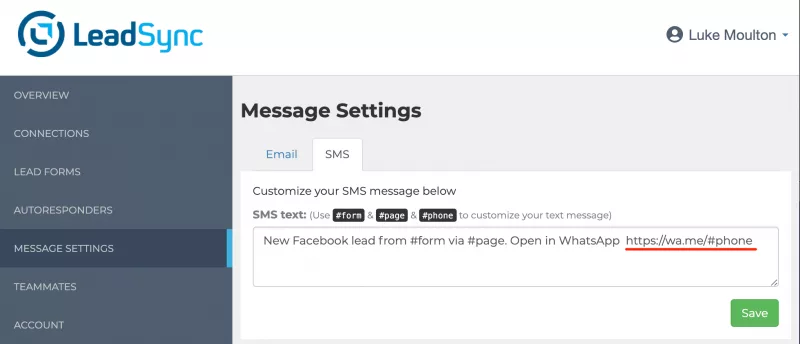
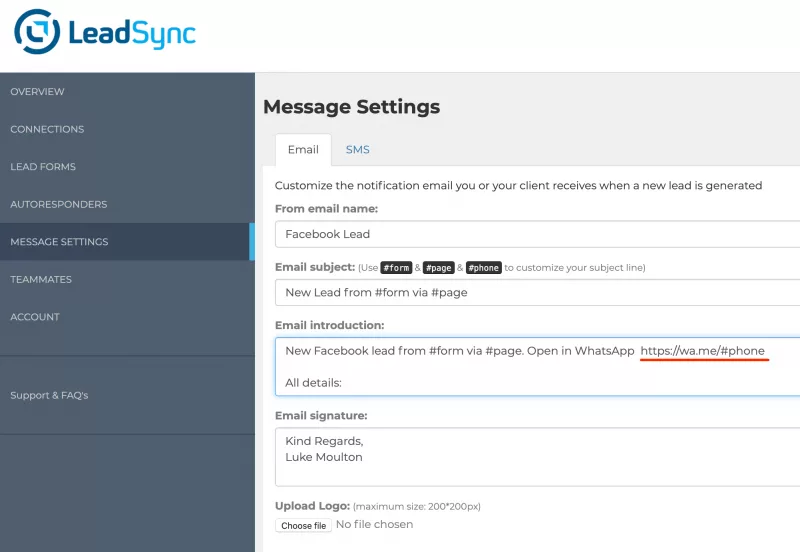
Prefer the alert by SMS or email? Both include a wa.me link that opens the chat the same way:
If you do want to automate the first message
Then you need four things LeadSync does not provide: a WhatsApp Business Platform account through a provider (Wati, Interakt, Gallabox, AiSensy, Twilio and the like), a business phone number on it, an approved template, and a connection from your lead form to the provider that passes the lead’s name and number into the template. Providers that do this out of the box typically start at US$45 to $150 a month at the small-business tier, before Meta’s per-message fees.
Before you sign up, run the four rules against your situation. Is the consent line on the form? Is the first message a confirmation (utility) rather than a pitch (marketing)? Are your leads in the US? What does a month of messages cost on top of the subscription? If the answers are no, marketing, yes and more than you expected, the manual route above usually wins. Running click-to-WhatsApp ads instead, where the lead messages you first? The rules are different and WhatsApp Flows can qualify those leads inside the chat.
Copy-paste pack: consent line and two templates
Edit the bracketed parts. The consent line goes in the Instant Form’s custom disclaimer or as an optional checkbox; the templates are submitted to Meta through your provider.
Consent line for the lead form
By submitting this form you agree that [Business name] may contact you
about your enquiry by phone, email and WhatsApp. Reply STOP to any
WhatsApp message to opt out.
Utility template (confirms what they asked for; deliverable to US numbers)
Hi {{1}}, this is [Business name]. We received your request for
[a quote / a callback / more information] through our [Facebook /
Instagram] ad. [First name], one of our team, will [call / message]
you [before 5pm today / within one business day]. Reply here if a
different time suits you better.
Marketing template (promotional; not delivered to US numbers)
Hi {{1}}, thanks for your interest in [Business name]. This week we
are offering [offer] to new enquiries from [Facebook / Instagram].
Reply YES and we will send the details, or reply STOP to opt out.
Keep the variable count low, name the business in the first line, and give the person a way to reply in words rather than a link. Templates that read like a confirmation get approved as utility; templates with an offer get marketing, and should carry the opt-out.
Frequently Asked Questions
Can I message a Facebook lead on WhatsApp if they only gave me their phone number?
From your own phone, replying by hand, yes: that is a normal follow-up like a phone call. Through the WhatsApp Business Platform (the API your automation tool uses), no. Meta requires an opt-in that names your business and says you will message them on WhatsApp. Add that line to the form’s custom disclaimer before you automate anything.
Why does my automated WhatsApp message to a new lead fail?
The three usual causes: the first message was free-form text instead of an approved template (only templates can start a conversation), the template was a marketing template sent to a US number (Meta does not deliver those), or the lead has hit their per-user marketing limit, which returns error 131049. Check the category and the destination country first.
What is the difference between a utility and a marketing WhatsApp template?
A utility template confirms or updates something the person asked for, such as a quote request received or an appointment time. A marketing template promotes something: an offer, a reminder to book, a nudge. Meta decides the category when it approves the template, and marketing templates cost more and face delivery limits that utility templates do not.
Does LeadSync send WhatsApp messages to my leads?
No. LeadSync sends the new lead to you on WhatsApp, with an Open lead button that takes you to a lead page where a WhatsApp button opens the chat with the lead from your own number. If you want an automated first message to the lead, LeadSync’s SMS and email autoresponders do that; WhatsApp automation to the lead needs a WhatsApp Business Platform provider.
How much does a WhatsApp follow-up message cost in 2026?
Meta bills per delivered message. Vendor transcriptions of Meta’s 1 October 2026 rate card put a marketing message at about US$0.025 to a US number, $0.012 to India and $0.064 to the UK, with utility messages a fraction of that. Your provider adds its own subscription and usually a per-message markup. Replies you type inside a 24-hour service window are free up to 1,000 a month per number.
Do click-to-WhatsApp ads follow the same rules?
No, and that is the main reason people run them. When someone starts the chat from your ad, Meta opens a free entry point window of up to 7 days in which your replies are free and no template is needed. The rules in this article apply to leads who filled in a lead form and have not messaged you first.
Get Meta leads on your WhatsApp in seconds and reply from your own number. Start a free 7-day LeadSync trial, no credit card required.