Meta instant forms are the reason lead ads work on Facebook and Instagram. When someone taps your ad, the form opens inside the app with their name, email and phone number already filled in, so most leads take two taps to submit. You will also hear them called Facebook lead forms, Meta lead forms or simply Meta forms. This guide covers all of it: the four sections of a form, the three form types, what a form can collect, eight examples, how to create and test one, when a website form is the better choice, and the step most advertisers get wrong, which is what happens to the lead after it is submitted.
What Is a Meta Instant Form?
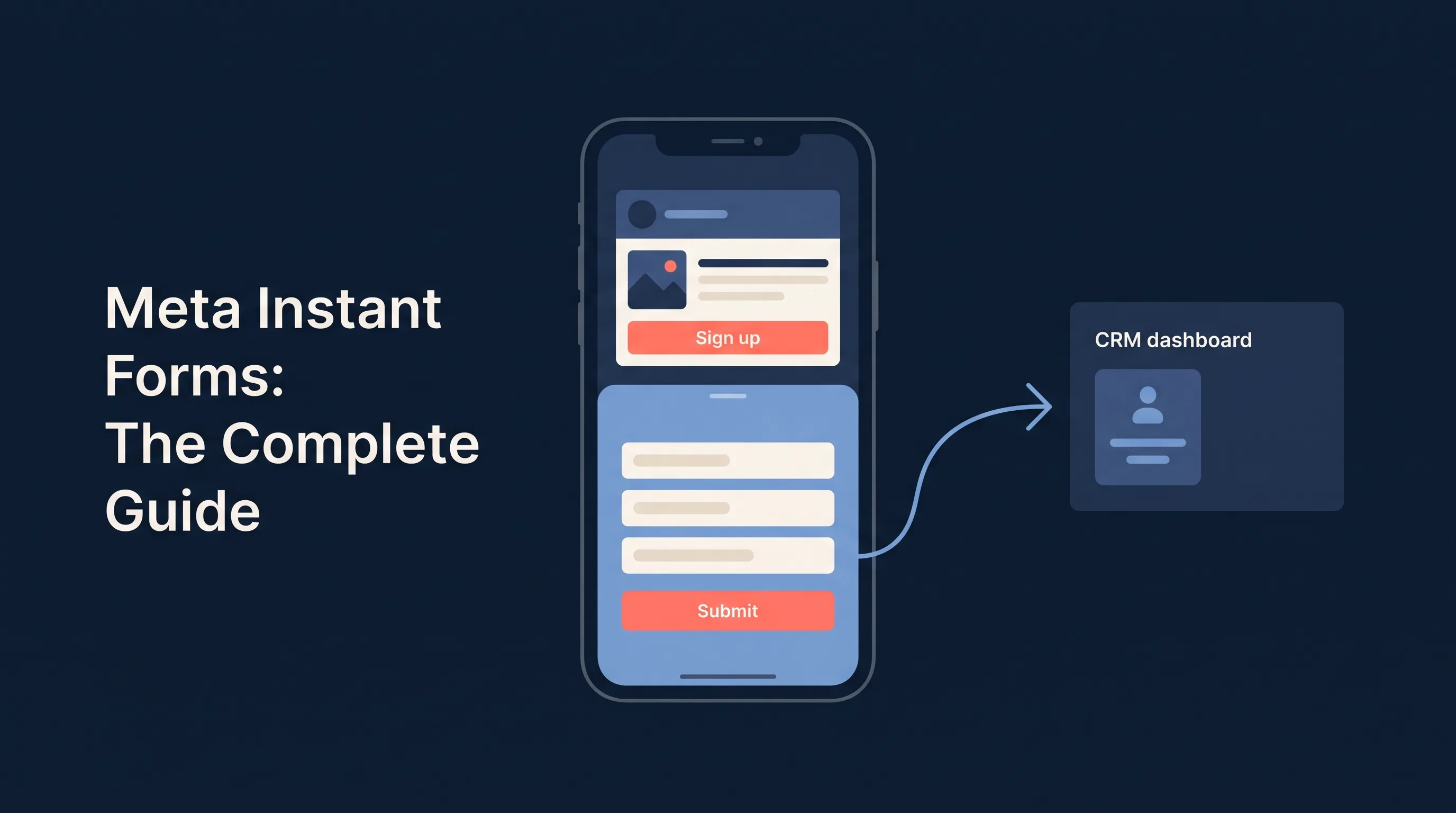
A Meta instant form is the native lead form attached to a lead ad. Instead of sending the click to a landing page, the form opens as a sheet inside the Facebook or Instagram app. Meta pre-fills the contact fields from the person’s profile, the person checks the details, answers any custom questions you added, and taps submit.
Visually the ad looks like any other feed ad. The difference is the conversion location: with an instant form the conversion happens inside Meta, and the lead is stored in Meta’s Leads Center until you move it. With a website form, the click goes to your page and the lead lands in your own form handler.
Meta’s own documentation on lead ads with instant form describes them as a way to generate and qualify leads by asking people to fill out a form, and that word qualify matters. The pre-fill gets you volume. The custom questions and form type settings are how you get quality.
The Four Sections of an Instant Form
Every instant form is built from the same four parts, in this order.
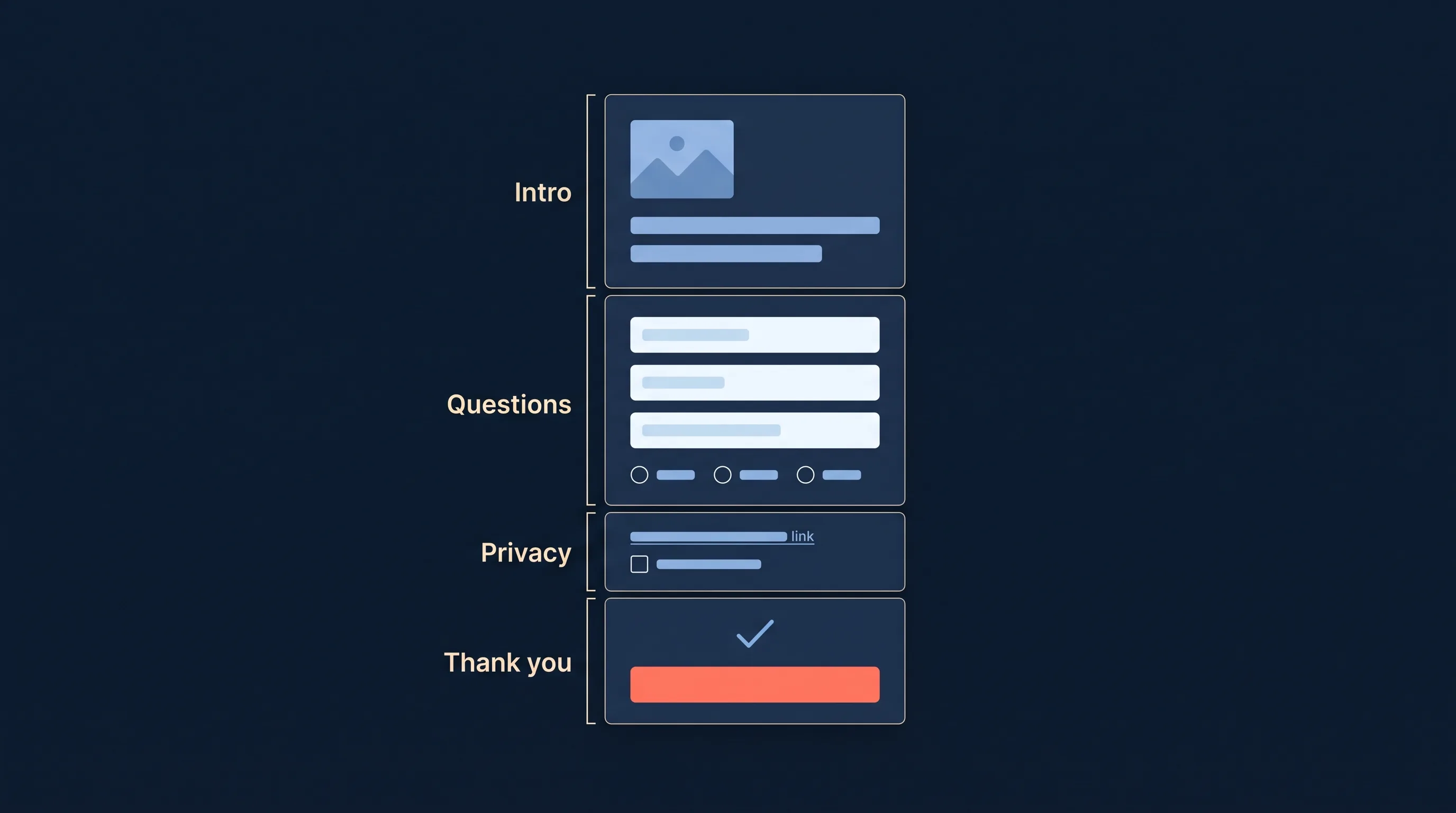
- Intro. An optional greeting screen with an image, a headline and a short description. On More volume forms most advertisers skip it; on Higher intent and Rich creative forms it is where you restate the offer.
- Questions. The core of the form: the pre-filled profile fields you request plus any custom questions. This is the only section that has to exist.
- Privacy policy. A required link to your privacy policy, with optional custom disclaimers and consent checkboxes underneath it. Meta will not publish a form without the link.
- Thank-you screen. The ending: a headline, a short message and a call-to-action button. The button can send the person to your website, let them download a file, call your business or start a message thread, depending on the form type.
Two things people learn the hard way: the form has to be attached to a campaign with the Leads objective (or a traffic campaign with the browser add-on turned on), and once published it is locked. Editing means duplicating the form, changing the copy and publishing a new version, per Meta’s guidance on editing a lead ad with instant form.
The Three Instant Form Types
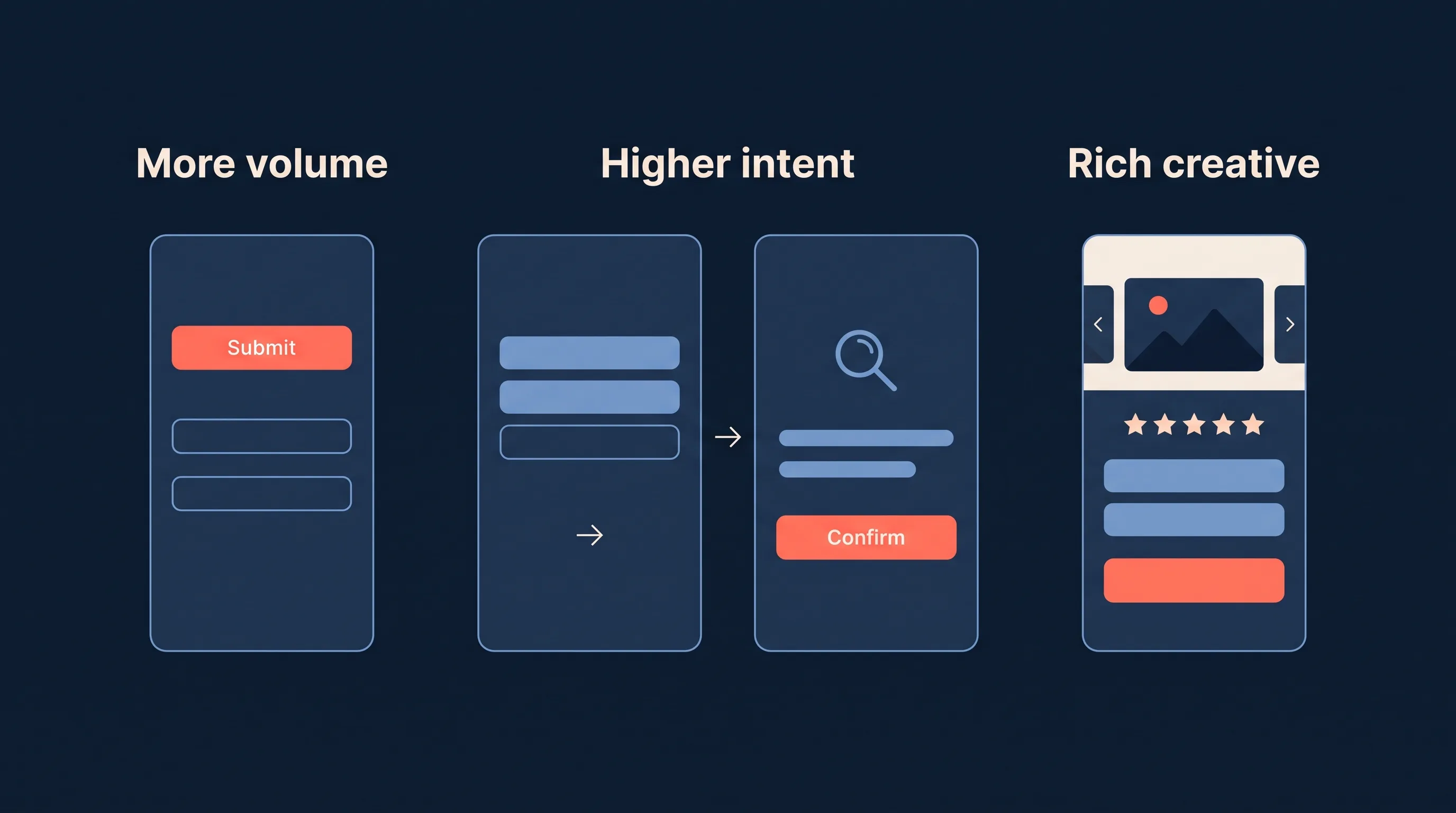
When you create a form, Meta asks you to pick a form type. The choice changes how the form looks, where it can run, and the balance between lead volume and lead quality.
| Form type | What it adds | Where it runs | Use it when |
|---|---|---|---|
| More volume | Nothing. A single screen, submit in two taps. | Facebook and Instagram, mobile and desktop | You want the most leads at the lowest cost per lead and can qualify on follow-up |
| Higher intent | A review screen that asks the person to confirm their details before submitting | Facebook and Instagram mobile feeds | Junk or accidental leads are eating your sales team’s time |
| Rich creative | Landing-page style sections above the questions: how it works, a product carousel, social proof, incentives, plus a file download on the thank-you screen | Facebook mobile app only | You have no landing page and need the form to sell the offer, not just collect details |
More volume is the default and the right starting point for most campaigns. Higher intent is the cheapest lead-quality lever Meta gives you; it usually reduces volume by a noticeable margin and removes most of the “I do not remember filling this in” leads. Rich creative is a different animal, and we have a separate walkthrough of every section in our rich creative instant forms guide.
What Can a Meta Instant Form Collect?
Instant forms draw from two buckets, and the difference between them decides your completion rate.
Pre-filled profile fields. Meta fills these from the person’s account, so they cost almost nothing in friction. The list is long: full name (or first and last name separately), email, phone number, street address, city, state or province, country, post code, date of birth, gender, marital and relationship status, job title, work email, work phone and company name. Our guide to Facebook lead ad fields that can be pre-filled covers every option and its quirks. Two to watch: the email is the one on the person’s Facebook account, which is often a personal address, and phone numbers are pre-filled only when the person has one on their profile.
Custom questions. These are typed or tapped by the person, and each one lowers completion a little. Meta’s custom questions come in five kinds:
- Short answer, an open text field. Use sparingly.
- Multiple choice, the workhorse qualifier: budget band, timeline, service needed, team size.
- Conditional, a chain of multiple-choice questions where each answer decides the next question, driven by a CSV you upload. Our conditional answers guide shows how.
- Appointment request, which lets the person propose a date and time.
- Store locator, which lets them pick a location from a list you supply.
You can ask up to 15 questions in total across both buckets, per Meta’s guidance on asking the right questions. Almost nobody should get near that. Three or four pre-filled fields and one multiple-choice qualifier is the pattern that keeps completion high and still tells sales what they are dealing with.
Consent and disclaimers. Under the privacy policy link you can add custom checkboxes (marketing consent, terms) and a custom disclaimer. If your website has no privacy policy yet, use our free privacy policy generator to make one in a few minutes.
8 Meta Instant Form Examples
The right form depends on the offer. Here are eight instant forms we see working across LeadSync customers, with the fields, the one custom question worth asking, and where the lead should land.
1. Real estate home valuation
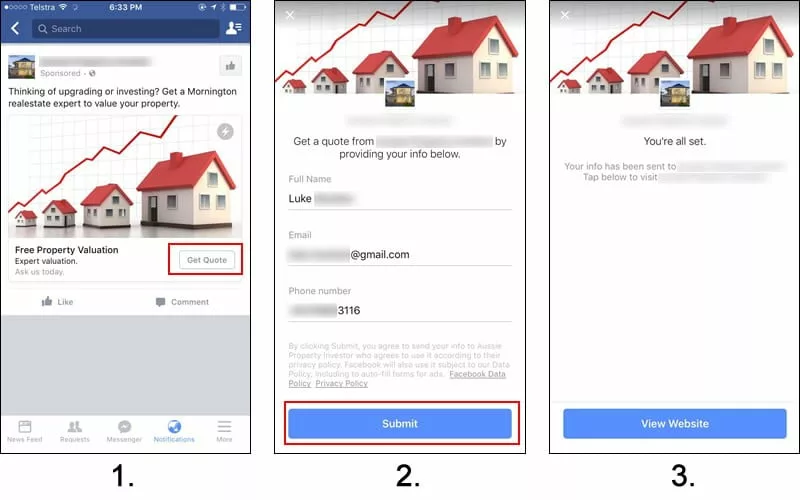
The realtor ad above offers a home valuation. When the person taps Get Offer, the form opens with name, email and phone already filled in. One multiple-choice question (“When are you thinking of selling?”) sorts hot from cold. The lead should go straight to the agent’s phone as an SMS alert and into a real estate CRM such as Follow Up Boss. More real estate examples in our real estate Facebook ad examples post.
2. Home services quote request
A plumbing, HVAC or roofing company runs a “Get a free quote” ad. Pre-fill name and phone, ask one multiple-choice question (“What do you need help with?”) and route the answer to the right technician. Higher intent is worth testing here because every junk lead costs a phone call. See our HVAC Facebook ad examples for the creative side.
3. Solar quote
Solar is the classic instant form use case: a high-value quote, a long consideration cycle and a lot of tyre-kickers. Pre-fill name, phone and post code, then ask one qualifier that actually predicts a sale, such as “Do you own your home?” as multiple choice. Turn on SMS verification for the phone number. Our solar Facebook ads guide goes deeper.
4. Gym or studio trial
“Claim your free week” with name, email and phone pre-filled, and a single multiple-choice question on the goal (lose weight, build strength, train for an event). The thank-you screen sends them to book their first session. The lead should trigger an email autoresponder within a minute with the booking link. We collected ten gym lead ad examples that all use instant forms.
5. B2B lead magnet
A software company offers a guide or benchmark report to a niche audience it has no landing page for. Pre-fill name, work email and company name, ask company size as multiple choice, and put the download on the thank-you screen (a Rich creative form can attach the file directly). The lead should land in the email platform, tagged by asset, so the nurture sequence starts automatically.
6. Car dealership test drive
“Book a test drive” with name and phone pre-filled, plus a store locator question so the person picks the dealership and a multiple-choice question on the model. The lead goes into the dealer CRM and to the salesperson’s phone. Our guide to Facebook lead ads for car dealerships covers the follow-up.
7. Education enrolment enquiry
A college, course provider or tutoring business asks for name, email and phone, then one multiple-choice question on the course of interest and one on the intended start date. The intake team gets an email notification and the lead is added to the course’s email sequence.
8. Webinar or event registration
Pre-fill name and email, ask one short question on what they want covered, and put the calendar link on the thank-you screen. Sync the lead to the webinar platform and your CRM at the same time so the invite and the sales record are created together.
Across all eight: match the number of fields to the size of the ask, add one custom question only when the answer changes what you do next, and decide before launch where the lead is going. For a bigger swipe file, see our Facebook lead ad examples by industry.
Instant Forms vs Website Forms
Instant forms and website forms are the two conversion locations for a Meta lead ad. The right choice depends on what you need from the click.
| Instant form | Website form | |
|---|---|---|
| Where the form opens | Inside Facebook or Instagram | On your landing page |
| Pre-filled fields | Yes, from the person’s profile | No, typed by hand |
| Completion on mobile | High, two taps | Lower, every field typed |
| Room to sell the offer | Limited (more with Rich creative) | Unlimited |
| Analytics | Form metrics in Ads Manager | Full site analytics and pixel events |
| Retargeting | Form openers and submitters | Page visitors |
| Where the lead lands | Leads Center, 90-day retention | Your own form handler |
When to use an instant form
- You do not have a landing page, or building one for this audience is not worth it.
- Most of your audience is on mobile, where typing into a website form is where conversions die.
- You are running to a cold audience and want the lowest cost per lead you can get.
- You want to qualify with one or two questions rather than a long page of copy.
A practical example: a B2B software company has a valuable guide for a niche audience and no landing page for it. An instant form captures name, work email and company size in two taps, and a sync tool like LeadSync drops the lead into the email platform to start the nurture sequence.
When to use a website form
- The offer needs more explanation than a headline and a short description can carry.
- You want the landing page visit for retargeting and full-funnel analytics. You will need the Meta pixel on the page and a thank-you page to fire the Lead event.
- The landing page itself does work beyond the campaign: SEO, social proof, a longer sales argument. Addressing objections on a landing page can lift conversion rates by 80%, which is space an instant form does not give you.
A practical example: a marketing agency offering a free consultation to small businesses has a landing page with case studies and testimonials. Sending the click there lets the page do the convincing and the pixel do the tracking.
Whichever you pick, the goal is the same: a compelling offer, the fewest fields that still qualify the lead, and a follow-up that starts within minutes.
Meta Instant Form Best Practices for 2026
The examples above share a handful of habits. Here are the ten that matter most, in the order they come up when you build a form.
- Size the form to the ask. A free guide earns three pre-filled fields. A $20,000 solar quote earns five fields and a qualifier. Every extra field cuts completion, so add one only when the answer changes what you do next.
- Pre-fill only what you will use. Meta lets you pre-fill name, email, phone, city, post code, job title and more. If nobody at your company will ever call the lead, do not collect the phone number; it lowers completion for nothing.
- Ask one qualifier, as multiple choice. “Do you own your home?”, “When are you looking to buy?”, “What is your team size?” Free-text questions get skipped or filled with junk. Use conditional questions when you need a second question that depends on the first.
- Write the intro, do not skip it. The intro screen is where you restate the offer in one line and set the expectation (“We will call within the hour”). Forms that go straight to questions lose people who tapped by accident and keep people who did not understand the offer.
- Pick the form type for the lead you want. More volume for cheap, high-volume offers; Higher intent when every junk lead costs a phone call; Rich creative when the offer needs explaining. Test two types against each other with Meta’s lead form split testing rather than guessing.
- Verify the phone number when calls are expensive. SMS verification sends a code before the lead counts. It cuts volume a little and removes most wrong numbers.
- Use the thank-you screen as the next step. A booking link, a “call now” button or the download itself. A thank-you screen that only says thanks wastes the one moment the person is most engaged.
- Submit a test lead before you spend. A form with a broken privacy link, a missing question or a sync that never fires is cheap to catch on day zero and expensive to catch after a week of spend. See how to test a Meta instant form.
- Get leads out of Leads Center in real time. Meta deletes instant form leads after 90 days and does not notify anyone when a form is submitted. Sync every lead to your CRM, email tool or phone the moment it arrives, so the next practice is possible.
- Reply inside five minutes. The lead filled the form from a feed, not a search. The speed-to-lead research is unambiguous: a reply inside five minutes is many times more likely to reach them than one at 30 minutes, and most advertisers take hours. Feed what happens next back to Meta with the Conversions API and the ads get better at finding people who convert.
How to Create a Meta Instant Form
You can build the form in Ads Manager during campaign setup, or ahead of time in Meta Business Suite. The Ads Manager path, per Meta’s create a lead ad with instant form guide, gives you the most control.
In Ads Manager
- Click Create and choose the Leads objective. Name the campaign something you will recognise in reports (“Solar quote - instant form - AU” beats “Campaign 12”).
- At the ad set level, set the conversion location to Instant forms. Set your audience, placements and budget as usual. Our Facebook ads targeting guide covers the audience side.
- At the ad level, build the creative, then under Destination click Create form.
- Choose the form type: More volume, Higher intent or Rich creative.
- Fill the intro (optional), add your questions (pre-filled fields plus custom questions), paste the privacy policy URL, and write the thank-you screen with its call-to-action button.
- Check every field. Published forms cannot be edited.
- Click Publish, then publish the ad. Meta reviews the ad before it runs.
In Meta Business Suite
If you prefer to build forms first and attach them later, open Business Suite, choose Lead Ads forms from the menu and click Create form. The builder is the same. Forms you create here appear in the Ads Manager dropdown when you create the ad, and the dropdown defaults to the most recently created form, so check it before publishing.
For the full campaign walkthrough, including creative and budget settings, see our guide to creating a Facebook lead ad campaign.
The Instant Form Browser Add-on for Traffic Campaigns
Instant forms are not limited to the Leads objective. Meta’s instant form browser add-on lets a traffic campaign show an instant form inside Meta’s in-app browser once the person has clicked through to your website and scrolled for the first time. If they ignore it, the form minimises to the footer so they can come back to it. You get the website visit and, for a share of visitors, the lead as well.
To set it up:
- Create a Traffic campaign and, at the ad set level, choose Website as the conversion location with the Maximise number of landing page views goal. Consider switching from Advantage+ placements to manual placements and unticking Audience Network, which tends to produce cheap, low-quality clicks for this setup.
- At the ad level, create the ad from scratch. The browser add-on is not available when you boost or reuse an existing post.
- Enter your destination URL, then under the destination settings select Instant form and click Create form.
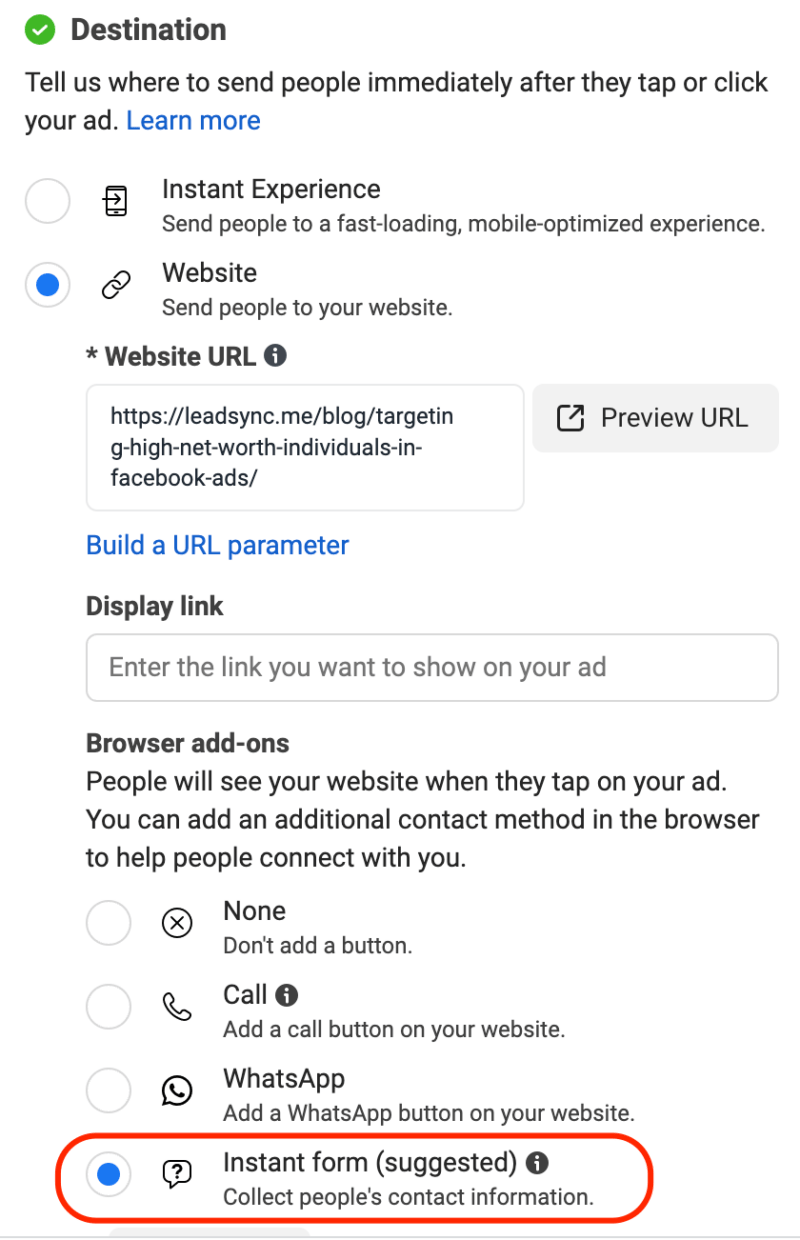
- Build the form the same way as any other instant form. For a traffic campaign a light ask works best: first name and email for a newsletter, or a single-question lead magnet form.
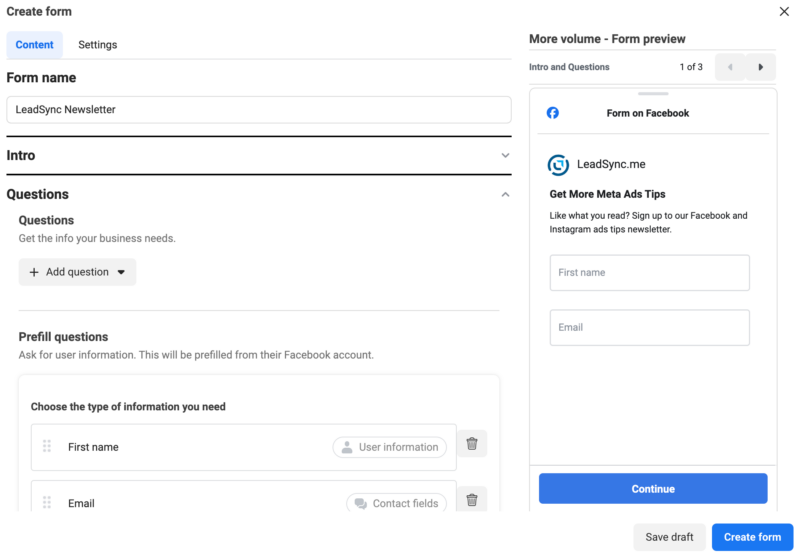
- Link your privacy policy, click Create form, then publish the campaign.
The leads arrive in Leads Center exactly like leads from a Leads-objective campaign, and every download and sync option below applies to them.
How to Improve Instant Form Lead Quality
Pre-fill makes instant forms easy to submit and easy to submit by accident. Four levers fix that, and they stack.
- Switch to Higher intent. The review screen removes most accidental submissions. Expect fewer leads and a higher cost per lead; judge it on cost per qualified lead.
- Ask one custom question that predicts a sale. “Do you own your home?” for solar, “When are you looking to buy?” for real estate, “What is your team size?” for B2B. Multiple choice, not free text. Conditional questions let you branch without adding length.
- Verify the phone number. SMS verification sends a code to the number on the form before the lead counts. It removes wrong and fake numbers before they reach sales.
- Optimise for Conversion Leads with the Conversions API. Send your CRM outcomes (qualified, appointment, sale) back to Meta and choose the Conversion Leads performance goal. Meta’s published results are a 19% lower cost per quality lead on average, 21% for instant forms, and a 44% higher quality-lead rate. Our CAPI for lead ads guide explains the setup, and LeadSync sends the events for you.
Then follow up fast. A pre-filled form is easy to forget, and speed to lead decides whether the person still remembers the ad when you call.
How to Test a Meta Instant Form
Meta provides a lead ads testing tool that submits a test lead against any published form on a Page you manage, without running the ad. Use it to check three things: that the form is attached to the right ad, that the lead appears in Leads Center, and that the lead arrives wherever it is meant to land, whether that is your inbox, a Google Sheet or your CRM. If you are syncing with LeadSync, the test lead appears in your lead log within a minute and can be deleted from there. Not on LeadSync? Our free Meta Lead Ads Testing Tool creates the test lead for you and emails it, no account needed to start. Our guide to testing Facebook lead ads walks through the tool, the common errors and the fixes.
Where Instant Form Leads Go
Submitted leads land in Leads Center inside Meta Business Suite, where you can view them, assign them and download them as a CSV. Two facts about that storage shape everything else:
- Meta keeps lead data for 90 days. After that it is deleted and cannot be downloaded. Our guide to downloading leads from Facebook covers every export route, and how to check your Facebook ad leads shows where to find them in the first place.
- Nothing tells you a lead has arrived. Meta sends no email, no text and no push notification by default. Leads sit in Leads Center until someone looks.
That second fact is why so many instant form campaigns underperform. The fix is a real-time sync. LeadSync reads each submission the moment Meta records it and delivers it where your team works:
- Straight to your inbox with instant email notifications, or as an SMS or WhatsApp alert to the person who should call
- Into your CRM, including HubSpot, Salesforce, Pipedrive, Zoho CRM and GoHighLevel; our best CRM for Facebook leads comparison helps if you are choosing one
- Into a spreadsheet with the Google Sheets sync, the quickest shared lead log for a small team
- Back to the lead with an email autoresponder, so the person hears from you while the ad is still on their screen
Every field on the form, including custom question answers, is mapped to the destination, so the qualifier you asked for lands next to the contact details instead of in a CSV column nobody opens.
Frequently Asked Questions
What is a Meta instant form?
A Meta instant form is the native lead capture form that opens inside Facebook or Instagram when someone taps the call to action on a lead ad. Meta pre-fills it with the person’s profile details (name, email, phone and more), so they can submit without leaving the app or typing. Facebook lead form, Meta form and instant form all describe the same thing.
Are Facebook instant forms the same as lead forms?
Yes. Instant form is Meta’s name for the native lead form attached to a lead ad. People also call them Facebook lead forms, Meta lead forms, lead gen forms or Meta forms. They all refer to the same in-platform form, and the same form runs on both Facebook and Instagram placements.
What is the difference between More volume, Higher intent and Rich creative instant forms?
More volume is the default single-screen form, built for the most submissions. Higher intent adds a review screen before submitting, which cuts accidental leads at the cost of some volume. Rich creative adds landing-page style sections (how it works, product carousel, social proof, incentives) above the questions and is designed to replace a landing page.
How many questions can a Meta instant form have?
Up to 15 questions in total, mixing pre-filled profile fields and custom questions. Meta’s own guidance is to ask only for what you need, because every extra question lowers the completion rate. Three or four pre-filled fields plus one custom qualifying question is the usual sweet spot.
Can you edit a Facebook instant form after publishing?
No. Once an instant form is published it is locked. To change it, duplicate the form, edit the copy, publish the new version and attach it to your ads. Any ad still pointing at the old form keeps collecting leads with the old questions, so switch the ad’s form as well.
Where do Meta instant form leads go?
Leads land in Leads Center inside Meta Business Suite, and you can download them as a CSV from Ads Manager or Leads Center. Meta only stores them for 90 days, so most advertisers sync each lead to a CRM, email platform or inbox in real time with a tool like LeadSync.
How long does Meta keep instant form leads?
90 days from submission. After that the lead data is deleted from Leads Center and can no longer be downloaded. Download your CSVs regularly, or set up a real-time sync so every lead is already in your CRM or inbox long before the 90 days run out.
How do I test a Facebook instant form?
Use Meta’s lead ads testing tool to submit a test lead against your form, then check it arrives wherever your leads are meant to land (email, CRM or Leads Center). If you are syncing with LeadSync, the test lead shows in your lead log within a minute. Our guide to testing Facebook lead ads walks through it step by step.
Do instant forms work on Instagram?
Yes. The same instant form runs across Facebook and Instagram placements, and the pre-filled details come from whichever profile the person is using when they tap the ad. Rich creative forms are the exception: they show on the Facebook mobile app only.
Are instant form leads lower quality than website form leads?
They can be, because pre-filled fields lower the effort to submit. You can offset that by adding one or two custom qualifying questions, switching the form type to Higher intent, turning on SMS verification for the phone number, optimising for Conversion Leads through the Conversions API, and following up within minutes while the lead still remembers the ad.
What is the instant form browser add-on?
A setting on traffic campaigns that shows an instant form inside Meta’s in-app browser once someone has clicked through to your website and scrolled. It lets a traffic ad collect leads as well as visits. It only works on ads you create from scratch, not on boosted posts, and the form is built the same way as any other instant form.
What are the best practices for Meta instant forms in 2026?
Match the field count to the size of the ask, pre-fill only the fields you will use, add one multiple-choice qualifier that changes what you do next, write an intro that repeats the ad’s offer, use Higher intent or SMS verification when junk leads cost you calls, put the next step on the thank-you screen, test the form with a test lead before launch, sync every lead out of Leads Center in real time, and follow up inside five minutes.
Do I need a privacy policy for a Meta instant form?
Yes. Meta will not let you publish an instant form without a link to a privacy policy, and the link has to work. If your website does not have one, LeadSync’s free privacy policy generator produces a page you can host and link to in a few minutes.
Put Your Instant Forms to Work
The form is the easy half. Meta will happily collect leads for you and then let them sit in Leads Center for 90 days before deleting them. With LeadSync, every instant form submission flows into your CRM, email tool or inbox the moment it happens, with every custom question answer attached.
Next steps: build the campaign with our Facebook lead ad campaign guide, split test two forms with Meta’s lead form A/B testing, or compare Google, Meta, LinkedIn and TikTok lead forms if you are choosing a platform.