Introduction to WhatsApp Notifications for Meta Lead Ads
When someone submits a Facebook lead ad form, the window to follow up is measured in minutes, not hours. Leads contacted within five minutes are 9× more likely to convert than those contacted an hour later, but most businesses don’t sit at their desk watching email.
That’s the problem WhatsApp notifications solve. With over 2.78 billion monthly active users, WhatsApp is the one app most people read within minutes of a notification sound. Pipe your Meta lead ads into it and you get the fastest possible first-touch, no CRM, no SMS carrier delays, no cold emails sitting unread.
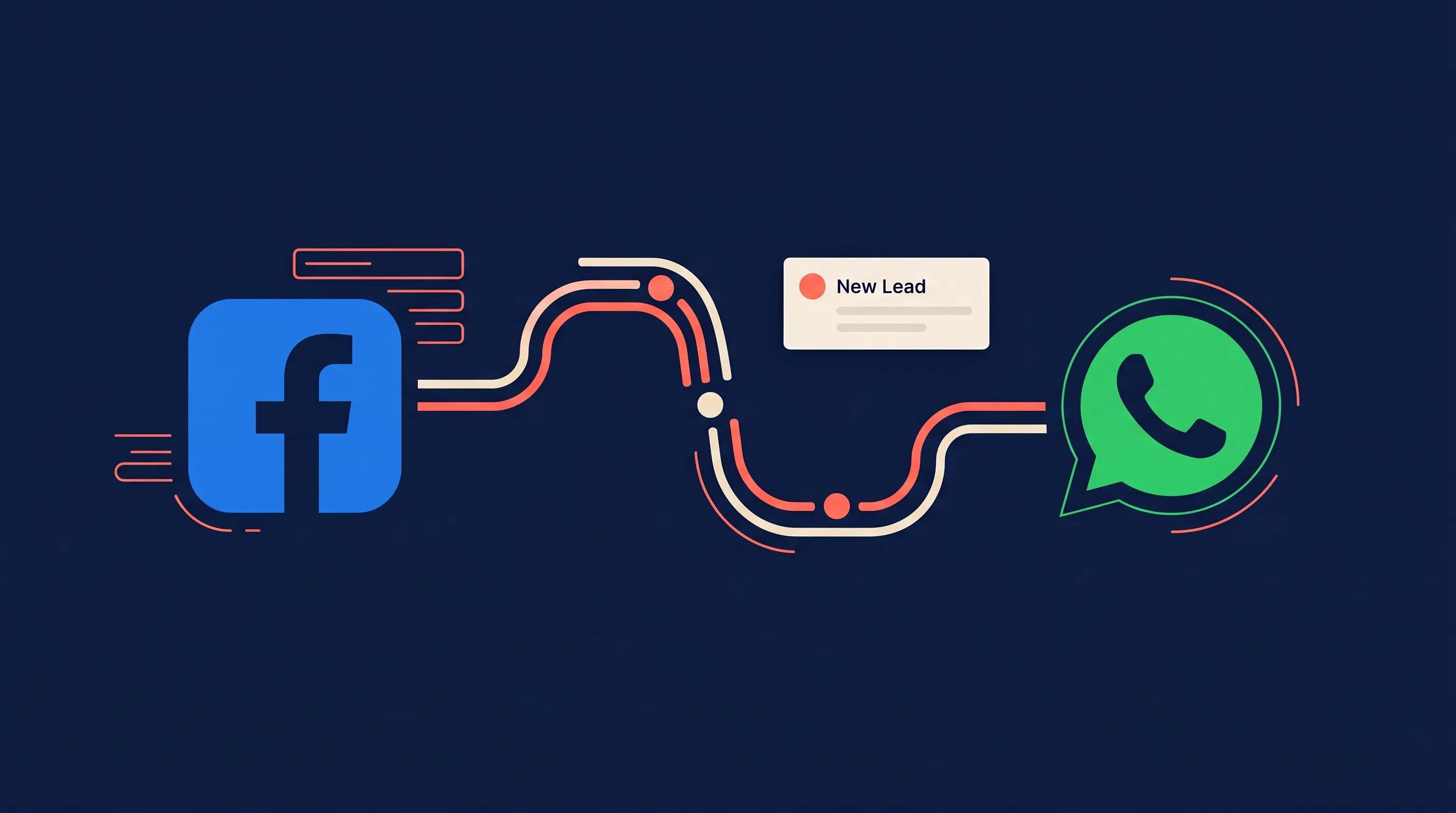
LeadSync sends Meta lead ad notifications directly to your WhatsApp, with full lead details in the message body and an Open lead button that takes you to a page where you can call, text, WhatsApp or email the lead and mark how it went. No WhatsApp Business account required on your end, just enter your phone number and we handle the rest. And if you capture leads inside WhatsApp itself via click-to-WhatsApp ads, see our guide to lead qualification with WhatsApp Flows.
Key Takeaways:
- WhatsApp notifications deliver new Meta lead ad details to your phone within seconds
- No WhatsApp Business account setup required – LeadSync sends from its own verified number
- Every message includes the Page name, lead name, phone, email, and all custom form fields
- An Open lead button under every alert opens the lead page: call, text, WhatsApp or email in one tap, then mark the lead Contacted, No answer, Booked or Not interested
- Customize which fields appear in the message from Message Settings → WhatsApp
- Works globally across 180+ countries; 10 free notifications included every month
- Credit packs start at $5/month for 200 WhatsApp notifications
Why WhatsApp Beats Email and SMS for Lead Follow-up
Email is where leads go to die. The average business email open rate hovers around 20%, and even opened emails sit unread for hours. SMS is faster, but carrier delivery delays, international friction, and the lingering “is this spam?” effect still cost you conversions.
WhatsApp sidesteps all of that:
- Instant delivery: messages arrive in under 10 seconds globally, with no carrier throttling
- Read within minutes: a WhatsApp notification sits in the same chat list as messages from friends and family, so it gets looked at
- Tap-to-call, tap-to-email: phone numbers and email addresses in the message are tappable, and the Open lead button gives you Call, Text, WhatsApp and Email buttons plus status tracking on one page
- Works everywhere: WhatsApp is the #1 messaging app in 63+ countries, including most of Latin America, Europe, India, and Southeast Asia
- No carrier fees: same $5/month pricing whether your leads are in the US, Brazil, or Indonesia
If you run Meta lead ads internationally, WhatsApp is often the only notification channel that works consistently across every market.
How to Set Up Meta Lead Ads to WhatsApp Notifications
Setup takes about two minutes. Here’s the full walk-through, and the same steps live in the WhatsApp notifications setup guide if you would rather follow the support doc.
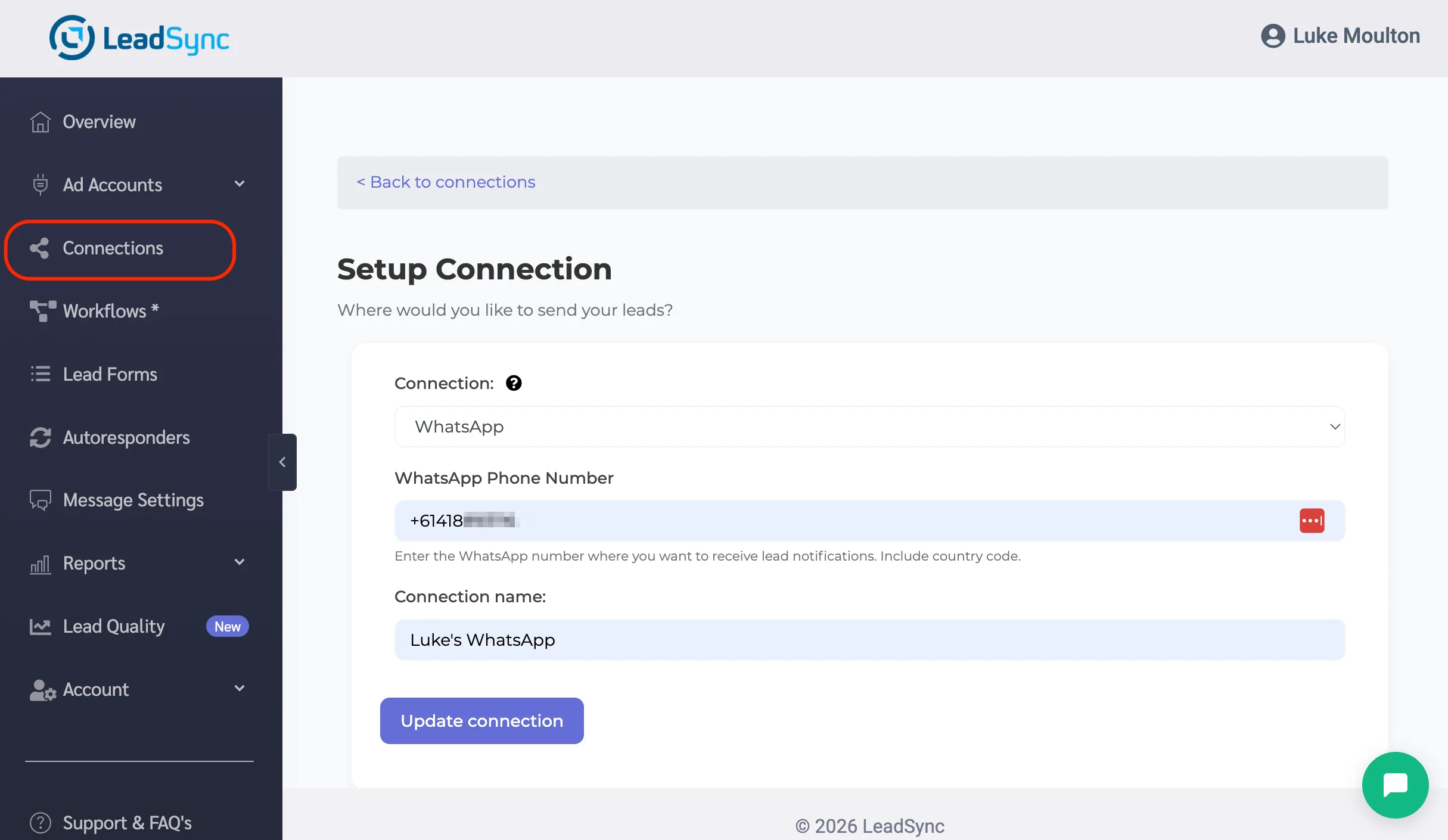
Step 1: Add a WhatsApp Connection
- Log in to LeadSync and go to the Connections section.
- Click Add Connection.
- From the Connection dropdown, select WhatsApp.
- Enter the WhatsApp phone number where you want to receive lead notifications. Include the country code (e.g.
+1 555 123 4567). - Give the connection a name for your own reference – for example, “My WhatsApp”.
- Click Update Connection.
Step 2: Attach the Connection to a Lead Form
Now tell LeadSync which Meta lead ad form should trigger WhatsApp alerts:
- Go to Lead Forms in the sidebar.
- Select the Page running your lead ads, then the specific Form.
- Under Select Connection, choose the WhatsApp connection you just created.
- Click Update notification.
- Test your lead form connection to confirm everything is wired up correctly – this uses 1 credit.
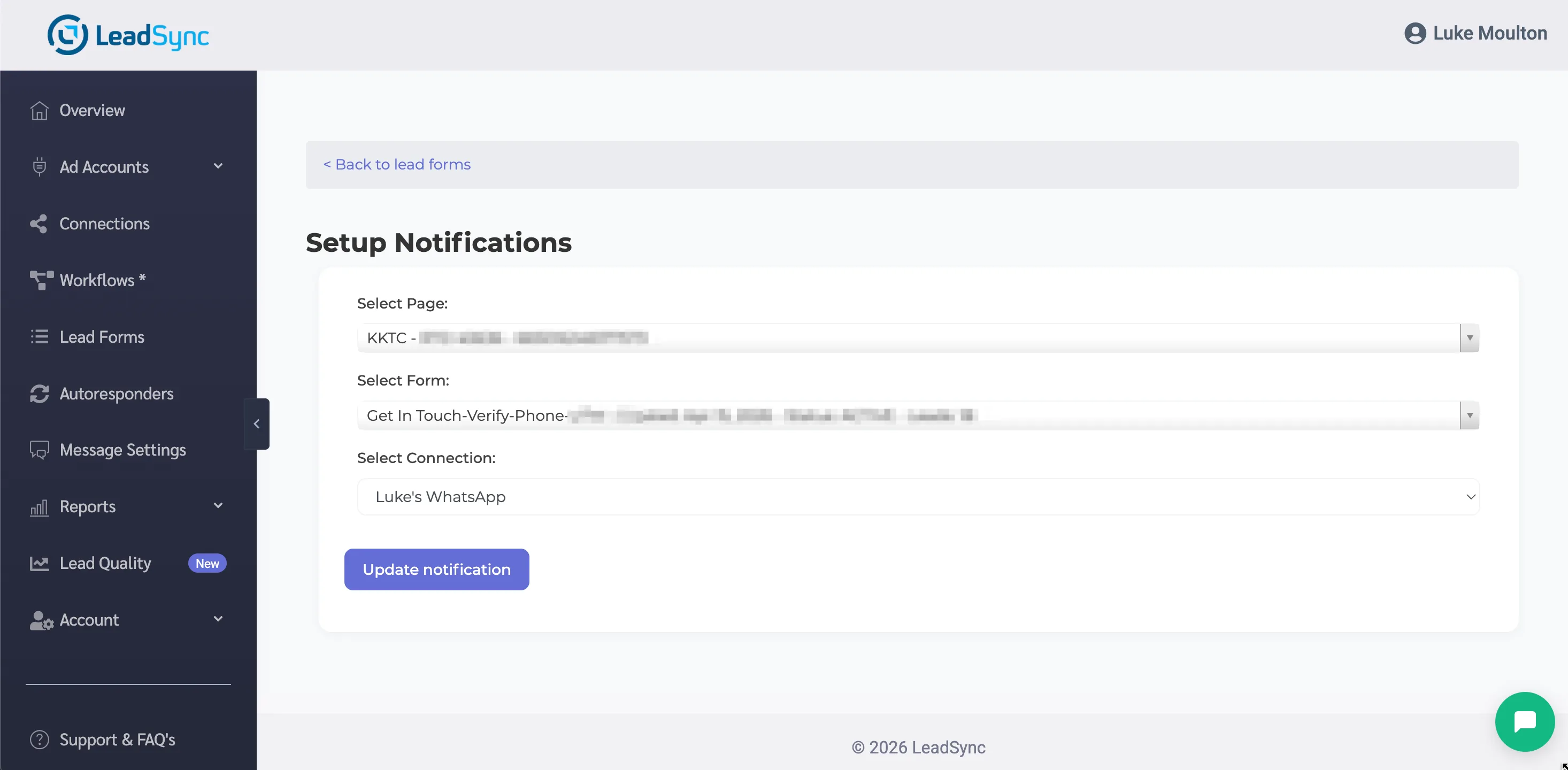
That’s it. From now on, every new lead that submits this form will trigger a WhatsApp message to your phone within seconds.
Tip: Notifications are sent from +1 (650) 899-6930. Save that number to your phone contacts as “LeadSync” before your first lead comes in – every notification will then arrive under the branded name in your WhatsApp chat list instead of the raw US phone number.
What a WhatsApp Lead Notification Looks Like
The message arrives in a normal WhatsApp chat from LeadSync’s verified business number. Every notification includes:
- Header: “New lead from” and your Page or ad account name
- Lead details: the lead’s name, phone and email, then an Additional information block with the rest of their answers and any ad details you have chosen to show
- Open lead button: one tap opens the lead page (below)
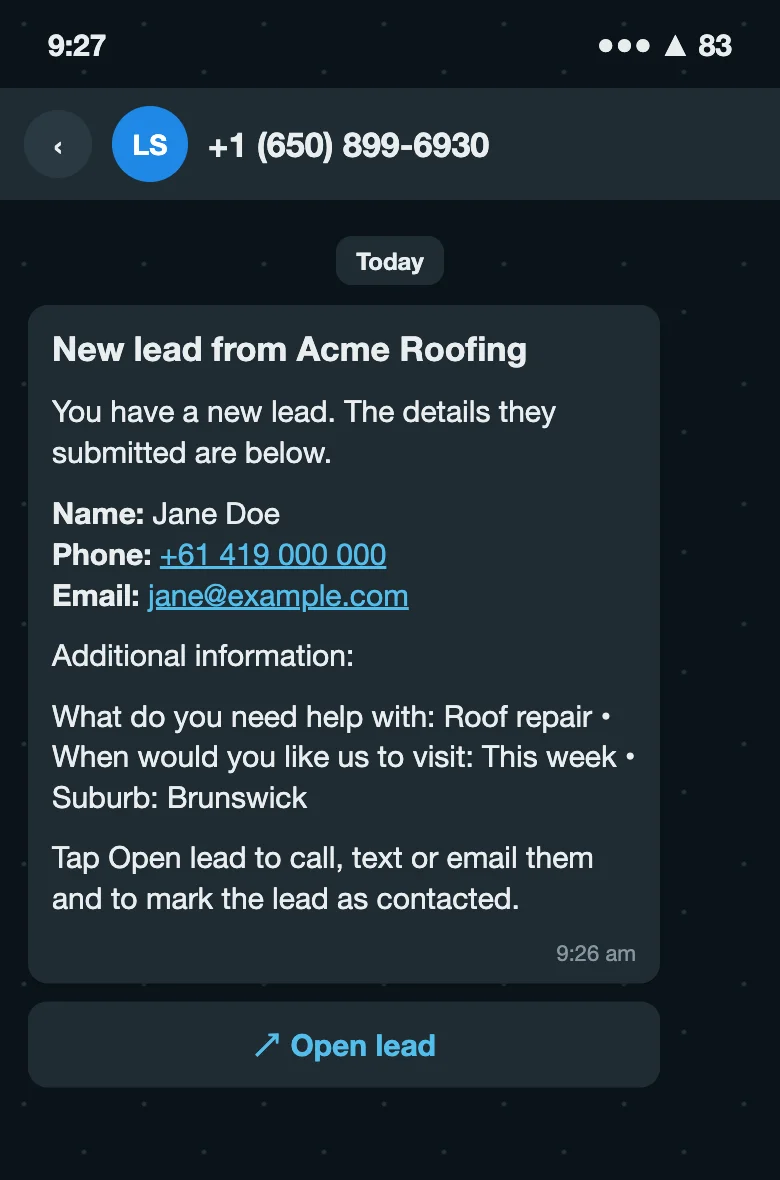
Phone numbers and email addresses in the message are tappable, one tap to call, one tap to reply. The Open lead button is what turns the alert into a workflow: it opens a lead page with Call, Text, WhatsApp and Email buttons at the top, each one opening the right app with a short message ready to send, and four status buttons underneath so you can mark the lead Contacted, No answer, Booked or won or Not interested as soon as you have acted on it.
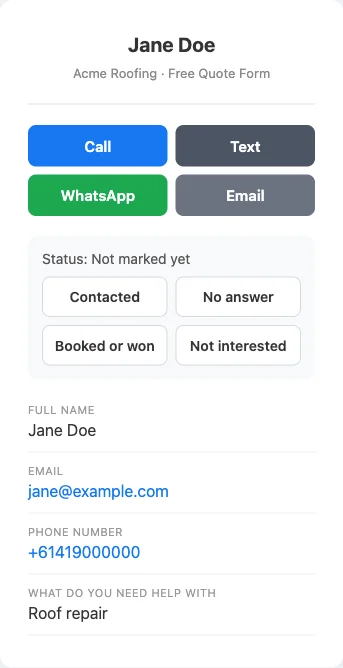
The WhatsApp button on that page opens a chat with the lead from your own WhatsApp, with a greeting already typed (you can set your own wording as a saved reply under Message Settings). It appears only when the lead’s number includes a country code, because WhatsApp needs one to open a chat. Leads you have not marked show up in your daily or weekly digest as still waiting, so nothing slips. The full tour is in the lead page guide.
Customizing What Appears in Your WhatsApp Message
The WhatsApp message body is built from your lead form’s fields. By default, LeadSync hides Meta’s ad and campaign metadata (Ad ID, Campaign Name, Ad Set Name, etc.) so the message stays focused on the contact details that matter – name, phone, email, and your custom form questions.
If you’d like to see some of that metadata in the message – for example, when running multiple campaigns and wanting to know which one a lead came from at a glance – you can toggle individual fields on or off:
- Log in to LeadSync and go to Message Settings in the left sidebar.
- Click the WhatsApp tab – it sits alongside the Email and SMS tabs.
- Scroll past the sample message preview to Hide fields from WhatsApp message.
- The fields are organised into three groups:
- Ad metadata: Ad ID, Ad Name, Ad Set ID, Ad Set Name, Campaign ID, Campaign Name
- Timestamps: Created Date, Created Time
- Other: Platform, Form ID, Page ID
- Untick any fields you’d like included in the message. Use the Select all / Deselect all links above the groups for a one-click sweep.
- Click Save Changes.
Form-submitted fields (Name, Email, Phone, and any custom questions on your lead form) are always shown – those are the ones you actually need to follow up, and the toggles intentionally don’t expose them. The settings only control the optional metadata block.
Why hide metadata by default? The Additional information block in a WhatsApp alert is capped at 600 characters. Your lead’s answers always come first, so if anything is cut it is the ad details at the end. Hiding fields you don’t need keeps the message readable on mobile.
These settings are independent from your email notification preferences – you can show every metadata field in your email but keep WhatsApp messages short, or vice versa.
Pricing and Credits
All LeadSync accounts include 10 free WhatsApp notifications per month so you can try the feature before committing. Testing your connection uses 1 credit.
Need more? Monthly credit packs cost $5 per 200 notifications, and you can purchase multiple packs from the WhatsApp tab in your billing settings. Credits reset at the start of each billing cycle. Low-balance reminders are sent by email before you run out.
WhatsApp vs SMS vs Email: Which Should You Use?
| Channel | Speed | Typically read | International Cost | Best For |
|---|---|---|---|---|
| Seconds | Within minutes | $5 / 200 msgs (flat) | Global lead ads, high-value leads | |
| SMS | Seconds to minutes | Within minutes | $5 / 100 msgs, limited countries | US/AU/UK-focused campaigns |
| Seconds | Hours, if at all | Unlimited, free | Backup / archival record |
Most LeadSync customers run all three in parallel: WhatsApp for the fast response, SMS as a backup, and email as the permanent paper trail. You can enable any combination on the same lead form.
Frequently Asked Questions
Do I need a WhatsApp Business account to receive notifications?
No. You only need a regular WhatsApp account on your phone. LeadSync sends notifications from its own verified WhatsApp Business number – you just enter the phone number where you want to receive alerts.
How fast will I receive the WhatsApp notification after a lead submits?
Notifications arrive within seconds of the form submission. WhatsApp messages are typically read within 3 minutes, which makes it the fastest way to react to a new lead.
Can I send WhatsApp notifications to multiple team members?
Yes. Create one WhatsApp connection per team member and attach them to the same lead form. Every new lead will fan out to all configured phone numbers simultaneously.
Does it work with international phone numbers?
Yes. WhatsApp is used in 180+ countries and LeadSync supports notifications to any WhatsApp number worldwide, just enter the number with its country code.
What does the WhatsApp notification include?
Every notification includes the Page or ad account name, the lead’s name, phone number, email, and every other field they filled out on your form, plus an Open lead button. Phone and email are tappable, and Open lead takes you to a page where you can call, text, WhatsApp or email the lead and mark it Contacted, No answer, Booked or Not interested.
Can I customize which fields appear in the WhatsApp message?
Yes. Go to Message Settings in the LeadSync sidebar and click the WhatsApp tab. By default, Meta ad and campaign metadata (Ad ID, Campaign Name, etc.) are hidden so your messages stay short. You can toggle any of those fields back on individually. Form-submitted fields like Name, Email, and Phone are always shown.
Can I use WhatsApp alongside email and SMS notifications?
Yes. WhatsApp, email, and SMS are independent channels. You can enable any combination on the same lead form, all three will fire when a new lead comes in.
What happens if I run out of WhatsApp credits?
Notifications pause until your credits reset at the start of your next billing cycle, or until you top up. LeadSync sends you a reminder email when your balance is running low.
Which lead sources are supported?
WhatsApp notifications work for leads from Facebook, Instagram, LinkedIn, TikTok, and Google Ads, the same sources supported for email and SMS.
Start Receiving Meta Leads via WhatsApp
Worth being explicit about the boundary: this feature notifies you on WhatsApp. It does not send an automated WhatsApp message to the lead. Once the alert arrives you tap Open lead and reply from your own WhatsApp. Before you automate anything beyond that, read the WhatsApp rules for following up Facebook leads. If you want automated first contact instead, email and SMS follow-up can do that.
Stop missing leads while you’re away from your desk. Sign up for a free 7-day LeadSync trial and set up WhatsApp notifications in two minutes.