Open Events Manager for most small businesses and you will find PageView, maybe ViewContent, and a Lead event that fires twice as often as it should. That is not a Meta problem. It is what happens when a pixel is installed by a web developer, a theme plugin and an agency, each adding “the events”, and nobody decides which ones the business actually needs.
This guide lists all 17 of Meta’s standard events exactly as Meta defines them, then narrows the list to the handful that matter for lead generation. It also covers the part most event guides leave out: instant forms, which never touch your website, and the CRM stage events that teach Meta the difference between a lead and a customer. For the full case for server-side tracking, start with our Conversions API guide for lead ads; this page is the reference for the events themselves.
What are Facebook standard events?
Standard events are actions with predefined names that Meta recognises and supports across its ad products (Meta Business Help Centre, 2026). Lead, Purchase, Schedule and ViewContent are all standard events. Because Meta already knows what “Lead” means, you can pick it as an optimisation goal, report on it in Ads Manager and build audiences from it the moment the first one arrives.
You can send a standard event four ways: Meta’s no-code event setup tool, a partner integration (Shopify, WordPress plugins, CRM sync tools), the Meta Pixel code on your site, or the Conversions API from your server. The name is the contract. Send Lead from any of them and Meta treats it as the same kind of action.
Anything outside the standard list is a custom event: a name you choose, such as Quote Sent or Qualified Lead. Custom events work for optimisation and audiences too, but Meta asks you to review each new one in Events Manager to confirm it came from your business.
What are all 17 Meta standard events?
This is Meta’s own list from the Meta Pixel reference, with the description Meta gives, the parameters each event supports, and what a lead generation business would use it for.
| Standard event | When Meta says it fires | Supported parameters | Lead-gen use |
|---|---|---|---|
| AddPaymentInfo | Payment details are added during checkout | content_ids, contents, currency, value | Rarely. Paid consultations only. |
| AddToCart | A product is added to the cart | content_ids, content_type, contents, currency, value | No |
| AddToWishlist | A product is added to a wishlist | content_ids, contents, currency, value | No |
| CompleteRegistration | A registration or signup form is completed | currency, value (plus status) | Account signups, webinar or event registrations |
| Contact | A person contacts the business by phone, SMS, email or chat | none | Click-to-call, chat starts, a lead who answered your call |
| CustomizeProduct | A person customises a product | none | Configurators and quote builders, occasionally |
| Donate | A person donates funds | none | Non-profits |
| FindLocation | A person searches for a store location | none | Multi-location service businesses |
| InitiateCheckout | A person enters the checkout flow | content_ids, contents, currency, num_items, value | No |
| Lead | A signup is completed (Meta’s wording) | currency, value | Enquiry, quote request, contact form, download |
| Purchase | A purchase or checkout is completed | content_ids, content_type, contents, currency, num_items, value. currency and value required | Closed deals, if you send revenue |
| Schedule | A person books an appointment | none | Consultations, inspections, test drives, demos |
| Search | A search is made on your site | content_ids, content_type, contents, currency, search_string, value | Property or vehicle search pages |
| StartTrial | A free trial starts | currency, predicted_ltv, value | SaaS and subscription services |
| SubmitApplication | A person applies for a product, service or program | none | Finance, insurance, jobs, courses, rentals |
| Subscribe | A paid subscription starts | currency, predicted_ltv, value | Memberships, retainers |
| ViewContent | A visit to a page you care about | content_ids, content_type, contents, currency, value | Service pages, pricing, landing pages |
Three details worth knowing. PageView is fired automatically by the pixel base code on every page, so it shows in Events Manager, but it is not in Meta’s standard events table. Purchase is the only event with required parameters: send it without currency and value and it will not report revenue. And every standard event maps to a custom_event_type value (LEAD, SCHEDULE, SUBMIT_APPLICATION and so on) that the Marketing API uses when a campaign optimises for it, which is why agencies building campaigns by API care about the exact spelling.
Which standard events should a lead generation business use?
Four or five, chosen to mirror the steps a real customer takes. More events do not give Meta more signal; they give it more ways to optimise for the wrong thing.
| Business type | First event (top of funnel) | Lead event | Later stage |
|---|---|---|---|
| Home services, trades | ViewContent on service pages | Lead (quote request) | Schedule (inspection booked) |
| Real estate agents | Search or ViewContent | Lead (valuation or enquiry) | Schedule (appraisal booked) |
| Mortgage, finance, insurance | ViewContent | SubmitApplication | Purchase (settled or bound) |
| Clinics, dentists, med spas | ViewContent | Lead or Schedule | Purchase (treatment paid) |
| B2B services, agencies | ViewContent on pricing | Lead (demo or consult request) | Schedule (call booked) |
| SaaS | ViewContent on pricing | CompleteRegistration or StartTrial | Subscribe |
| Education, courses | ViewContent | SubmitApplication or CompleteRegistration | Purchase (enrolled) |
The rule behind the table: pick the event name that describes what the person did, not what you hope it means. A booked inspection is Schedule, not a second Lead. A finance application is SubmitApplication. When every form on the site fires Lead, Meta cannot tell a newsletter signup from a quote request, and it will happily find you more newsletter signups because they are cheaper.
Contact is the most misused event on the list. Meta defines it as someone initiating contact by phone, SMS, email or chat. That makes it the right event for a click-to-call button or a chat that starts, and, sent from your CRM, a sensible signal that a lead actually picked up the phone.
Why don’t instant forms fire pixel events?
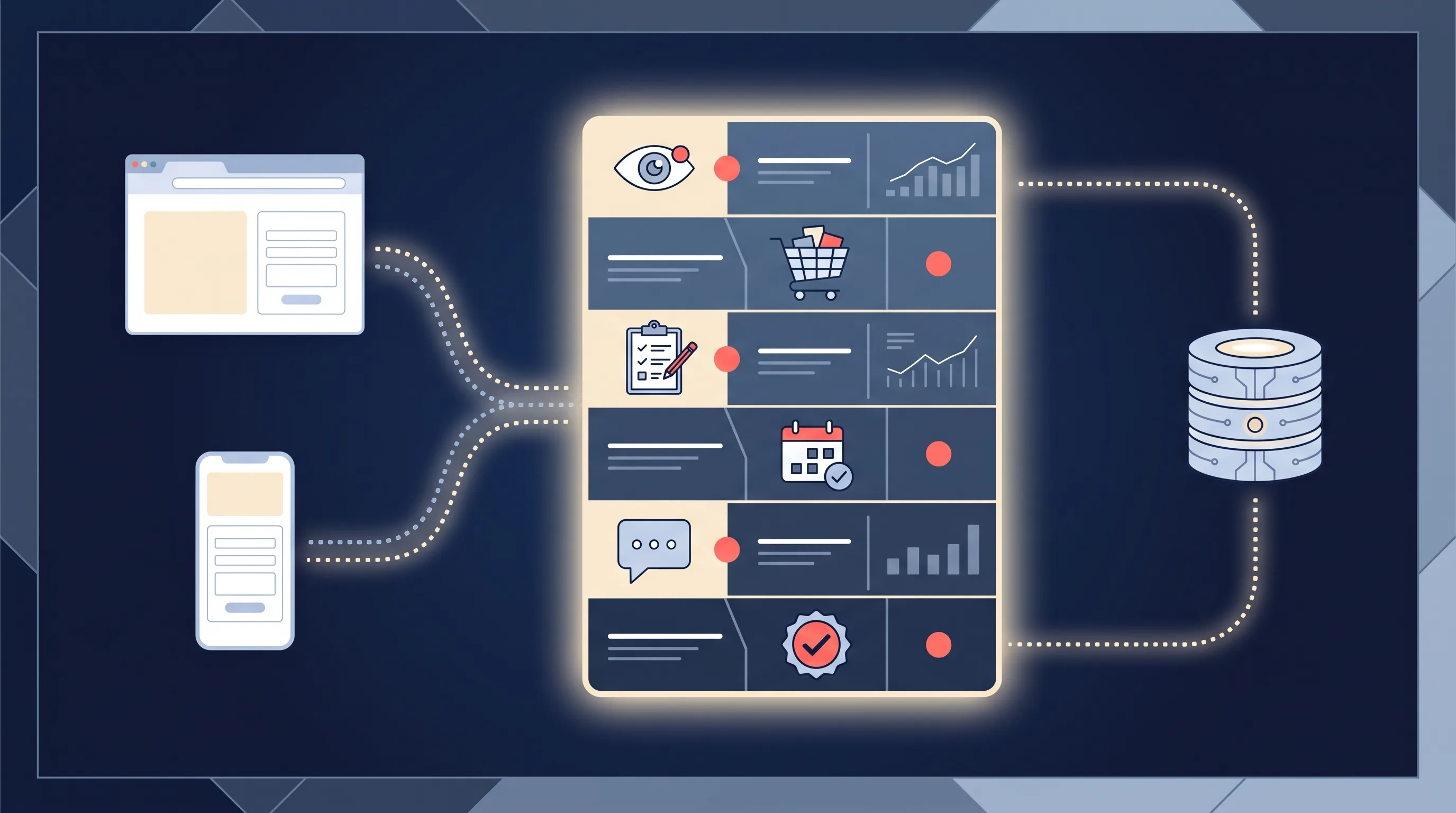
Because your website is never involved. An instant form opens inside Facebook or Instagram, pre-fills the person’s details and submits without a page load on your domain. The pixel only runs on your site, so it sees nothing: no ViewContent, no Lead, no Schedule.
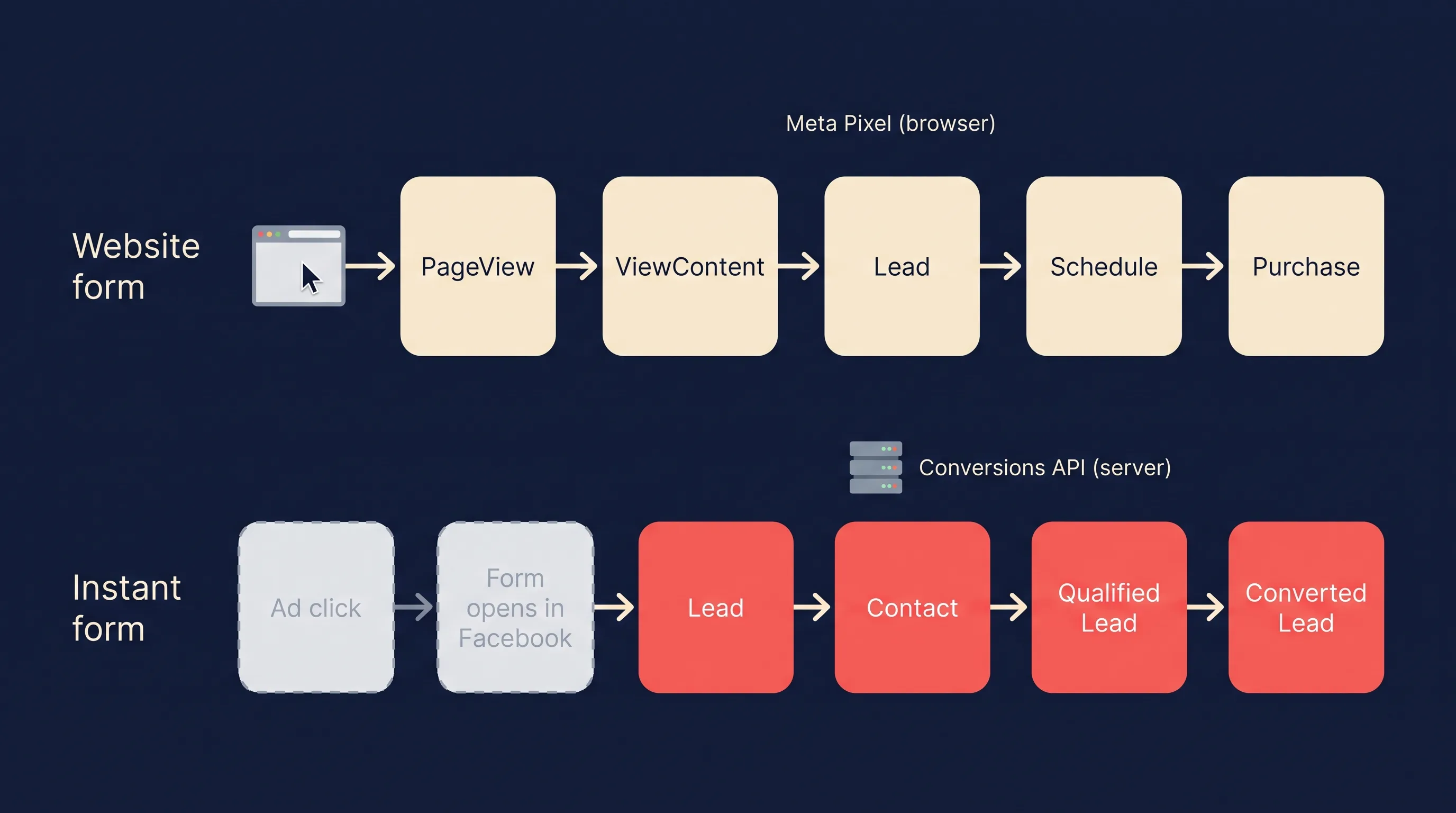
Meta does record the form fill itself. It shows up as a lead result in Ads Manager, and the lead appears in your Leads Center or reaches your CRM through the Lead Ads API. What Meta cannot see is anything after that. Did the lead answer? Were they in your service area? Did they buy? On a website funnel the pixel can at least see a booking page load. With instant forms, that information lives only in your CRM or inbox.
This is the main reason lead advertisers moved to the Conversions API first. Our comparison of instant forms and website forms covers when each form type makes sense, and whether you still need the pixel for lead ads covers the pixel’s remaining jobs, mostly retargeting and website audiences.
What is the difference between standard events, custom events and custom conversions?
They are three different tools that people use interchangeably, and mixing them up is how accounts end up with five versions of “lead”.
| Standard event | Custom event | Custom conversion | |
|---|---|---|---|
| What it is | One of Meta’s 17 predefined event names | An event name you invent | A rule applied to an existing event or URL |
| Example | Lead | Qualified Lead, Quote Sent | “Lead where the URL contains /roofing” |
| Needs code? | Pixel, CAPI, partner tool or event setup tool | Pixel or CAPI code | No, built in Events Manager |
| Meta understands it immediately? | Yes | After you review it in Events Manager | Once it has recorded enough events |
| Best for | The core steps of your funnel | CRM stages and actions the standard list misses | Splitting one event by product, service or value |
Custom conversions are the underrated one. Meta describes them as rules on top of standard events, custom events or URL traffic (Meta Business Help Centre, 2026). If you sell three services and every form fires Lead, a custom conversion per service lets you optimise a campaign for roofing leads only, without touching the website. They can also log a standard event from a URL rule alone, which is the fastest fix for a thank-you page that never had an event.
How do you set up standard events?
Three routes, from least to most technical.
1. Meta’s event setup tool (no code). In Events Manager, choose your pixel, open the event setup tool, enter your website URL and click the buttons or pages you want to track, assigning a standard event to each. It needs the pixel base code already installed and works best on simple sites where button labels do not change.
2. Pixel code. Add a fbq('track', ...) call where the action happens, usually on a thank-you page or a form’s success handler:
<script>
  fbq('track', 'Lead', {value: 40.00, currency: 'AUD'}, {eventID: 'lead-8841'});
</script>
The third argument holds parameters (value and currency are optional for Lead). The fourth holds the event ID, which you only need if you also send the event from your server, but it costs nothing to include.
3. The Conversions API. Your server or a partner tool posts the event to Meta directly, with hashed customer details for matching. Meta requires an action_source on every server event (website, phone_call, chat, email, physical_store, system_generated and a few others) and accepts an event_time up to seven days in the past; older events fail the whole request (Meta for Developers, 2026). This is the only route that works for instant forms and for anything that happens offline.
Whichever route you use, check the result in Events Manager before you build a campaign on it. The Test Events tab shows events arriving in real time, and for lead ads our Meta lead ads testing tool guide walks through sending a test lead end to end.
How do you stop the pixel and the Conversions API counting the same event twice?
Meta recommends sending website events from both the pixel and the Conversions API, which it calls a redundant setup. Redundant setups double-count unless you deduplicate.
The recommended method is event name plus event ID. The pixel’s eventID (the fourth argument in fbq) must match the Conversions API’s event_id, and the event names must match too. When Meta finds the same pair sent to the same pixel within 48 hours, it discards the later one (Meta for Developers, 2026). Use something that already identifies the action, such as a form submission ID or order number.
The fallback method matches on fbp or external_id plus the event name. It has two limits Meta spells out: it generally only works when the browser event arrives before the server event, and it does nothing if you only use one source.
You do not need deduplication for events you only send one way. CRM stage events sent from your server, with no pixel equivalent, cannot collide with anything, although a stable event ID still protects you if your system retries a send.
How do CRM stage events work with the Conversions API?
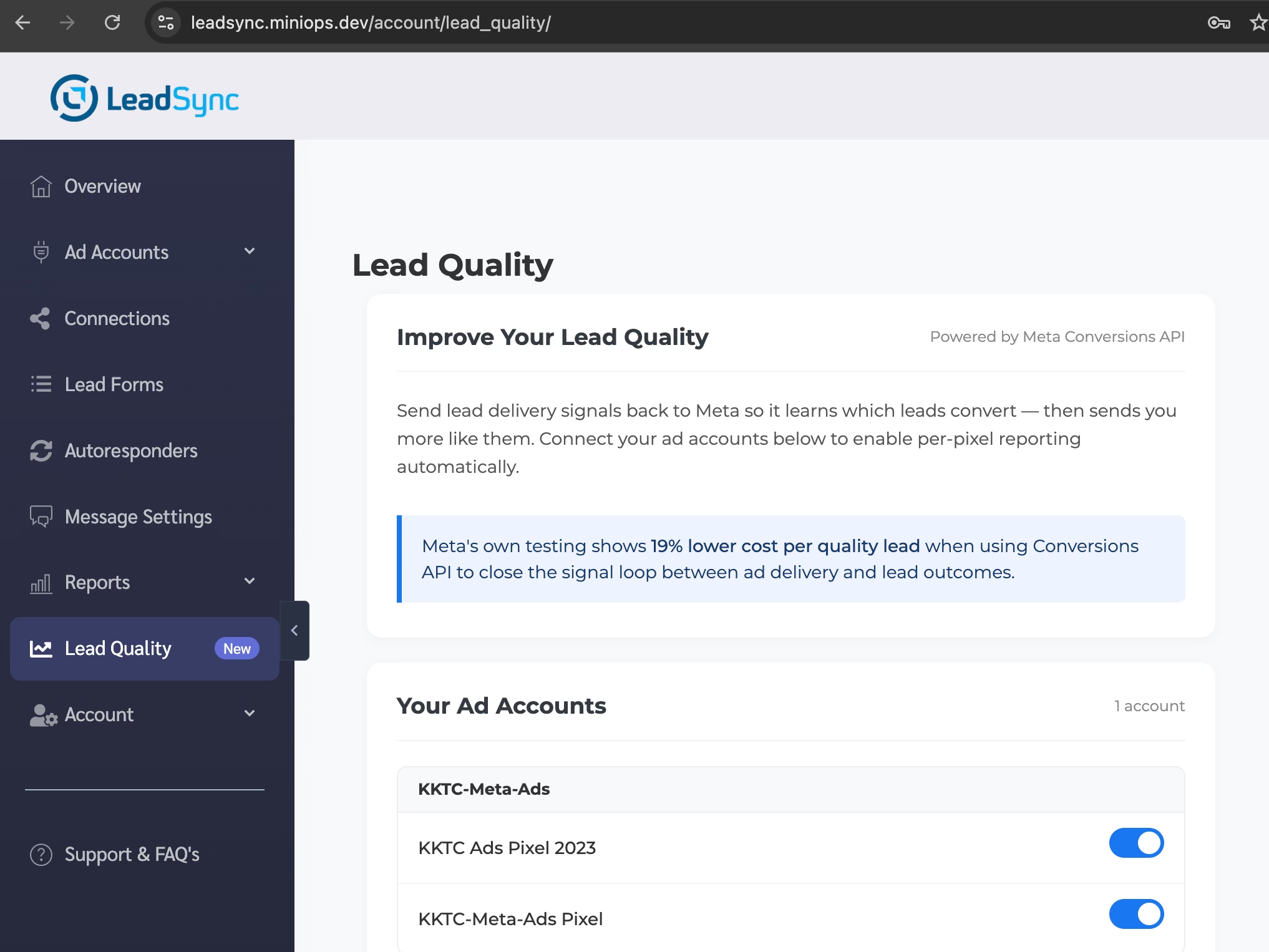
This is where lead ads get their real optimisation signal. Meta’s Conversions API for CRM lets you send each stage a lead reaches in your CRM back to Meta, and the Conversion Leads performance goal then optimises delivery towards people who reach your chosen stage, not just people who fill in forms. Meta puts the result at 19% lower cost per quality lead on average (Meta, 2026).
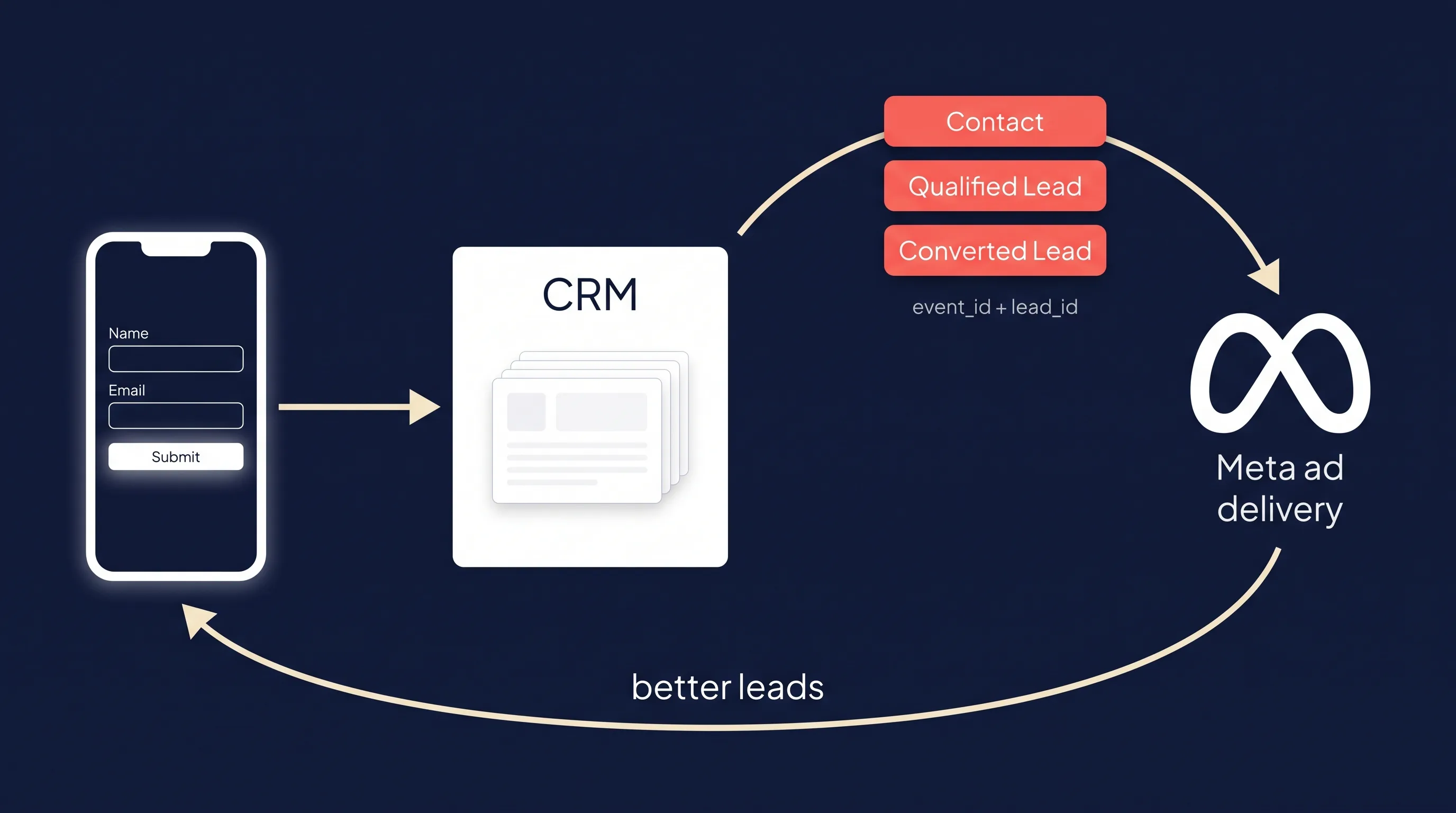
CRM stages do not have to use standard event names. Meta accepts stage names such as Qualified Lead and Converted Lead as they appear in your pipeline, which is the one place where custom names are the norm rather than the exception. Meta’s fit guidelines for the integration are specific (Meta for Developers, 2025):
| Requirement | Meta’s guideline |
|---|---|
| Lead source | Facebook or Instagram lead ads (instant forms) |
| Matching | Store the 15 to 17 digit Meta lead ID and send it with every event; fall back to click ID, phone or email |
| Volume | At least 200 leads a month |
| Upload frequency | At least once a day |
| Stage timing | The stage you optimise for happens within 28 days of the lead |
| Stage conversion rate | Between 1% and 40% of leads reach it |
The last two rows decide which stage to optimise for. “Became a customer” is often too rare or too slow; “answered the phone” is often too common. A qualified or booked stage usually sits in the middle. Our pillar covers the Conversion Leads goal and event match quality in depth, and the guides to qualifying Facebook leads and scoring Meta leads help you draw the line between qualified and not.
What events does LeadSync send to Meta?
LeadSync connects the lead form to your CRM or inbox, so it already holds the one identifier Meta wants most: the lead ID. With the Conversions API switched on, it sends these events without any code:
| When | Event sent | Type |
|---|---|---|
| A lead is delivered to your CRM, email or sheet | Lead | Standard |
| You rate the lead Good from the notification email, or an auto-scoring rule does | Contact | Standard |
| You mark a Good lead as Qualified | Qualified Lead | CRM stage |
| You mark a qualified lead as Converted | Converted Lead | CRM stage |
| An auto-scoring rule rates the lead Poor | Lead event withheld | Negative signal |
Every event carries the raw lead ID plus SHA-256 hashed email, phone, name and location fields where the form collected them, uses system_generated as the action source, and gets a stable event ID built from the lead ID, so a retry never counts twice. Rating happens from the buttons at the bottom of each lead notification email, with no login:
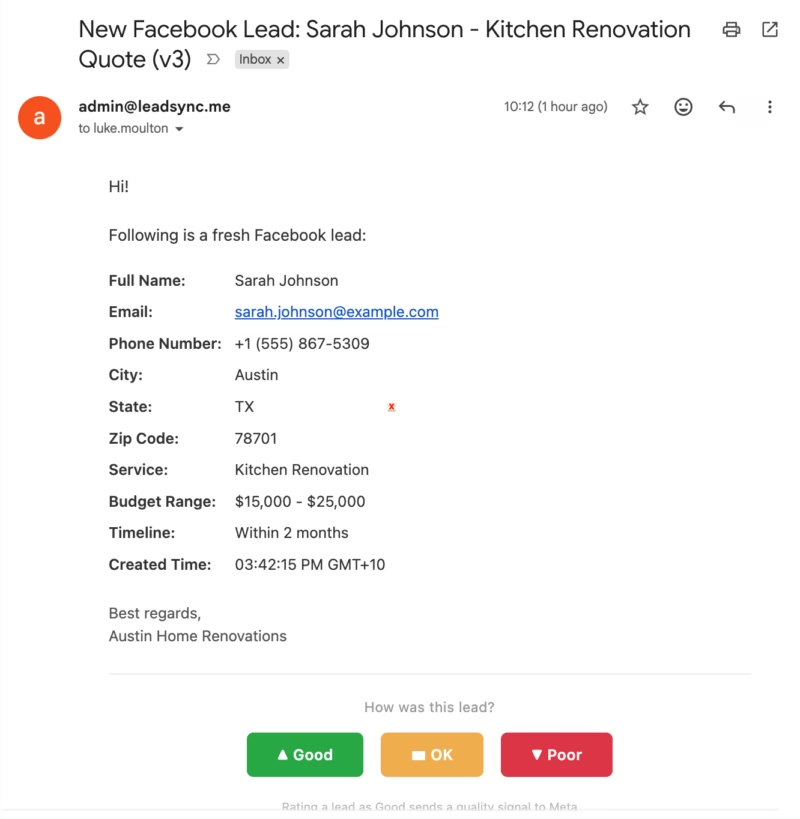
What the ratings look like in practice. Across 732 leads rated by hand by LeadSync customers between 17 March and 30 September 2026, 38% were marked Poor, 17% OK and 45% Good. Of the Good leads, 171 (52%) went on to be marked Qualified and 40 were marked Converted: 5.5% of all rated leads. That conversion rate sits inside Meta’s 1% to 40% window, and the 38% Poor share is exactly the signal a raw Lead count hides. The setup steps are in our Lead Quality announcement.
How do you check your standard events are working?
Four checks, in this order:
- Test Events in Events Manager. Trigger the action yourself (submit the form, click the button) and confirm the event appears with the right name within a minute or two.
- Overview tab, by source. Each event shows whether it arrived from the browser, the server or both. A Lead event that shows both sources but no deduplication is double-counting.
- Event match quality. Meta scores how well each server event matches a person. Low scores usually mean missing email, phone or lead ID. The EMQ section of our CAPI guide covers what moves it.
- Ads Manager columns. Add the event as a column on a live campaign and compare it with the leads your CRM actually received. If Ads Manager shows 60 leads and your CRM shows 40, find out why before you optimise on either number.
If you are building audiences from these events next, our guides to custom audiences for lead generation and Facebook retargeting ads pick up from here.
Frequently Asked Questions
What are Facebook standard events?
Standard events are actions with predefined names that Meta recognises across its ad products, such as Lead, Purchase, Schedule and ViewContent. You send them from the Meta Pixel on your website, from your server through the Conversions API, or through a partner integration. Because Meta knows what each name means, standard events can be used straight away as optimisation goals, conversion columns and audience sources without any extra mapping.
How many standard events does Meta have?
Seventeen: AddPaymentInfo, AddToCart, AddToWishlist, CompleteRegistration, Contact, CustomizeProduct, Donate, FindLocation, InitiateCheckout, Lead, Purchase, Schedule, Search, StartTrial, SubmitApplication, Subscribe and ViewContent. PageView is fired by the pixel base code on every page but is not in Meta’s standard events table. Purchase is the only one with required parameters: currency and value.
What is the difference between standard events and custom events?
A standard event uses one of Meta’s 17 predefined names, so Meta understands it immediately. A custom event uses a name you invent, such as Qualified Lead or Quote Sent, for actions the standard list does not cover. Both can be used for optimisation and audiences. Custom events need a review in Events Manager when they first arrive, and a custom conversion is something else again: a rule applied on top of an existing event.
Which standard event should I use for leads?
Use Lead for an enquiry or quote request, CompleteRegistration for an account sign-up or webinar registration, Schedule for a booked appointment, Contact for a call, chat or email enquiry, and SubmitApplication for an application such as finance, insurance or a job. Pick the one that matches what the person actually did, and keep the name consistent between your pixel and your server events.
Do Facebook instant forms fire pixel events?
No. An instant form opens and submits inside Facebook or Instagram, so your website and its pixel never see it. Meta records the form fill as a lead result in Ads Manager on its own. To tell Meta what happened next, such as whether the lead answered your call or became a customer, you send events from your CRM through the Conversions API, matched on the lead ID.
How do I stop duplicate events from the pixel and the Conversions API?
Send the same event name and the same event ID from both. In the pixel, the ID goes in the fourth argument of the fbq track call as eventID; in the Conversions API it is the event_id field. When Meta receives a matching name and ID pair for the same pixel within 48 hours, it keeps one and discards the other. Matching on fbp or external_id also works, but only when the browser event arrives first.
Can I send standard events without a developer?
Yes, in two ways. Meta’s event setup tool lets you point at a button or URL on your site and assign a standard event without touching code, as long as the pixel base code is installed. For lead ads, a CRM sync tool such as LeadSync sends Lead and later-stage events through the Conversions API for you. You only need a developer for a custom server-side integration.