Most advertisers who ask about “leads from Google” think they’re asking about Search ads. They’re not, at least not exclusively. Since 2019, Google has had its own native lead form ad format that competes directly with Meta Lead Ads: the user submits their details inside Google’s UI, no landing page required, and the lead flows into your CRM or email in seconds.
This guide covers what Google Lead Form Ads are, where they show up, how they compare to Meta and LinkedIn lead forms, what they cost, and how to get the leads where you actually need them: your CRM.
Key takeaways
- The Google Ads lead form extension and the lead form asset are the same thing. Google launched it as the Lead Form Extension in 2019 and renamed every extension to an asset in 2023. If you cannot find “extensions” in the interface, look under Assets.
- What it does: lets users submit name/email/phone directly inside the Google ad, with the form pre-filled from their Google account. No landing page is required.
- Five placements: Search, YouTube, Discovery, Demand Gen, and Performance Max, each with different intent profiles and cost per lead.
- Cost per lead ranges from $10–$15 for restaurants and home services up to $50–$80 for legal, finance, and B2B: broadly in line with Meta Lead Ads, with Search placements skewing higher-quality and YouTube/Discovery skewing higher-volume.
- Lead quality vs Meta: Google Search Lead Forms have higher intent (the user just searched for your service), while YouTube and Discovery placements behave more like Meta: wider audience, more “form fillers” mixed with serious buyers. Use form type and qualifying questions to filter.
- CRM integration is limited natively (~10 supported CRMs), so most advertisers need a sync layer like LeadSync to deliver Google leads to HubSpot, Salesforce, Pipedrive, Jobber, Follow Up Boss, or any of 30+ supported CRMs in real time.
- Speed-to-lead matters as much on Google as it does on Meta: leads contacted within 5 minutes are 21x more likely to convert than those contacted after 30. Whatever the source platform, the destination matters more.
What Is a Google Ads Lead Form Extension?
The Google Ads lead form extension is a native lead-capture format built into Google Ads. Instead of clicking through to a landing page, a user clicks the call-to-action on your ad and a form opens directly inside the Google interface, pre-filled with the contact details Google already has on file from their account. They submit, the lead lands in your CRM (or webhook, or downloaded as CSV), and they go back to whatever they were doing.
The format competes directly with Meta Lead Ads and LinkedIn Lead Gen Forms. Three platforms, same fundamental pattern: native form, pre-filled, no landing page.
Lead Form Extension or Lead Form Asset: What Is the Difference?
There is no functional difference. They are the same feature under two names, and the rename is the single most common source of confusion when you are following a setup guide.
- 2019 to 2023: Lead Form Extension. Google launched the format in late 2019, Search only, as one of its “extensions”.
- 2023 onwards: Lead Form Asset. Google renamed every extension type to an “asset” across Google Ads. Nothing about the feature changed, only the label and the menu it lives under.
So if you are hunting for “lead form extensions” in the Google Ads interface and cannot find them, look under Assets instead. Older guides, most advertisers, and the majority of search traffic still say “extension”, while Google’s own documentation says “asset”. This page uses both, because you will meet both.
What Fields Can the Form Collect?
Google Lead Form Ads support a small set of standard fields and a slightly larger set of custom questions:
- Standard fields (pre-filled from the user’s Google account where possible): name, email, phone, postal code, city, country, company name, job title, business email, business phone
- Custom questions (up to 10 per form): multiple-choice, short answer, or yes/no, useful for qualification
- Background image + headline + description + business name: the visible ad content above the form
- Call to action: choose from preset CTAs (Get Quote, Apply Now, Sign Up, Subscribe, Contact Us, Book Now, Get Offer, Download, Learn More, Get Started)
- Privacy policy URL (required)
Google offers two form types: “More volume” (single submission, lowest friction, highest lead count) and “More qualified” (adds a confirmation step where the user reviews their info before submitting, so fewer leads, but they’re typically of higher intent and lower bounce).
Where Do Google Lead Form Ads Appear?
Unlike Meta Lead Ads, which run on Facebook and Instagram only, Google Lead Form Ads can appear across five different ad placements in 2026. Each placement attracts a different kind of user, so cost per lead and quality vary dramatically.
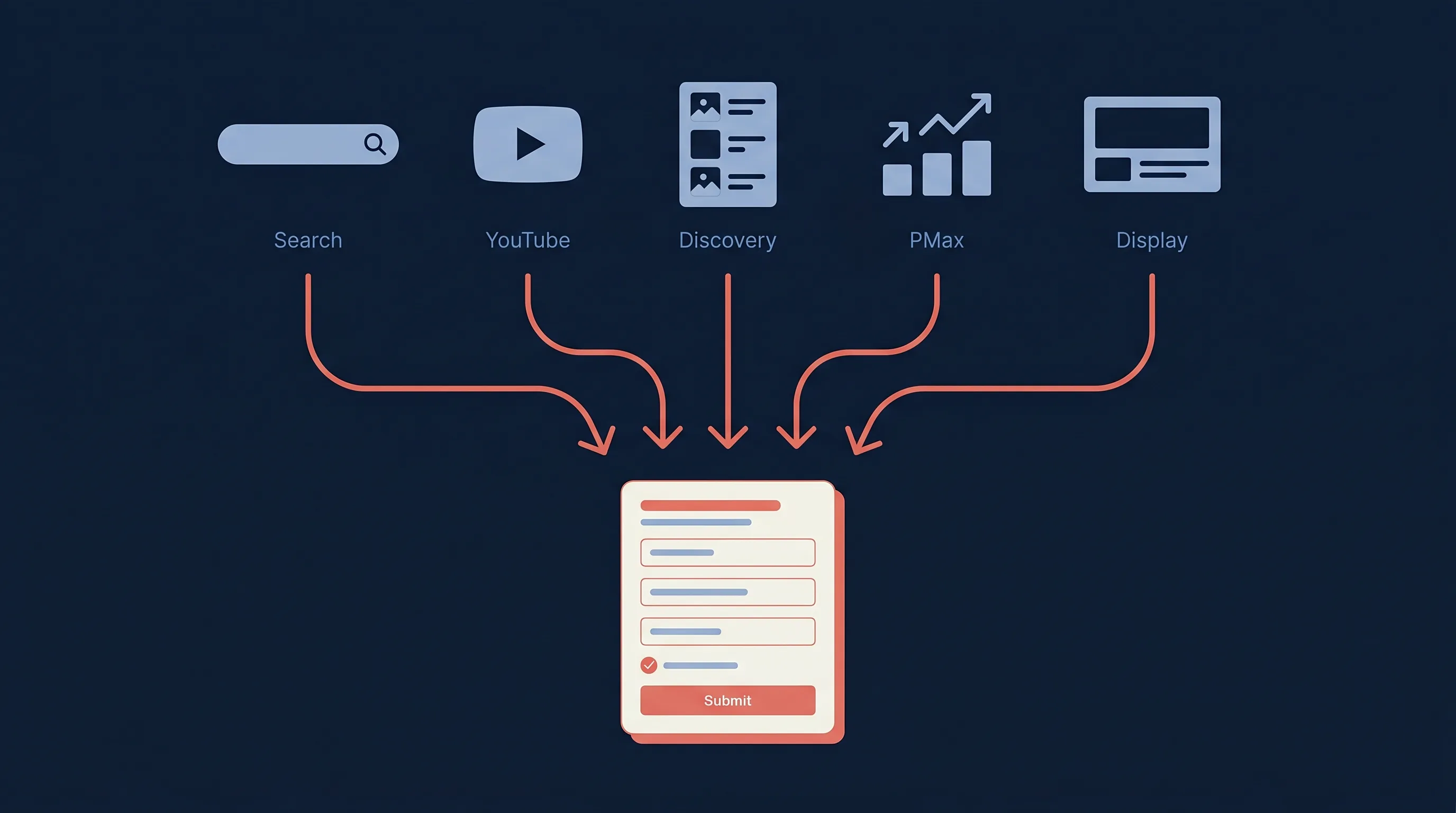
- Search: the original placement. Lead form shows on the SERP when someone searches a keyword you’re bidding on. Highest intent because the user explicitly searched for your service.
- YouTube (TrueView for Action): lead form attaches to skippable in-stream video ads. Higher volume, lower intent, and it works well for brand discovery + simple offers (“free quote”, “free demo”).
- Discovery / Demand Gen: lead form appears across Google Discover feeds, Gmail promotions tab, and YouTube home/Watch Next. Visual-first, mid-funnel intent.
- Performance Max (PMax): Lead Form Ads can be one of the asset types Google’s Performance Max algorithm routes traffic into, combining all placements above plus Display and Maps.
- Display: limited support; not all Display campaigns can serve lead forms.
For most advertisers, Search + YouTube is the right starting mix. Search captures bottom-of-funnel demand at premium CPL, YouTube fills the top of the funnel at lower CPL. That Search half is only bottom-of-funnel if your keywords are: SE Ranking tags each keyword by intent, so research queries get filtered out before you pay Search prices for them. Performance Max can work but is harder to attribute and control.
Lead Form Extension vs Search Ads and a Landing Page: Which Wins?
The fundamental trade-off: Google Lead Form Ads convert visitors at a higher rate (no landing page friction) but give up control over the post-click experience.
A traditional Search ad + landing page lets you:
- Tell a longer story before asking for the user’s information
- Run A/B tests on copy, layout, offers
- Track form analytics, heatmaps, scroll depth
- Build retargeting audiences based on landing page visits
A Google Lead Form Ad:
- Strips that all out
- Captures the lead in 30 seconds instead of 3 minutes
- Often costs 30–60% less per lead than the equivalent landing page flow
- Trades lead quality signal (a user who reads your page is more committed) for lead volume
When Lead Form Ads win: simple offers (“free quote”, “free consultation”, “book a demo”), brands the user already trusts, mobile-heavy audiences, lead-gen-only goals where downstream qualification handles the filter.
When landing pages win: complex products needing explanation, high-ticket B2B sales where lead quality matters more than volume, brands where trust needs to be earned in long-form copy, anywhere you need analytics depth to optimize the funnel.
Most mature advertisers run both: Lead Form Ads to harvest the easy wins, landing pages for the campaigns where conversion rate matters more than top-of-funnel volume.
Meta Lead Ads vs Google Lead Form Ads vs LinkedIn Lead Gen Forms
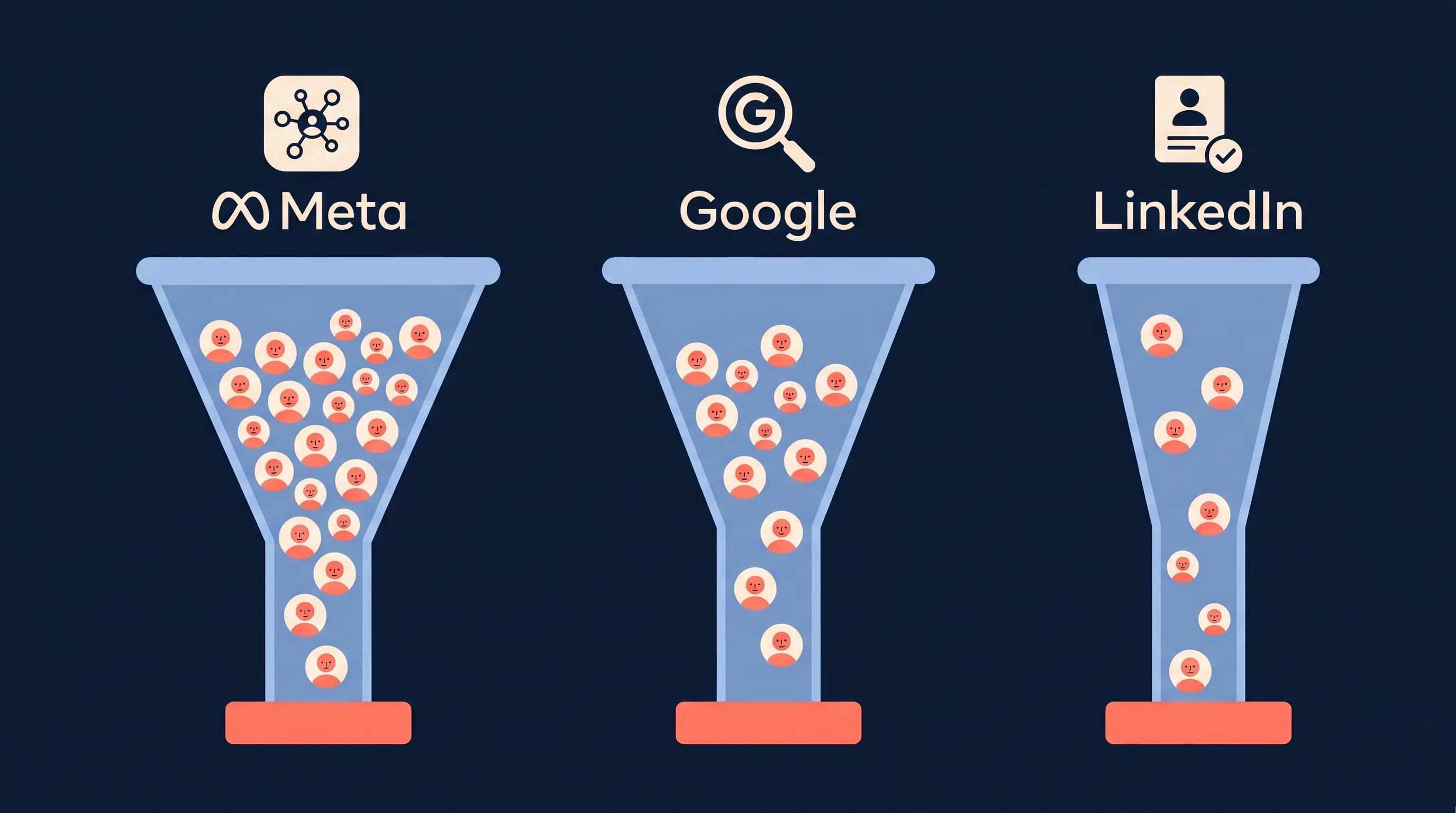
If your real question is “which lead form platform should I run on”, here’s the head-to-head. All three formats follow the same pattern (native form, pre-filled, no landing page) but target completely different user states.
| Dimension | Meta Lead Ads | Google Lead Form Ads | LinkedIn Lead Gen Forms |
|---|---|---|---|
| User intent | Discovery / interest-based | High (Search) to medium (YouTube/Discovery) | Professional / B2B-specific |
| Average CPL (cross-industry) | $27.66 (WordStream 2025) | $15–$60 depending on placement | $45–$100+ |
| Lead quality | Mixed, wide top-of-funnel audience | Search: high. YouTube/Discovery: mixed | High, verified professional profile |
| Audience targeting | Interests, lookalikes, custom audiences | Keywords (Search), affinity + custom intent (YouTube) | Job title, company, seniority, industry |
| Form pre-fill data | From Facebook profile | From Google account | From LinkedIn profile (most accurate of the three for B2B) |
| Native CRM integrations | ~10 (HubSpot, Salesforce, Mailchimp, Zoho, etc.) | ~10 (HubSpot, Salesforce, Zapier, Mailchimp, etc.) | ~10 (Salesforce, HubSpot, Marketo, Eloqua, etc.) |
| Best for | B2C, local services, e-commerce, lead-gen at scale | High-intent commercial searches, app installs, B2C with intent signal | B2B SaaS, enterprise sales, recruiting, professional services |
| Worst for | Niche B2B (audiences too broad) | Pure brand awareness (use Display) | B2C / impulse purchases (audiences too narrow + expensive) |
The right answer is rarely one platform. Most lead-gen advertisers we work with run Meta + Google in parallel: Meta for the cheap-volume top of funnel, Google for the high-intent bottom of funnel. B2B advertisers add LinkedIn on top when their target accounts are too narrow for the other two to reliably target.
For a deeper comparison of just Meta vs Google specifically, see our Meta Ads vs Google Ads for lead generation guide.
How Do I Set Up a Lead Form Asset in Google Ads?
The setup happens inside Google Ads → Campaigns → your campaign → Assets. (Lead Form Assets are not their own campaign type; they attach to Search, YouTube, Discovery, or Performance Max campaigns.)
- Open Google Ads → select the campaign you want to attach the lead form to (Search, YouTube, Discovery, Demand Gen, or PMax).
- Navigate to Assets → click “+” → select Lead form.
- Form CTA + extension text: choose from Google’s preset CTAs (Get Quote, Sign Up, etc.) and write a one-line extension text that appears under your headline.
- Form headline + description + business name: what appears at the top of the form when it opens. This is your offer.
- Background image (optional): 1200 × 628px recommended. Improves CTR and trust.
- Pick fields: choose from the standard fields (name, email, phone, postal code, etc.). Fewer fields = more submissions. 3–5 fields is the sweet spot.
- Add custom questions (optional, max 10): multiple-choice, short answer, or yes/no. Use for qualification (“What’s your budget?”, “Timeline?”).
- Set the form type: “More volume” or “More qualified”. Default to “More volume” until you have enough data to know whether qualification helps.
- Privacy policy URL + post-submit message: required by Google. Your post-submit message can include a website CTA or just a thank-you.
- Lead delivery method: webhook URL, supported CRM integration (HubSpot, Salesforce, Mailchimp, Zoho, Constant Contact, etc.), or CSV download from the Ads UI. We’ll cover this in detail in the next section.
Save the asset. It will start serving alongside your existing ad creative within an hour or two. New leads land in Assets → Lead form → View leads in your Google Ads dashboard, and (if you set up delivery) in your CRM or webhook endpoint.
For email and SMS notifications on each new lead, which Google doesn’t include natively, see our Google lead ad email notifications guide.
What Does a Google Lead Form Ad Cost? (2026 Benchmarks)
Google doesn’t publish official CPL benchmarks for Lead Form Ads specifically. The numbers below for Google leads combine our own customer data (across thousands of Google Lead Form campaigns synced through LeadSync) with WordStream’s published Google Ads benchmarks. Treat them as ballpark, not target.
| Industry | Search Lead Form CPL | YouTube / Discovery CPL | Notes |
|---|---|---|---|
| Restaurants & Local Services | $10–$20 | $5–$15 | Cheapest verticals. Specific local intent. |
| Home Services (HVAC, roofing, solar) | $30–$60 | $15–$30 | Search dominated by commercial intent. |
| Automotive | $25–$50 | $10–$25 | Test drive offers convert best. |
| Real Estate | $30–$60 | $20–$40 | Free home valuation is the highest converter. |
| Education / Bootcamps | $40–$70 | $20–$40 | Higher LTV justifies premium CPL. |
| Health Care | $30–$80 | $15–$45 | Wide range, dentistry highest, general practice mid-pack. |
| Legal Services | $50–$120 | $30–$70 | Highest CPL of any common vertical. Highest LTV too. |
| Financial Services / Insurance | $40–$100 | $25–$60 | Compliance-heavy. CPL spikes for specific products. |
| B2B SaaS | $50–$150 | $30–$80 | Treat Google Lead Form leads as MQL, not SQL. |
Two things drive CPL on Google Lead Form Ads more than anything else:
- Form length. Every additional field reduces conversion rate. Three fields beats five fields beats ten. Use custom questions only when you actually need the qualification signal to filter downstream.
- Speed-to-lead. Google’s algorithm uses downstream conversion data to optimize who sees the form. If your follow-up takes 6 hours, leads churn out before they convert, Google sees the low conversion rate, and your CPL climbs. Real-time CRM sync + immediate follow-up is the cheapest CPL lever you control after launch. (Our speed-to-lead deep dive covers the data.)
If your CPL is materially higher than the ranges above, the bottleneck is usually one of: too many form fields, weak offer (generic “Contact us” instead of specific value prop), or slow follow-up making Google’s algorithm de-prioritize you.
How Do I Connect Google Lead Form Ads to a CRM?
This is the part most setup guides skim, and it’s the part that actually decides whether the leads are useful. Getting Google leads into your CRM is where most ad accounts lose 30–50% of the lead’s value. Google captures the submission, but if it sits unread in the Ads dashboard for hours, by the time your team follows up, the prospect’s moved on.
Google offers four delivery methods:
- CSV download. Manually export leads from the Google Ads UI. Useful for testing; not a real solution.
- Webhook URL. Google POSTs each new lead as JSON to a URL you provide. You build the receiving endpoint, parse the payload, push to your CRM. Powerful, requires engineering.
- Native CRM integration. Google natively integrates with about ten CRMs: HubSpot, Salesforce, Mailchimp, Zoho, Constant Contact, ActiveCampaign, plus a small handful of others. If yours is on the list and you don’t need field mapping flexibility, this works.
- Third-party sync tool like LeadSync, which gives you real-time webhook-based delivery to 30+ CRMs with field mapping, normalization, email/SMS notifications, autoresponders, and multi-account routing for agencies.
What Columns Does the Lead Form CSV Contain?
The export gives you one row per lead. Every file carries the campaign and asset identifiers plus the submission timestamp, then one column for each field you put on the form:
| Column group | Examples |
|---|---|
| Identifiers | Campaign ID, Asset ID or Form ID, Lead ID |
| Timing | Submission date and time (account timezone) |
| Standard fields | Full Name, User Email, User Phone, Postal Code, City, Country, Company Name, Job Title, Work Email, Work Phone |
| Custom questions | One column per question, headed with the question text you wrote |
The detail that catches people out: custom questions become columns headed by the question text, so editing the wording of a question, adding one, or reordering the form changes the column layout of every subsequent export. If you have a spreadsheet or an import template mapped to fixed column positions, that is why it breaks after a form edit. Map by header name rather than position, or sync directly and skip the file entirely.
How Does the Google Lead Form Webhook Work?
Choose Webhook as the delivery method and Google POSTs a JSON payload to your URL the instant someone submits. The payload contains the lead’s answers as a list of column ID and value pairs, alongside the campaign and form identifiers, a timestamp, and a webhook key you define yourself.
That key is the part worth understanding. Google will not accept the endpoint unless your server echoes the same key back, which is how Google proves the request genuinely came from it and not from someone who guessed your URL. Google also sends a test lead when you save the asset, so a webhook that fails validation fails loudly at setup rather than silently in production.
The trade-off is ownership. Webhook delivery is real time and free, but you host the endpoint, validate the key, parse the payload, map the column IDs to your CRM’s fields, and handle retries when your endpoint is down. That is a small engineering project rather than a setting. If you would rather not own it, LeadSync’s Google Ads webhook destination does the receiving, validation, and field mapping for you.
Most LeadSync customers come in because their CRM (Pipedrive, Jobber, Follow Up Boss, HouseCall Pro, Keap, MailerLite, etc.) isn’t on Google’s short native list, or because they need notifications and autoresponders on top of the CRM sync. Some popular destinations:
- Send Google Ads leads to HubSpot
- Send Google Ads leads to Mailchimp
- Send Google Ads leads to Pipedrive
- Send Google Ads leads to Follow Up Boss
- Send Google Ads leads to ActiveCampaign
- Send Google Ads leads via webhook
The full list of 30+ supported destinations is on our integrations page.
How Do Enhanced Conversions for Leads Work With Lead Form Ads?
By default Google optimises a lead form campaign toward one event: the submission. It has no idea which submissions became customers, so Smart Bidding chases whoever is most likely to fill in a form, and form-fillers are cheap. Enhanced conversions for leads closes that loop. In Google’s words it is “an upgraded version of offline conversion import that uses user-provided data, such as email addresses, to supplement imported offline conversion data to improve accuracy and bidding performance.” You tell Google which leads qualified or closed, Google matches them back to the ad interaction, and the bidding starts chasing the leads that turn into revenue rather than the ones that turn into rows.
The mechanics, for a lead form asset:
- The form captures the identifier. Every submission carries the lead’s email and, if you asked for it, phone number. That is the matching key, which is why the lead has to reach your CRM with those fields intact rather than as a mangled CSV import.
- The CRM records what happened next. Google’s setup guide is explicit: “Your CRM must store the Google Click ID (GCLID) or the email addresses of your leads.” Lead form submissions do not always carry a GCLID, so for lead form campaigns the email is usually the key that does the work.
- You create conversion actions for the stages that matter. In Google Ads, a conversion action with Import from click as the source, typically one for Qualified lead and one for Converted lead. Give each a value if you can; a funded loan or a signed contract is worth more than a demo request.
- You send the conversions back. Upload from the CRM as leads move stage, with the email hashed (SHA-256, after lower-casing and trimming) and the GCLID where you have it. Google Ads Data Manager takes a manual file, a scheduled pull from Google Sheets or an SFTP drop, or a direct CRM connection (HubSpot and Salesforce are among the partner integrations); Zapier is also a documented path. One note for anyone with a developer on the job: from 15 June 2026 these uploads go through the Data Manager API rather than the Google Ads API.
- Google attributes and learns. Matched conversions appear against the campaign, ad group and keyword that produced the lead, and Smart Bidding uses them. Google lists the gains over the old GCLID-only import as more durable matching, more accurate reporting, and credit for engaged-view and cross-device conversions.
One constraint to design around: Google supports only one data integration per lead form. If you choose Zapier’s built-in lead export for a form, that is the form’s integration; the conversion import itself runs through Data Manager or the API and is not tied to the form, so a webhook or sync-tool delivery on the form and a Data Manager upload from the CRM sit together without conflict.
Where LeadSync fits is the first half of the loop. It delivers each lead form submission to your CRM within a minute with the email and phone mapped to the right fields and a source tag identifying the campaign, which is exactly the record the upload step needs later. The second half, sending qualified and converted leads back, happens from the CRM or Data Manager; LeadSync does not upload Google conversions. On the Meta side the equivalent feedback loop is the Conversions API, and there LeadSync does send the signal itself; our CAPI lead quality guide covers it.
If you run lead form ads and have never sent a conversion back, this is the highest-leverage hour of setup you have left. Google is optimising toward the wrong event until you do.
How Do I Improve Google Lead Form Ad Quality?
Three levers, in order of impact:
- Switch form type to “More qualified”. Adds a one-step confirmation before submission. Reduces volume ~15–25%; typically improves downstream conversion rate enough to justify the CPL increase.
- Add 1–2 qualifying custom questions. “What’s your budget range?” or “When are you looking to start?” filters out tire-kickers. Don’t add more than 2, because drop-off compounds.
- Exclude high-fraud placements. YouTube and Demand Gen can attract accidental form-fillers (especially on mobile). If your data shows materially lower conversion rates from those placements, exclude them or set lower bids on them.
The most expensive mistake is layering quality filters on the form when the actual problem is downstream: leads sitting in your CRM uncontacted for hours. Fix that first; it’s the cheapest improvement and the one Google’s algorithm rewards most.
Frequently Asked Questions
What is a Google Ads lead form extension?
The lead form extension is Google’s native lead-capture format. It lets someone submit their contact details directly inside your ad, without clicking through to a landing page, and the form pre-fills from their Google account. Google renamed extensions to assets across Google Ads in 2023, so the official name is now the lead form asset. The feature is identical; only the label changed.
What is the difference between a lead form extension and a lead form asset?
Nothing functional. They are the same feature under two names. Google launched it in 2019 as the Lead Form Extension, then renamed every extension type to an asset in 2023, making the current official term Lead Form Asset. Most advertisers, and most of the internet, still say lead form extension. If a guide references extensions, it is describing the same product you will find under Assets in Google Ads.
What are Google Lead Form Ads?
Google Lead Form Ads (officially called Lead Form Assets since 2023, formerly Lead Form Extensions) are a native Google Ads format that lets users submit their contact information directly inside the ad, without clicking through to a landing page. The form pre-fills with details from the user’s Google account, reducing friction and improving conversion rates compared to landing-page-based lead capture.
What’s the difference between Google Lead Form Ads and Meta Lead Ads?
Both are native lead capture formats that bypass landing pages. Meta Lead Ads run on Facebook and Instagram and target users by interest, lookalikes, and custom audiences, typically a wider top-of-funnel audience. Google Lead Form Ads run on Search, YouTube, Discovery, and Performance Max, and Search placements have much higher commercial intent because the user explicitly searched for your service. Most lead-gen advertisers run both platforms in parallel for maximum reach.
How much do Google Lead Form Ads cost?
Cost per lead ranges from about $10–$20 for local services and restaurants on Search up to $50–$150 for B2B SaaS, legal, and financial services. YouTube and Discovery placements run 30–50% cheaper than Search but with lower intent. Cross-industry average is roughly $25–$50 per lead, broadly comparable to Meta Lead Ads. Form length and follow-up speed are the two biggest cost drivers within your control.
What columns are in the Google Ads lead form CSV download?
The CSV export contains one row per lead with the campaign and asset identifiers, the submission timestamp, and one column per field you configured on the form. Standard fields export under their Google names (Full Name, User Email, User Phone, Postal Code, City, Country, Company Name, Job Title, Work Email, Work Phone), and each custom question exports as its own column using the question text as the header. Adding or renaming a question changes the column layout, which is the usual reason a spreadsheet import that worked last month suddenly fails.
How does the Google lead form webhook work?
Google POSTs a JSON payload to the URL you supply the moment someone submits the form. The payload carries the lead’s answers as a list of column ID and value pairs, plus campaign and form identifiers, a timestamp, and a key you set yourself. Google requires that key to match on your side before it will accept the endpoint, which is how it proves the request came from Google. Delivery is real time, but you have to build and host the receiving endpoint, parse the payload, and push it into your CRM yourself.
Can I send Google Lead Form Ads to my CRM?
Yes, three ways. Google natively integrates with about ten CRMs (HubSpot, Salesforce, Mailchimp, Zoho, Constant Contact, ActiveCampaign, etc.). If your CRM isn’t on that list, you can use a webhook (build your own endpoint) or a third-party sync tool like LeadSync that supports 30+ destinations including Pipedrive, Jobber, Follow Up Boss, HouseCall Pro, and Keap with real-time delivery and field mapping.
Are Google Lead Form Ads better than landing pages?
It depends on your offer. Lead Form Ads convert at a higher rate (no landing page friction, form pre-filled) and typically cost 30–60% less per lead, but you give up landing page analytics, A/B testing, and the ability to tell a longer story before asking for contact details. Landing pages win for complex products, high-ticket B2B, and anywhere lead quality matters more than volume. Most mature advertisers run both: Lead Form Ads for top-of-funnel volume, landing pages for high-quality conversion campaigns.
What’s the difference between “More volume” and “More qualified” form types?
“More volume” is the default: single submission, lowest friction, maximum lead count. “More qualified” adds a confirmation step where the user reviews their information before submitting. The confirmation step reduces lead volume by 15–25% but typically delivers leads that convert at a higher rate downstream. Start with “More volume” and switch to “More qualified” once you have enough conversion data to justify it.
Can I get email or SMS notifications when a new Google lead comes in?
Not natively from Google Ads. Google only delivers leads to the CRM you connect or the webhook you provide. To get instant email or SMS notifications on every new Google lead, you need a sync tool like LeadSync, which sends notifications alongside the CRM sync. Our Google lead ad email notifications guide walks through the setup in under five minutes.
How fast do Google Lead Form Ads deliver leads?
Leads appear in the Google Ads dashboard within seconds of submission. Delivery to a native CRM integration is typically real-time. Webhook delivery is real-time. CSV download is manual. If you’re using a third-party sync tool, delivery speed depends on the tool. LeadSync delivers in under 60 seconds, typically 5–15 seconds. Speed-to-lead matters: leads contacted within 5 minutes are 21x more likely to convert than those contacted after 30 minutes.
How do I download lead form submissions from Google Ads?
In Google Ads go to Campaigns, then Assets, open the Lead form summary card and choose CSV or CSV for CRM. CSV uses the full question text as column headers; CSV for CRM uses short field names for importing. You need Standard or Admin access to the account, the export covers the last 30 days, and Google deletes submissions after 60 days, so download on a schedule or, better, set a delivery method (webhook, a supported CRM, Zapier or a sync tool such as LeadSync) so every lead leaves Google Ads the moment it arrives.
Where do I view lead form submissions in Google Ads?
Under Campaigns, then Assets, then the Lead form card: each form lists its submissions with the standard fields and the answers to your custom questions. They do not appear in the Conversions report and Google sends no notification when one arrives. Submissions are kept for 60 days. If you need to see leads as they come in, connect a delivery method: a webhook, one of Google’s supported CRMs, or LeadSync, which also sends an email or SMS alert for each new lead.
Try LeadSync Free for 7 Days
If you’re running Google Lead Form Ads and need them in a CRM that Google doesn’t natively support, or you want instant email/SMS notifications, autoresponders, and multi-account routing for agencies, LeadSync handles all of that out of the box. Setup takes under 5 minutes.
- ✅ Real-time sync (under 60 seconds)
- ✅ 30+ CRM integrations (Pipedrive, Jobber, Follow Up Boss, HouseCall Pro, Keap, and more)
- ✅ Email + SMS notifications + autoresponders included
- ✅ Multi-account architecture for agencies
- ✅ No credit card required
Related Resources
- Google Ads for Real Estate: Campaign Types, Keywords and Costs (2026)
- Meta Ads vs Google Ads for Lead Generation
- Google Lead Ad Email Notifications
- 13 Facebook Lead Ad Examples That Convert
- LinkedIn Lead Gen Ads Guide
- Why Speed-to-Lead Matters
- LeadSync vs Zapier for Lead Ads
- Google vs Meta vs LinkedIn vs TikTok Lead Ads