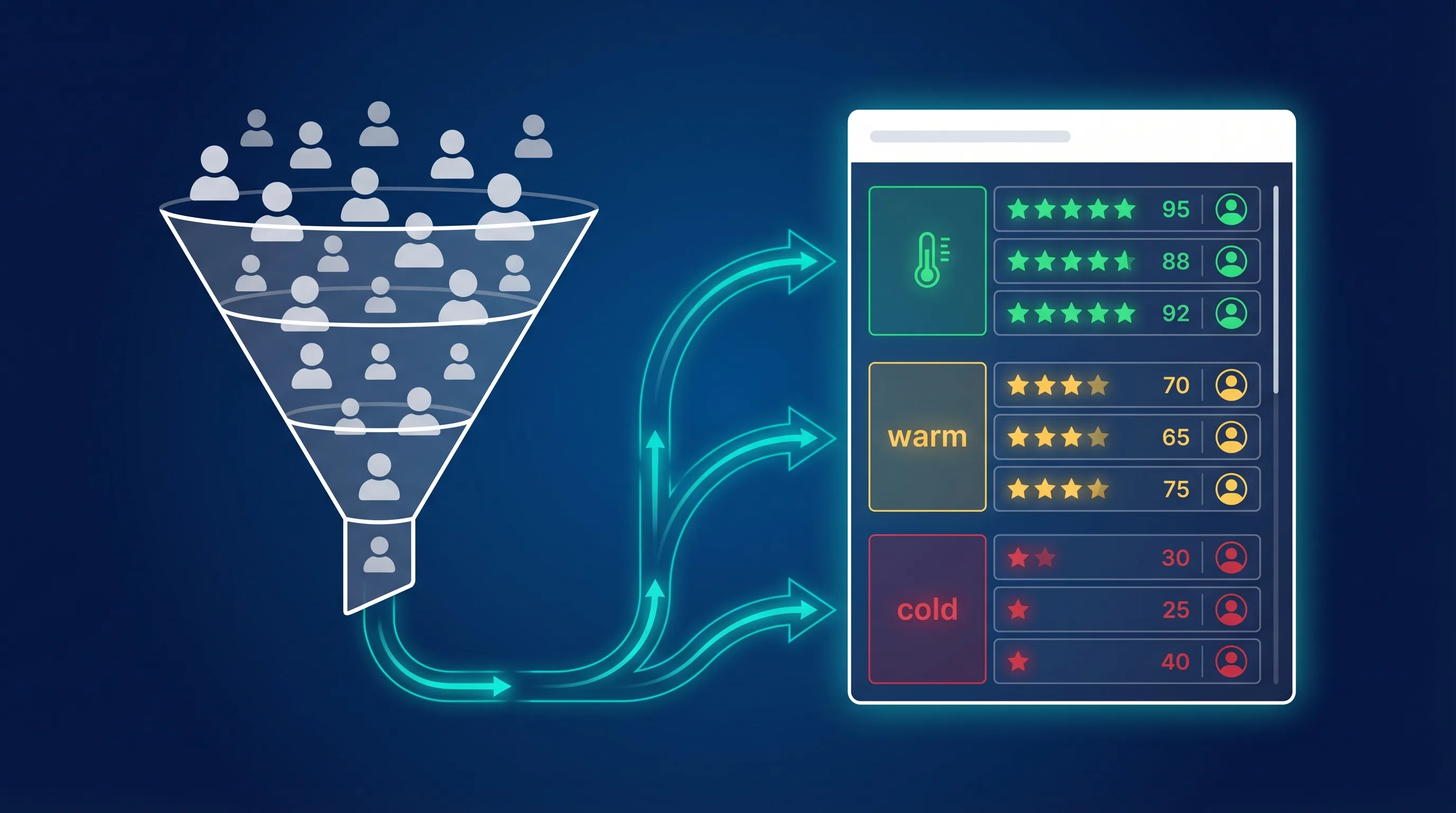
Lead scoring is how you figure out which leads to call first. Instead of treating every form submission equally, you assign points based on who the lead is and what they’ve done, and then focus your time on the ones most likely to become customers.
It sounds simple, but most businesses either don’t score leads at all (and waste time chasing bad ones) or build overly complex systems that nobody maintains. This guide covers the practical middle ground: how to build a lead scoring model that actually works, with real point-value examples you can copy.
Key Takeaways
- Lead scoring assigns points to leads based on demographics, behaviour, and engagement to prioritise follow-up
- Businesses using lead scoring see up to 30% higher close rates and 18% more revenue (Gartner)
- There are 4 main scoring models: demographic, behavioural, engagement, and firmographic; most businesses should combine at least 2
- The simplest starting point: score leads based on form responses from your Facebook Lead Ads or TikTok Lead Ads
- Meta CAPI integration creates an automated scoring feedback loop: Meta learns which leads convert and finds more like them
What Is Lead Scoring?
Lead scoring is a system for ranking leads by assigning numerical points based on attributes (who they are) and behaviours (what they’ve done). Higher scores indicate leads more likely to convert. Lower scores indicate leads that need more nurturing, or aren’t a fit.
For example, a lead who fills out a form, opens your follow-up email, and visits your pricing page might score 85/100. A lead who submitted a form but never opened an email might score 25/100. Your sales team calls the 85 first.
Lead scoring sits between lead capture and lead follow-up in your sales process. It’s the filter that ensures your team spends time on the right people:
- Lead captured: via Facebook Lead Ads, TikTok, LinkedIn, website form, etc.
- Lead delivered to CRM: via LeadSync in under 60 seconds
- Lead scored: based on form data, behaviour, and fit criteria
- Sales team prioritises: highest scores get called first
- Conversion data fed back: via CAPI to improve future lead quality
Lead Scoring Models
A lead scoring model is the set of rules that determines how points are assigned: which attributes and behaviours count, how many points each is worth, and what thresholds trigger which actions. There are four main types of data a lead scoring model can use, and most effective systems combine at least two.
1. Demographic Scoring
Score leads based on who they are: personal characteristics captured in your lead form or CRM.
| Attribute | High Score (+) | Low Score (-) |
|---|---|---|
| Location | Within your service area | Outside service area |
| Age range | Matches target demographic | Outside target range |
| Job title | Decision-maker (CEO, Owner, VP) | Student, intern |
| Income bracket | Matches product price point | Below minimum threshold |
Best for: B2C businesses, local services, real estate, financial services
Example: HVAC company
| Criterion | Points |
|---|---|
| Within 30-mile service area | +20 |
| Homeowner (not renter) | +15 |
| Home built before 2000 | +10 |
| Requested “replacement” (not “repair”) | +15 |
| Outside service area | -50 |
2. Firmographic Scoring
Score leads based on company attributes: industry, size, revenue, and technology stack. This is the B2B equivalent of demographic scoring.
| Attribute | High Score (+) | Low Score (-) |
|---|---|---|
| Company size | Matches ideal customer profile | Too small or too large |
| Industry | In your target verticals | Outside your focus |
| Revenue | Above minimum threshold | Below threshold |
| Technology | Uses complementary tools | Uses competing product |
Best for: B2B SaaS, agencies, enterprise sales
Example: Marketing agency targeting SMBs
| Criterion | Points |
|---|---|
| Company size 10-200 employees | +20 |
| Industry: e-commerce, SaaS, or professional services | +15 |
| Currently running paid ads (from form question) | +20 |
| Annual revenue $500K-$10M | +10 |
| Company size 1-5 employees (too small) | -20 |
| Already has an in-house marketing team | -10 |
For three more full point-value frameworks (B2B SaaS product-led growth, professional services, and enterprise sales), see our companion guide to B2B lead scoring examples.
3. Behavioural Scoring
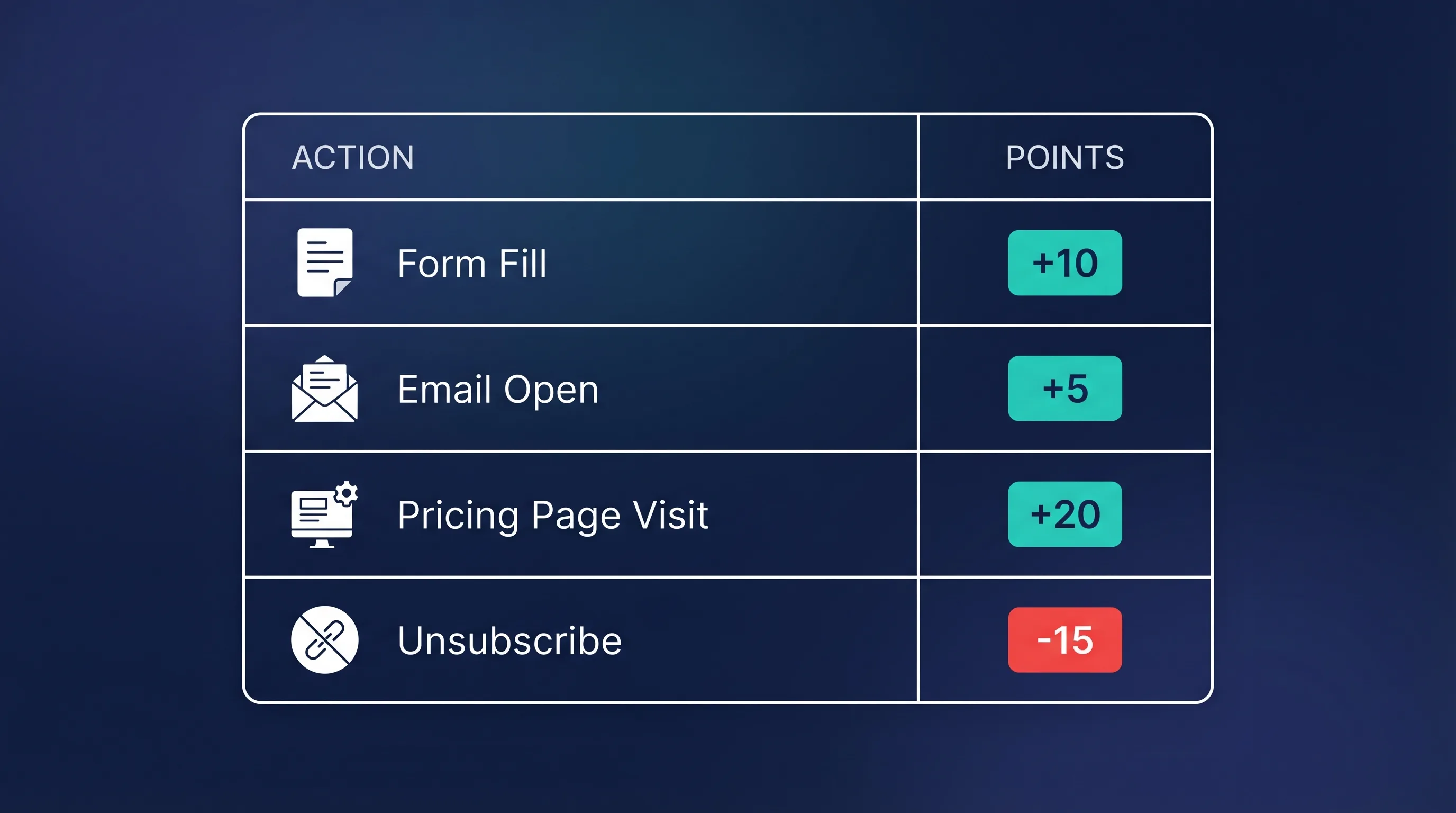
Score leads based on actions they take: website visits, email engagement, content downloads, and form interactions.
| Action | Typical Points |
|---|---|
| Visited pricing page | +20 |
| Opened follow-up email | +5 |
| Clicked link in email | +10 |
| Downloaded case study or guide | +15 |
| Watched product demo video | +20 |
| Visited careers page (not a buyer) | -10 |
| Unsubscribed from emails | -15 |
| No activity in 30+ days | -20 |
Best for: Any business with email marketing or a website; this is the most universally applicable model.
4. Engagement Scoring
Score leads based on how they interact with your lead ads specifically: form completeness, response to follow-up, and qualification signals.
This model is particularly relevant for businesses running Meta Lead Ads or TikTok Lead Ads, where the initial data comes from an in-app form.
| Signal | Points |
|---|---|
| Completed all form fields (including optional) | +15 |
| Provided a real phone number (not fake) | +10 |
| Answered custom qualifying question favourably | +20 |
| Responded to autoresponder email | +15 |
| Answered phone on first call | +25 |
| Fake/invalid email address | -30 |
| Didn’t answer phone after 3 attempts | -15 |
| Submitted form but immediately unsubscribed | -25 |
Best for: Businesses running paid lead generation ads across any platform.
Combining Models: A Real-World Example
Most businesses should combine 2-3 models. Here’s what a combined scoring system looks like for a real estate agent generating leads via Facebook Lead Ads:
| Category | Criterion | Points | Max |
|---|---|---|---|
| Demographic | Within target suburb/zip | +20 | |
| Homeowner | +15 | ||
| First-time buyer | +10 | ||
| Engagement | Completed all form fields | +10 | |
| Answered qualifying question: “Looking to buy in next 3 months” | +25 | ||
| Answered qualifying question: “Just browsing” | -10 | ||
| Behavioural | Opened follow-up email | +5 | |
| Clicked listing link in email | +10 | ||
| Visited agent’s website | +10 | ||
| Negative | Fake email detected | -30 | |
| No response after 5 days | -20 | ||
| 100 |
Score thresholds:
- 80-100: Hot lead: call immediately
- 50-79: Warm lead: add to nurture sequence, follow up within 24 hours
- 25-49: Cool lead: automated nurture only
- Below 25: Disqualified: don’t waste time
How to Score Leads from Facebook & Instagram Lead Ads
If you’re generating leads through Meta Lead Ads, you already have built-in scoring data; you just need to use it.
Score Based on Form Responses
Meta’s Instant Forms let you add custom questions. These questions double as scoring criteria:
- “When are you looking to buy?” → “Within 1 month” (+25), “3-6 months” (+10), “Just researching” (-5)
- “What’s your budget?” → “$500K+” (+20), “$200-500K” (+10), “Under $100K” (-10)
- “What service do you need?” → High-value service (+20), low-value service (+5)
Use Meta’s “Higher Intent” form type to add a confirmation step: leads who confirm are inherently higher quality and can be scored higher.
If a question only matters for some people, use conditional answers so it appears only after a relevant earlier answer. You get the scoring data without making the form longer for everyone.
Apply the Score Automatically in Your CRM
Meta doesn’t score leads for you. The score has to be calculated where the lead lands, so the usual flow is:
Meta lead form → LeadSync → CRM → scoring rules
LeadSync maps each form answer to its own CRM field, which means the CRM’s scoring rules can run the moment the lead arrives. HubSpot, ActiveCampaign and Zoho CRM all have built-in scoring rules on their higher plans. A simple model for Meta leads:
| Form answer | Points |
|---|---|
| Budget over $10,000 | +30 |
| Ready within 30 days | +20 |
| Decision-maker | +20 |
| Answered every optional question | +10 |
| Phone number left blank (if optional) | -20 |
Treat 60+ as hot, 30-59 as warm and anything lower as cold. For borderline leads, a fast phone call or SMS that asks one or two extra questions will tell you more than any form field, and speed matters here as much as anywhere.
Use CAPI to Automate Lead Quality Scoring
Here’s where it gets powerful. LeadSync’s CAPI (Conversions API) integration creates an automated feedback loop between your sales outcomes and Meta’s ad delivery:
- A lead fills out your Facebook or Instagram Lead Ad form
- LeadSync delivers the lead to your CRM in under 60 seconds
- You rate the lead as Good, OK, or Poor (one tap in your notification email)
- LeadSync sends that quality signal back to Meta via CAPI
- Meta’s algorithm learns which types of people become good leads
- Your future ads are delivered to more people who match your best customers
The result: Meta’s own testing shows 19% lower cost per quality lead when using Conversions API. Over time, CAPI effectively automates the demographic and engagement scoring: Meta does the scoring for you by optimising delivery toward your highest-converting audience profile.
This is the closest thing to automated lead scoring for lead ad campaigns. Instead of building a complex scoring model manually, you let Meta’s algorithm learn from your actual conversion data. The more leads you rate, the smarter the algorithm gets.
AI-Powered Lead Scoring
For businesses with larger lead volumes or complex sales cycles, AI-powered lead scoring takes the manual work out of the equation.
How AI Lead Scoring Works
Traditional scoring uses rules you define (“if job title = CEO, add 20 points”). AI scoring analyses your historical data (every lead that converted and every lead that didn’t) and automatically identifies which attributes and behaviours predict conversion.
| Factor | Traditional Scoring | AI Scoring |
|---|---|---|
| Rules | You define them manually | Algorithm learns from data |
| Updates | You update when things change | Adapts automatically |
| Complexity | Limited to rules you can think of | Finds patterns you’d miss |
| Data needed | Works with small datasets | Needs 500+ leads to train |
| Maintenance | Manual, ongoing | Self-updating |
| Best for | Small teams, simple sales | Large volumes, complex sales |
AI Lead Scoring Tools
| Tool | Best For | Starting Price |
|---|---|---|
| HubSpot (Predictive Lead Scoring) | Mid-size teams on HubSpot CRM | Included in Enterprise ($1,200/mo) |
| Salesforce Einstein | Enterprise teams on Salesforce | Included in Enterprise |
| Zoho CRM (Zia AI) | SMBs wanting affordable AI | Included in Enterprise ($40/user/mo) |
| Madkudu | B2B SaaS with product-led growth | From $999/mo |
| Clearbit | Data enrichment + scoring | From $99/mo |
For most small and mid-size businesses running lead ads, you don’t need AI scoring: the combination of form-based scoring + CAPI feedback handles the heavy lifting. AI scoring becomes valuable when you’re processing thousands of leads per month and have a longer, more complex sales cycle.
Lead Lifecycle Stages
Lead scoring works best when combined with clear lifecycle stages. Each lead should progress through defined stages based on their score:
| Stage | Score Range | Definition | Action |
|---|---|---|---|
| New Lead | 0-24 | Just submitted a form, no engagement yet | Send autoresponder, begin nurture |
| Marketing Qualified (MQL) | 25-49 | Engaged with content, fits basic criteria | Continue nurturing, marketing owns |
| Sales Qualified (SQL) | 50-79 | Demonstrated purchase intent, meets fit criteria | Sales team follows up within 24 hours |
| Hot Lead | 80-100 | High engagement + strong fit + recent activity | Immediate call, highest priority |
| Disqualified | Below 0 | Fake data, outside service area, or explicitly not interested | Remove from active pipeline |
For a deeper dive into how these stages work in practice, see our lead lifecycle stages guide.
The key principle: score determines stage, stage determines action. Your sales team shouldn’t be deciding who to call; the scoring system should tell them.
Best Practices
Start Simple
Don’t build a 50-variable scoring model on day one. Start with 5-8 criteria that you already know matter, run it for 30 days, then refine based on actual outcomes.
Score What You Can Measure
Only score data you actually capture. If you don’t ask for job title in your lead form, don’t include it in your scoring model. Add new fields to your forms over time as your scoring needs evolve.
Include Negative Scores
Negative scoring is just as important as positive scoring. Leads with fake emails, outside your service area, or who unsubscribe should lose points; this prevents your sales team from wasting time on leads that will never convert.
Review and Adjust Monthly
Lead scoring isn’t set-and-forget. Review your conversion data monthly and ask: “Are the leads we scored highest actually converting at the highest rate?” If not, adjust the point values.
Align Sales and Marketing on Definitions
Both teams need to agree on what “qualified” means. Marketing shouldn’t pass leads to sales at 30 points if sales expects 70 points. Set the threshold together and review it quarterly.
Use Speed-to-Lead as a Multiplier
A lead scored at 90 who gets called after 2 hours converts worse than a lead scored at 60 who gets called in 5 minutes. Lead scoring tells you who to prioritise, but speed to lead determines whether they actually pick up the phone. Deliver leads to your CRM instantly with LeadSync so your team can act on scores in real time.
Frequently Asked Questions
What is a lead scoring model?
A lead scoring model is the set of rules that determines how many points a lead earns: which attributes and behaviours count, how many points each is worth, and what score thresholds trigger which actions. The four main types are demographic, firmographic, behavioural, and engagement models, and most effective systems combine at least two.
What is lead scoring?
Lead scoring is a system for ranking sales leads by assigning numerical points based on who they are (demographics, company data) and what they’ve done (form submissions, email engagement, website visits). Higher scores indicate leads more likely to convert, helping sales teams prioritise their follow-up efforts.
How do you calculate a lead score?
Assign point values to specific attributes and actions. For example: filled out all form fields (+10), within service area (+20), visited pricing page (+20), opened follow-up email (+5). Add up the points for a total score. Most systems use a 0-100 scale with thresholds for each lifecycle stage (e.g., 50+ = sales qualified).
What is a good lead score?
It depends on your thresholds, but typically: 80-100 is a hot lead (call immediately), 50-79 is sales qualified (follow up within 24 hours), 25-49 is marketing qualified (continue nurturing), and below 25 needs more engagement before sales involvement. Calibrate based on your actual conversion data.
What’s the difference between lead scoring and lead grading?
Lead scoring measures engagement and behaviour (what leads do). Lead grading measures fit (who leads are). Scoring tells you how interested a lead is; grading tells you how closely they match your ideal customer profile. The best systems combine both.
Do small businesses need lead scoring?
If you’re getting more than 20 leads per month, yes. Even a simple version helps. Start by scoring leads based on your lead ad form responses (qualifying questions, service type, budget). You don’t need expensive software; a simple point system in your CRM or even a spreadsheet works.
How does CAPI improve lead scoring?
Meta Conversions API (CAPI) sends your lead quality ratings back to Meta’s ad algorithm. Over time, Meta learns which types of people become your best leads and optimises ad delivery accordingly. It’s essentially automated demographic scoring: Meta finds more people who match the profile of leads you rated as “Good.” LeadSync includes CAPI integration with one-click setup.
What’s the best lead scoring software?
For small to mid-size businesses: HubSpot (included in free CRM for basic scoring, predictive in Enterprise), Zoho CRM (affordable AI scoring), and Pipedrive (simple point-based). For enterprise: Salesforce Einstein. For lead ad campaigns specifically, LeadSync’s CAPI integration provides automated quality feedback without needing dedicated scoring software.
Start Scoring Your Leads Today
The simplest way to start lead scoring is with your lead ad forms. Add 1-2 qualifying questions, set up instant CRM delivery with LeadSync, and enable CAPI to create an automated quality feedback loop with Meta.
You don’t need a complex system; you need a system that helps your team call the right leads first. Start there, and refine as you learn.
Try LeadSync free for 7 days, instant CRM delivery + CAPI integration included.