Updated July 2026. We’ve been syncing Facebook leads since 2017 and have processed over 10 million of them. A large share of our customers arrive after hitting Zapier’s task limits, plan requirements, or delivery delays. So this comparison is opinionated, but we’ll show our sources: Zapier’s own help docs and pricing, Make’s published plans, Meta’s native options, and the community threads where the problems get reported.
Zapier is a great tool, with 9,000+ integrations that connect almost anything to anything. But most businesses running Facebook lead ads don’t need 9,000 integrations. They need one thing: leads in their CRM fast. That’s exactly what we built LeadSync to do. We’ll be upfront about where we win, where Zapier still makes sense, and how the other main Zapier alternatives for lead ads stack up.
LeadSync vs Zapier vs Make vs Native: Quick Comparison
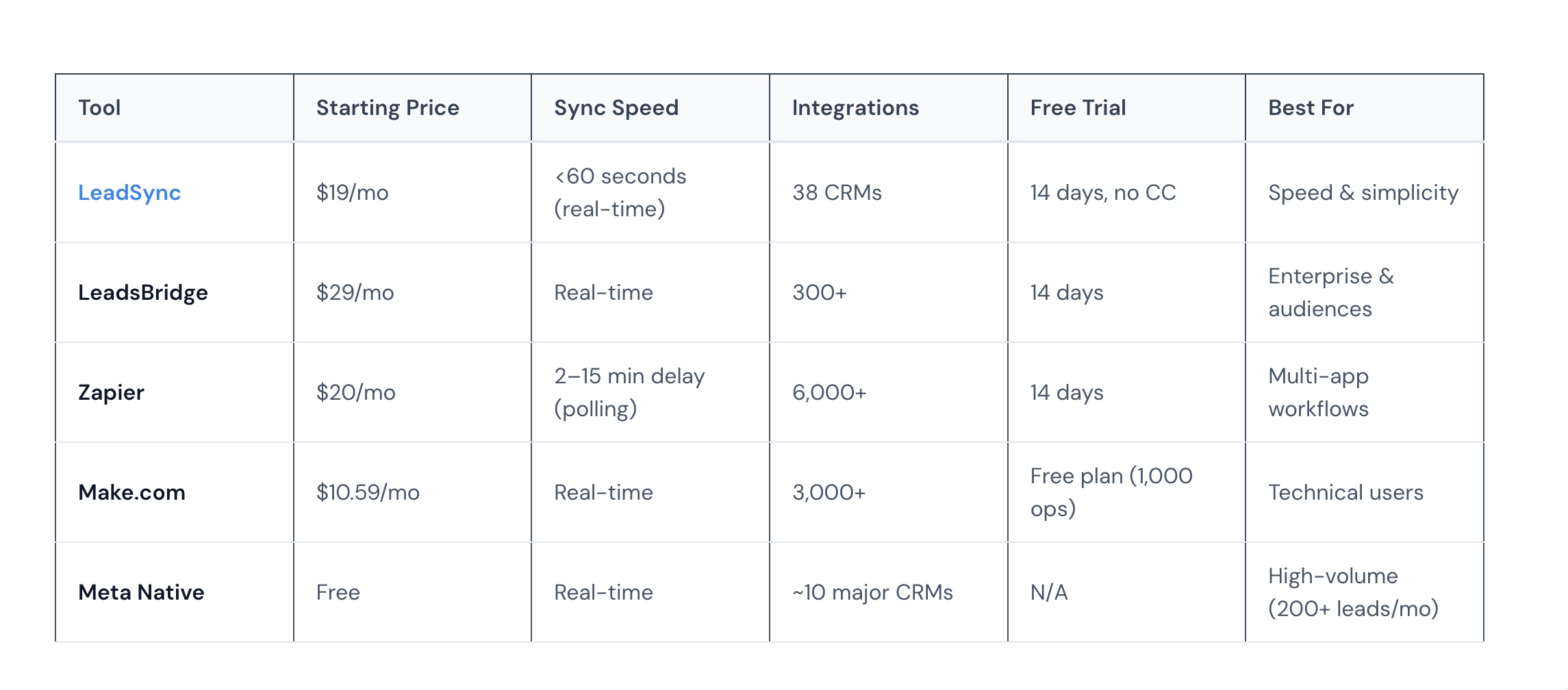
| Feature | LeadSync | Zapier | Make.com | Native (Meta/Google) |
|---|---|---|---|---|
| Starting price | $19/mo ($16.58/mo annual) | $19.99/mo annual ($29.99 monthly); FB Lead Ads needs Professional+ | Paid plans from $9/mo | Free |
| Sync speed | Under 60 seconds (real-time webhook) | Polling triggers check every 1 to 15 min by plan | Instant trigger available, plus a polling module | Real-time (depends on CRM) |
| Pricing model | Flat monthly fee, no per-task or per-lead charges | Per-task billing (each step counts) | Per-operation billing (each module run counts) | Free, but CRM-limited |
| Facebook / Instagram Lead Ads | ✅ Purpose-built | ✅ Premium app (paid plans only) | ✅ One of 2,000+ apps | ✅ Native (Meta only) |
| Google Lead Forms | ✅ | ✅ | ✅ | Webhook only (build your own endpoint) |
| LinkedIn Lead Gen | ✅ | ✅ | ✅ | Native (limited CRMs) |
| TikTok Lead Gen | ✅ | ✅ | ✅ | Native (limited CRMs) |
| CRM integrations | 30+ | 9,000+ apps | 2,000+ apps | ~10 (HubSpot, Salesforce, Mailchimp, Zoho, etc.) |
| Field mapping | ✅ Visual, with normalization | ✅ Manual per Zap | ✅ Visual, more flexible than Zapier | ❌ Vendor-defined, no customization |
| Email + SMS notifications | ✅ Built-in (SMS uses credits) | Extra steps (+1 task each) | Extra modules (+1 op each) | ❌ Not included |
| Email autoresponders | ✅ Built-in | ❌ Requires SendGrid/Mailchimp step | ❌ Requires email-tool module | ❌ Not included |
| Multi-account / agency routing | ✅ Unlimited ad accounts on Agency plan, one dashboard | One Zap per account (100 clients = 100+ Zaps) | One scenario per account | ❌ Manual config per page |
| Conversions API (CAPI) support | ✅ Built-in for Meta | ❌ DIY via webhook | ❌ DIY via webhook | Separate setup in Events Manager |
| Setup time | ~5 minutes | ~15 to 20 minutes per Zap | ~10 to 20 minutes per scenario | 5 to 10 min (if your CRM is supported) |
| Free trial | 7 days, no credit card | 14 days | Free plan (~1,000 ops/mo) | Free (always) |
Do I Need a Paid Zapier Plan for Facebook Lead Ads?
Yes. Facebook Lead Ads is a premium app on Zapier, available only on the Professional, Team, and Enterprise plans, per Zapier’s getting-started guide. It does not work on the Free plan at all.
That single fact changes the whole comparison. The real entry price for Facebook leads on Zapier is the Professional plan at $19.99/month billed annually ($29.99 month-to-month), which includes 750 tasks per month. That’s the same bracket as LeadSync’s $19/mo Business plan, before task counting even starts.
Why Do Businesses Switch from Zapier to LeadSync?
We surveyed LeadSync customers who came from Zapier. The three most common reasons they switched:
1. Zapier’s Delivery Delays Cost Leads
Zapier doesn’t publish the trigger mechanics for its Facebook Lead Ads app. What it does document is how its polling triggers work: they check for new data on a schedule set by your plan, every 2 minutes by default on Professional and every 1 minute on Team and Enterprise, adjustable between 1 and 15 minutes on paid plans.
In practice, users report worse than the schedule. Zapier community threads document triggers firing inconsistently and missing leads, plus Zaps that stop triggering entirely until reconnected.
Why does this matter? Harvard Business Review research shows that contacting a lead within 5 minutes makes you 100x more likely to connect than waiting 30 minutes. We cover the numbers in our speed to lead guide.
LeadSync subscribes directly to Meta’s real-time lead webhooks. Leads arrive in your CRM or inbox in under 60 seconds, usually within seconds of the form being submitted.
2. Zapier’s Task-Based Pricing Adds Up Fast
Zapier charges per “task”, and every step in your workflow counts as one task. Here’s what a typical Facebook lead workflow looks like:
- Step 1: New lead from Facebook (1 task)
- Step 2: Format/clean the data (1 task)
- Step 3: Send to CRM (1 task)
- Step 4: Send email notification (1 task)
That’s 4 tasks per lead. At 200 leads per month you’re burning 800 tasks, past the Professional plan’s base 750-task tier. You’d need the Team plan at $69/month (annual billing, 2,000 tasks) or a higher Professional task tier.
The same scenario on LeadSync costs $19/month (Business plan, includes up to 1,500 leads/month). One flat fee. No task counting. No surprise bills.
Cost Comparison: 200 Leads/Month
| LeadSync | Zapier | |
|---|---|---|
| What you get | CRM sync + email notification + autoresponder | CRM sync + email notification (4 tasks/lead) |
| Monthly cost | $19 | $69 (Team plan for 2,000 tasks) |
| Annual cost | $199 | $828 |
| Sync speed | Under 60 seconds | Minutes (polling schedule plus queue) |
| Annual savings with LeadSync | $629/year |
3. Zapier’s Facebook Integration Has Reliability Issues
Zapier’s community forums and help center document recurring problems with the Facebook Lead Ads integration:
- Missed leads. Threads like this one report leads that appear in Facebook’s export but never show up in Zapier’s history.
- Zaps not triggering. Zapier maintains a dedicated troubleshooting article listing six causes, including missing CRM access, expired connections, and form IDs invalidated by edits.
- API deprecations break workflows. In May 2025, Facebook deprecated their Offline Conversions API. Existing Zapier workflows stopped working overnight and had to be rebuilt on the new Conversions API.
- Permission complexity. Zapier requires Manage Pages, Manage Ad Account, and Leads Access, and changing permissions means reconnecting the account.
LeadSync is purpose-built for lead ad platforms. When Facebook changes their API, we update our integration, so you don’t have to rebuild anything.
How Do You Set Up Zapier for Facebook Lead Ads?
The short version: create a Zap with Facebook Lead Ads as the trigger, connect your Facebook account with the right permissions, pick your Page and form, then add your CRM as the action step. Zapier’s own guide covers the happy path. In our experience migrating Zapier users, three requirements trip people up before the Zap ever runs.
Three Gotchas Before You Start
- You need a paid Zapier plan. As covered above, Facebook Lead Ads is a premium app. If you’re on Free, the trigger simply isn’t available. Budget for Professional ($19.99/mo annual) minimum.
- You need the right Meta permissions, not just a login. Per Zapier’s permissions doc, the connecting account needs Manage Pages and Manage Ad Account access, plus Leads Access. If the Page uses customized lead access, a Business Manager admin has to grant CRM access to Zapier explicitly. Test leads that work in the editor but never fire live are almost always this. And if permissions change later, the account must be reconnected before the Zap works again.
- New forms show placeholder data until a real test lead exists. Zapier’s guide notes that a form with no submissions shows generic sample data in the editor. To test properly you need to generate a lead with Meta’s lead ads testing tool. Our walkthrough on how to test your Facebook lead ads covers that step by step.
The Full Zapier Setup, Step by Step
- Create a Zapier account and upgrade to Professional or higher
- Create a new Zap with the trigger: Facebook Lead Ads, New Lead
- Connect your Facebook account and approve every permission prompt (partial grants are the top cause of silent failures)
- Confirm Leads Access for the Page (a Business Manager admin may need to grant Zapier CRM access)
- Select your Page and lead form
- Generate a test lead with Meta’s testing tool so the editor pulls real field data instead of placeholders
- Add the action step: choose your CRM app
- Map each form field to a CRM field manually
- Test the Zap end to end
- Want an email notification too? Add another action step (+1 task per lead)
- Turn on the Zap
Budget 15 to 20 minutes if permissions are correct, longer if you’re chasing a Business Manager admin.
How Does the Same Setup Look in LeadSync?
- Create a LeadSync account (no credit card required)
- Connect your Facebook page
- Select your lead form
- Choose your CRM and map fields
- Done. Leads start syncing immediately
About 5 minutes, because the Meta permission flow, form selection, and field mapping are the entire product.
Zapier at Agency Scale: When Task Billing Breaks the Bank
Solo operators can usually live with Zapier’s delivery lag and task billing. Agencies can’t. Three compounding problems hit hard once you’re running ad accounts for 20+ clients.
The 100-Client Agency Math
Price out a realistic scenario: 100 active clients, each averaging 30 Meta lead ad submissions per month, each routed through a standard 4-step workflow (trigger, format, send to client CRM, email notification).
| Zapier Team | Make.com | LeadSync Agency | |
|---|---|---|---|
| Lead volume | 3,000 leads/mo | 3,000 leads/mo | 3,000 leads/mo |
| Task / operation usage | 12,000 tasks/mo | 12,000 ops/mo | N/A (flat) |
| Required plan | Team task tier sized for 12K tasks (base rate ~3.5c/task) | Mid ops tier (slider-based pricing) | Agency ($99/mo) |
| Workflows to maintain | ~100 Zaps (one per client) | ~100 scenarios | 1 dashboard, all clients |
| Annual cost | Roughly $5,000 (~$420/mo at Team’s base task rate) | Varies by ops tier, still metered | $899 ($74.92/mo annual) |
Zapier’s Team plan starts at $69/mo (annual) for 2,000 tasks, about 3.5 cents per task, with overages billed at a premium. At 12,000 tasks a month you’re buying a much larger task tier: roughly $420/mo at Team’s base task rate, or about $5,000/year (larger tiers shave the per-task price a little, but not enough to change the picture). That’s over $4,000/year more than LeadSync Agency, before counting the time cost of maintaining 100 separate Zaps. Make comes in cheaper at the same volume, but it’s still metered per operation and still ~100 scenarios to babysit.
Three Things That Make Zapier Painful for Agencies
Multi-account routing isn’t a first-class feature. In Zapier, each Facebook Page is a separate connection, so each client needs their own Zap, credential refreshes, and permission grants. Lose access to a client’s Business Manager? Their Zap breaks silently. LeadSync was built around a multi-account architecture: one login, every client visible, routing handled at the dashboard level.
Rate limits compound across 100 connections. Scheduled checks across 100 client accounts add up to a lot of Meta API calls, and Facebook rate-limits aggressively during high-volume campaign periods. Agencies switching from Zapier frequently mention “leads disappearing” during peak campaign launches.
Zap sprawl becomes its own maintenance burden. One Zap per client times multiple workflows means 300+ active Zaps. When Facebook deprecates an API version (as with Offline Conversions in May 2025), every Zap needs auditing. With LeadSync, we update the integration; you update nothing.
If you’re running ads for clients and Zapier’s monthly bill is starting to outpace what you charge a client for setup, that’s the signal to look at purpose-built tools. Our agency-focused lead automation guide covers the full architecture.
Where Does Zapier Still Make Sense?
We’re not going to pretend LeadSync replaces Zapier for everything. Here’s where Zapier is the better choice:
- Complex multi-app workflows. If you need “new lead → format data → add to CRM → Slack ping → update Google Sheet → trigger email sequence” in one flow, Zapier’s multi-step Zaps handle it. LeadSync is built for lead delivery, notifications, and autoresponders, not arbitrary multi-app chains.
- Non-CRM integrations. Need to connect Facebook leads to Slack, Trello, Airtable, or a niche industry tool? Zapier’s 9,000+ integrations have you covered. LeadSync focuses on 30+ CRMs and marketing platforms.
- Non-lead-ad automation. Zapier automates everything: form submissions, e-commerce orders, support tickets, file management. LeadSync only handles lead ads.
Bottom line: If you need a general automation tool, use Zapier. If you need leads from ad platforms in your CRM fast, LeadSync is purpose-built for that job.
What Are the Best Zapier Alternatives for Lead Ads in 2026?
If you’re searching for Zapier alternatives because of the paid-plan requirement, delivery delays, task billing, or reliability issues we’ve covered, there are realistically five paths. Here’s how each handles Meta lead ads specifically, starting with the numbers side by side (prices checked 16 September 2026):
| Zapier alternative | Entry price for Facebook lead ads | You pay per | Delivery | Free plan for lead ads? | Notifications and autoresponder built in? |
|---|---|---|---|---|---|
| LeadSync | $19/mo (Business, 1,500 leads) | Flat plan | Real-time webhook, under 60 seconds | 7-day trial, no free tier | Yes: email, SMS, autoresponder, Meta CAPI |
| Make | $9/mo (5,000 credits) | Operation (credit) | Instant trigger available; scheduled runs from 1 minute | Yes: 1,000 credits/mo, 15-minute scheduling | No, you build them as extra modules |
| Zapier | $19.99/mo annual, $29.99 monthly (Pro, 750 tasks) | Task | Polling every 2 minutes on Pro, 1 minute on Team | No: Facebook Lead Ads is a premium app | No, each is another task per lead |
| LeadsBridge | From $29/mo | Bridge (per connection) | Real-time on paid plans | Yes: 50 leads/mo, 1 bridge, 2 mapped fields | Partly; see our LeadsBridge comparison |
| Meta native CRM forwarding | $0 | Nothing | Real-time | Yes, for about 10 supported CRMs | No |
| Privyr | $0 | User (paid tiers) | Instant alert to the app | Yes | Alerts yes; CRM sync no |
Pick by the reason you’re leaving Zapier:
- The bill. The top Reddit thread on this query opens with Zapier “killing me expenses wise”. If you keep building your own workflows, Make gives you more runs per dollar and a documented instant trigger. If lead ads are the workload, LeadSync’s flat plan removes the task counter altogether: 1,500 leads for $19 whether the workflow has two steps or six.
- The delay. Anything that polls on a schedule loses the five-minute window. LeadSync’s webhook and Make’s instant trigger both fire on submission; Zapier’s 1-to-15-minute polling does not.
- The paid-plan wall. If you only need leads in a supported CRM, Meta’s native forwarding is free. If you only need them on your phone, Privyr is free. If you need field mapping, a team alert or an autoresponder, the cheapest full option is LeadSync at $19.
- Reliability. Zapier’s Facebook trigger stops silently when a token expires or the Page connection changes. A tool whose only job is the Meta connection (LeadSync, LeadsBridge) is watching for exactly that.
- Many client accounts. Task tiers scale with volume; LeadSync Agency is $99 flat for unlimited leads and lead sources under one login.
1. LeadSync: Purpose-Built for Lead Ad Sync
Best for: businesses or agencies whose primary need is getting lead ad submissions into a CRM and notifying a team in under a minute.
- Real-time webhooks, not scheduled checks. Leads land in under 60 seconds.
- Flat pricing, no task counter, no per-lead surcharge.
- 30+ CRM integrations (including HubSpot, Salesforce, GoHighLevel, and Zoho), plus built-in email notifications, SMS alerts, and autoresponders.
- Built-in Conversions API for sending lead-quality signals back to Meta. See our CAPI lead quality guide.
- Multi-account architecture: unlimited client ad accounts under one login.
Where it isn’t the right fit: automating non-lead-ad workflows (e-commerce orders, support tickets, file management). Use Zapier or Make for those, and run LeadSync alongside.
2. Make.com (formerly Integromat): The Cheaper Zapier
Best for: technically confident users who want Zapier-style flexibility at a lower per-operation price.
- Visual scenario builder like Zapier’s, but more powerful (loops, error handlers, data stores).
- Per-operation billing. Every module run counts, the same fundamental issue as Zapier’s tasks.
- Instant trigger available for Facebook Lead Ads, alongside a polling Watch Leads module, per Make’s app docs. That’s a genuine speed advantage over Zapier’s undocumented trigger, if you configure it correctly.
- 2,000+ apps, broader than LeadSync, narrower than Zapier.
- Pricing: free plan (~1,000 ops/mo), paid plans from $9/mo for 5,000 operations (Make now meters these as credits), higher tiers scale with an ops slider, Enterprise custom.
Where Make wins over Zapier: more operations per dollar, and a documented instant trigger. Where it loses to LeadSync: per-operation billing, no built-in notifications, autoresponders, or CAPI, and every workflow is yours to build and maintain.
3. Native Meta CRM Forwarding: Free, But Feature-Thin
Meta supports direct CRM integration from Ads Manager (Forms Library, Connect CRM). It’s free and real-time, but with significant constraints.
- Supported CRMs only: HubSpot, Salesforce, Mailchimp, Zoho, Constant Contact, ActiveCampaign, and a handful of others (~10 total). Outside that list, you’re stuck with CSV export or webhook DIY.
- No field mapping or normalization. Meta sends the lead in its raw shape; if your CRM expects different field names, you’re out of luck.
- No notifications. No email, no SMS, no Slack ping. You see the lead when you next log into the CRM.
- No multi-account routing for agencies. Each Facebook Page has to be connected manually per CRM destination.
- Google Lead Forms native option is even thinner: just a webhook URL, you build the receiving endpoint yourself.
When native is the right answer: single business, supported CRM, no need for notifications or normalization, one ad platform. For everyone else, it’s a starting point you’ll outgrow within weeks. Our guide to connecting Facebook Lead Ads with CRMs walks through all the options.
4. Privyr: Free Mobile Lead Alerts, Not a Sync Layer
Best for: solopreneurs and small sales teams who mainly want new leads on their phone, fast, without a CRM in the middle.
Privyr’s free plan sends instant new-lead alerts to its mobile app and email, and bundles a lightweight personal CRM with follow-up templates. For a one-person business whose “CRM” is their phone, that’s genuinely useful, and it’s why Privyr ranks well for free Zapier alternatives.
What it isn’t: a sync layer. Privyr doesn’t map lead fields into HubSpot, Salesforce, GoHighLevel, or the other platforms LeadSync supports, and there’s no multi-account routing, autoresponder engine, or Conversions API feedback. If leads need to land inside a real CRM with your team notified, you’ll outgrow it quickly. If they just need to reach your phone, it’s a fair free option.
5. Zapier: Use If You Already Live in Zapier
Best for: businesses with extensive existing Zapier infrastructure, where adding one more Zap is cheaper (in switching cost) than adopting a new tool. The trade-offs we’ve covered apply: premium app requirement, delivery lag, task billing, reliability quirks, separate steps for notifications. Fine if Meta lead ads are a small slice of a much larger automation footprint, expensive and fragile if leads are the main event.
Honorable Mentions: LeadsBridge and Pabbly Connect
LeadsBridge is purpose-built like LeadSync, with a different feature set and per-bridge billing; we go deep on the differences in our LeadsBridge alternatives comparison. Pabbly Connect is a budget Zapier-style platform known for lifetime-deal pricing; it supports Facebook Lead Ads but shares the general-purpose trade-offs of Zapier and Make.
And if you were weighing IFTTT instead: it has no Facebook Lead Ads integration at all, only Page-post triggers. We break down where each tool fits in our Zapier vs IFTTT comparison.
Is There a Free Zapier Alternative for Facebook Lead Ads?
Yes, three real ones, each with a catch. Meta’s native CRM forwarding works with about 10 supported CRMs and gives you no field mapping or notifications. Privyr’s free plan gets lead alerts to your phone instantly, but doesn’t sync into a proper CRM. Make’s free tier (~1,000 ops/mo) can run a basic lead scenario you build and maintain yourself. Zapier’s own Free plan is not on this list: Facebook Lead Ads is a premium app there. Once you need field mapping, team notifications, autoresponders, or more than one ad account, the cheapest full sync option is LeadSync’s Business plan at $19/mo.
Pricing Breakdown
LeadSync Pricing
| Plan | Monthly | Annual (per month) | Leads/Month | Lead Sources |
|---|---|---|---|---|
| Business | $19/mo | $16.58/mo | 1,500 | 2 |
| Marketer | $49/mo | $33.25/mo | 50,000 | 10 |
| Agency | $99/mo | $74.92/mo | Unlimited | Unlimited |
A lead source is one place your leads come from: a Facebook Page, a Google Ads account, a LinkedIn Page, or a TikTok ad account. Instagram lead ads count under their Facebook Page.
All plans include: Meta, Google, LinkedIn, and TikTok lead ads. 30+ CRM integrations. Real-time sync. Email notifications and autoresponders. SMS notifications available on a simple credits model. No per-lead or per-task charges.
Zapier Pricing
| Plan | Monthly | Annual (per month) | Tasks/Month (base tier) | Facebook Lead Ads? |
|---|---|---|---|---|
| Free | $0 | $0 | 100 | ❌ Not available (premium app) |
| Professional | $29.99/mo | $19.99/mo | 750 | ✅ |
| Team | $103.50/mo | $69/mo | 2,000 | ✅ |
| Enterprise | Custom | Custom | Custom | ✅ |
Remember: each step in a Zapier workflow counts as a task, and higher task tiers cost more within each plan. A 3-step lead sync workflow uses 3 tasks per lead.
Features You Get with LeadSync (That Cost Extra on Zapier)
- Instant email notifications. An email the moment a lead comes in, with form data plus campaign details. On Zapier, that’s an extra action step (+1 task per lead).
- SMS notifications. A text when high-value leads arrive, using LeadSync SMS credits. On Zapier, you’d wire up Twilio (+1 task per lead plus Twilio costs).
- Email autoresponders. Automatic replies to new leads, built in at no extra cost. On Zapier, that’s a SendGrid or Mailchimp step (+1 task per lead).
- Lead ad field normalization. Lead forms sometimes return inconsistent formatting. LeadSync normalizes fields automatically; on Zapier you’d add a Formatter step (+1 task).
What Users Say
“Never had any tech issues in 2+ years. The setup is straightforward and leads sync instantly.” LeadSync user, Capterra
LeadSync is rated 4.7 out of 5 on Capterra with users consistently citing speed, simplicity, and reliability as top strengths. We’ve processed over 10 million leads since 2017.
Related Resources
More guides to help you get the most from your lead ads:
- Best LeadsBridge Alternatives: Pricing & Feature Comparison
- Facebook Lead Ads Integration: Connect Any CRM
- Why Speed to Lead Matters
- Best CRM for Facebook Leads
- Meta Lead Ads Testing Tool: How to Send a Test Lead
- How to Connect Facebook Leads with Hatch
- Improve Lead Quality with Conversions API
Try LeadSync Free for 7 Days
If you’re using Zapier for Facebook lead ads and frustrated by delays, task limits, or surprise costs, give LeadSync a try. Most users are fully set up in under 5 minutes.
- ✅ Real-time sync (under 60 seconds)
- ✅ 30+ CRM integrations
- ✅ Email + SMS notifications included, set up in under 30 seconds
- ✅ No credit card required
- ✅ 30-day money-back guarantee
Already using Zapier? You can run LeadSync alongside your existing Zaps during the trial. When you’re ready, just turn off the Zapier workflow, with no leads lost in the transition.
Frequently Asked Questions
Is LeadSync faster than Zapier for Facebook lead ads?
Yes. LeadSync uses real-time webhooks to deliver leads in under 60 seconds. Zapier does not publish the trigger mechanics for its Facebook Lead Ads app, but its polling triggers check for new data every 1 to 15 minutes depending on plan (2 minutes by default on Professional), and Zapier community threads document longer delays and missed leads with the Facebook trigger.
How much does Zapier cost for Facebook lead ads?
Facebook Lead Ads is a premium Zapier app, so the minimum is the Professional plan at $19.99/month (annual billing) with 750 tasks per month. Each step in your workflow counts as a task: a typical lead sync with email notification uses 3 to 4 tasks per lead, so 200 leads/month would push you past the base tier, to a larger Professional task tier or the Team plan at $69/month. LeadSync handles the same volume for $19/month with no task counting.
Do I need a paid Zapier plan for Facebook Lead Ads?
Yes. Facebook Lead Ads is a premium app on Zapier, available on the Professional, Team, and Enterprise plans only. It does not work on Zapier’s Free plan. The cheapest way to run it is Professional at $19.99/month billed annually ($29.99 month-to-month).
Can LeadSync replace Zapier completely?
For lead ad syncing, yes. LeadSync handles Facebook, Instagram, Google, LinkedIn, and TikTok lead ads syncing to 30+ CRMs. But if you use Zapier for other automations (e-commerce, support tickets, file management), you’ll still need Zapier for those. Many users run both: LeadSync for leads, Zapier for everything else.
Does Zapier miss Facebook leads?
Zapier’s community forums document cases where the Facebook Lead Ads trigger intermittently misses leads or stops firing without warning, and Zapier maintains a dedicated troubleshooting article for Zaps not triggering on new leads. Common causes are missing CRM access on the Page, expired connections, and form IDs invalidated by edits. LeadSync uses real-time webhooks, so every lead is delivered as soon as it’s submitted.
What CRMs does LeadSync integrate with?
LeadSync integrates with 30+ CRMs and marketing platforms including HubSpot, Salesforce, Zoho CRM, Mailchimp, ActiveCampaign, Google Sheets, Monday.com, GoHighLevel, Jobber, Follow Up Boss, and more. CRMs without a native connector, such as Attio, plug in through LeadSync’s Webhook destination. See the full integrations list.
Can I switch from Zapier to LeadSync without losing leads?
Yes. Set up LeadSync alongside your existing Zapier workflow during the 7-day free trial. Once you’ve confirmed leads are syncing correctly, turn off your Zapier Zap. There’s no gap in delivery if you set up LeadSync first.
Does LeadSync work with Instagram lead ads?
Yes. LeadSync supports both Facebook and Instagram lead ads through Meta’s unified API. Any lead form you create in Meta Ads Manager, whether it runs on Facebook, Instagram, or both, will sync automatically.
What happens when Facebook changes their API?
LeadSync is purpose-built for lead ad platforms, so we update our integration when APIs change, and you don’t have to rebuild anything. Zapier users, by contrast, may need to reconfigure their Zaps when Facebook deprecates or changes API versions (as happened with the Offline Conversions API in May 2025).
What are the best Zapier alternatives for lead ads?
The best Zapier alternatives for lead ads in 2026 are: LeadSync (purpose-built real-time sync, flat $19/mo), Make.com (Zapier-style flexibility with per-operation billing, from $9/mo, instant Facebook trigger available), LeadsBridge (purpose-built like LeadSync, per-bridge billing), native Meta/Google CRM forwarding (free but limited to ~10 supported CRMs with no notifications or field mapping), and Privyr (free mobile lead alerts plus a lightweight personal CRM, but no CRM sync layer).
Can I sync Meta lead ads without Zapier?
Yes. You have three good options. (1) LeadSync: purpose-built, real-time, 30+ CRMs, $19/mo flat. (2) Meta’s native CRM forwarding: free and real-time, but limited to about 10 supported CRMs with no field mapping or notifications. (3) LeadsBridge: purpose-built alternative with per-bridge pricing. None of these require Zapier as a middleware layer.
How does LeadSync compare to Make.com for lead ads?
LeadSync is purpose-built for lead ads: real-time webhook delivery, flat $19/mo, built-in notifications, autoresponders, and Conversions API support. Make.com is a general-purpose platform with per-operation billing; it offers an instant trigger for Facebook Lead Ads alongside a polling module, but notifications, autoresponders, and CAPI all cost extra operations and setup work. Make suits general automation across many apps; LeadSync is the better fit if Meta, Google, LinkedIn, or TikTok lead sync is your primary use case.
Is there a free alternative to Zapier for Facebook lead ads?
Yes, with trade-offs. Meta’s native CRM forwarding is free and real-time, but only for about 10 supported CRMs, with no field mapping or notifications. Privyr’s free plan sends instant lead alerts to your phone, but it’s a personal CRM, not a sync layer. Make’s free tier covers about 1,000 operations a month. Zapier’s Free plan doesn’t support Facebook Lead Ads at all, since it’s a premium app there. For full CRM sync with notifications, the cheapest paid option is LeadSync at $19/mo.
Comparing more than these two? Our Meta leads to CRM sync tools comparison puts all 7 realistic options side by side with 2026 pricing.