If you run Facebook or Instagram lead ads, you have probably hit the same wall as everyone else: plenty of leads come in, but too many are junk. Wrong numbers, fake emails, people who never intended to enquire.
The problem is not your creative or your targeting. It is that Meta’s algorithm does not know which of your leads are any good. Without that feedback it optimises for volume, because volume is the only thing it can see.
That is the gap CAPI closes.
What Does CAPI Stand For in Meta Ads?
CAPI stands for Conversions API. It is Meta’s server-to-server connection for sending conversion data straight from your systems to Meta’s ad platform, without passing through the user’s browser.
You will see it written as CAPI, Meta CAPI, Facebook CAPI or Conversions API for CRM. They all refer to the same API. “Conversions API for CRM” is simply the name Meta gives to the lead-ads use case, where the data you send back comes from your CRM rather than your website.
For lead ads, CAPI does one job that nothing else can do: it tells Meta which leads turned into real customers, so the algorithm can go and find more people like them. If you are new to the vocabulary here, our Meta lead gen glossary covers the surrounding terms.
What Is the Meta Conversions API?
The Meta Conversions API is a server-to-server connection between your business systems and Meta’s ad platform. Instead of relying on browser-based tracking like the Meta Pixel, CAPI sends conversion data directly from your server, or through a tool like LeadSync, back to Meta.
For lead ads specifically, CAPI lets you tell Meta which leads actually converted into customers, booked appointments, or took meaningful action. That creates a quality feedback loop the algorithm uses to find more people like your best leads.
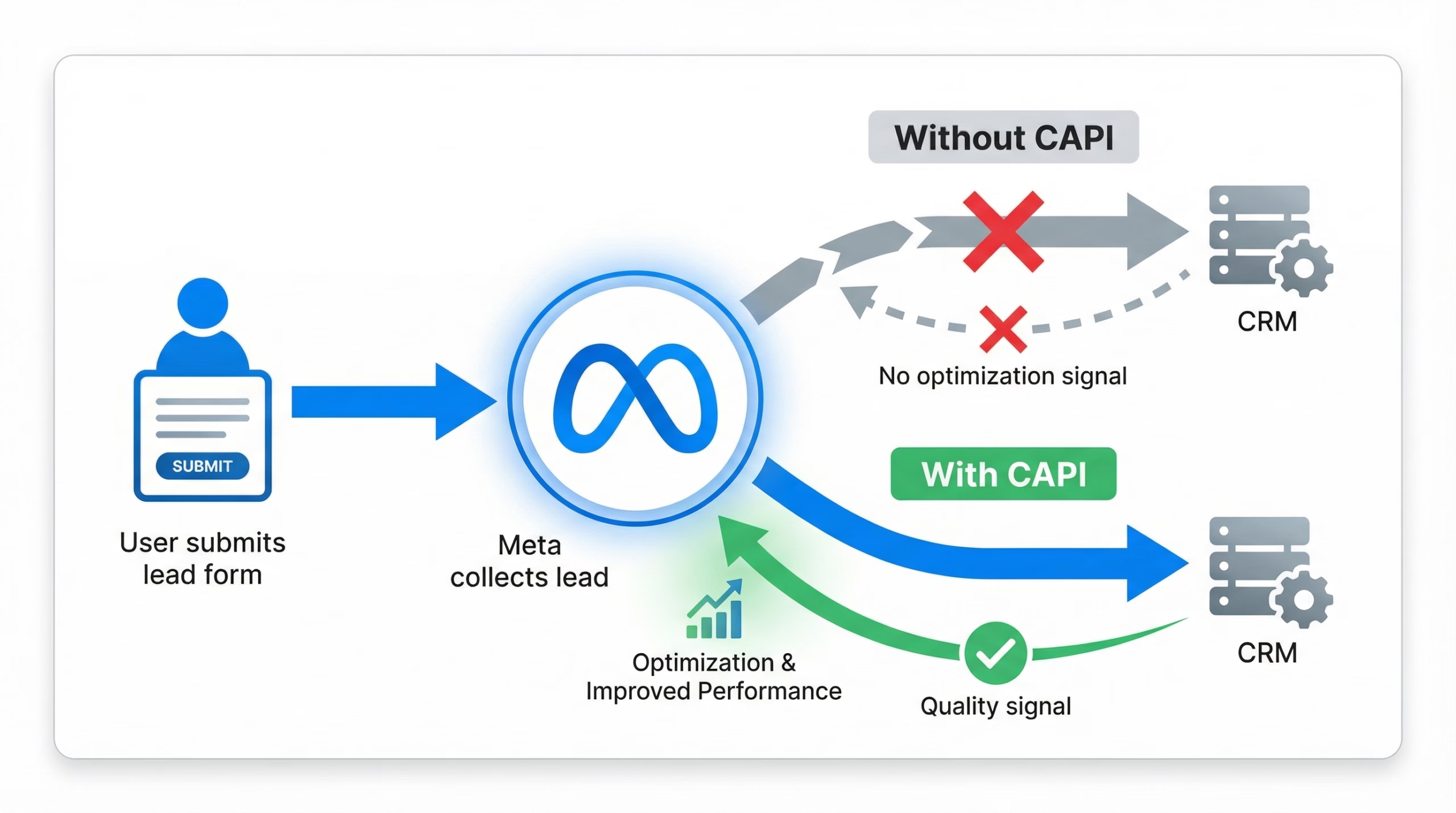
Think of it this way. Without CAPI, Meta is flying blind. It knows someone filled out your form, but it has no idea whether that person became a paying customer or ghosted your sales team. With CAPI, you are handing Meta the data it needs to tell those two people apart.
Why Does Lead Quality Matter More Than Lead Volume?
Every business running lead ads eventually hits the same wall. Cost per lead looks great on paper, but the sales team is burning hours chasing leads that go nowhere. The metric that actually matters, ROAS, stays invisible to the ad platform on lead-gen campaigns until you close the CAPI loop.
Here is what the maths looks like for a typical account:
- Without quality optimisation: 100 leads at $5 each is $500. If 5% convert, that is 5 customers at $100 acquisition cost each.
- With CAPI quality optimisation: 70 leads at $7 each is $490. If 15% convert, that is 10.5 customers at $47 acquisition cost each.
Fewer leads, lower cost per customer, and a sales team that is not burning out on dead-end calls.
Meta’s own published numbers back this up. Advertisers using Conversions API for CRM see a 19% lower cost per quality lead on average, rising to 21% on instant form campaigns using the Conversion Leads performance goal, alongside a 44% increase in the rate of converting a lead into a quality lead (Meta, 2026).
If your cost per lead is already the number you optimise against, it is worth reading what a good cost per lead actually looks like before you judge the change CAPI makes. Cost per lead usually goes up. Cost per customer is what should go down.
CAPI vs the Meta Pixel: What Is the Difference?
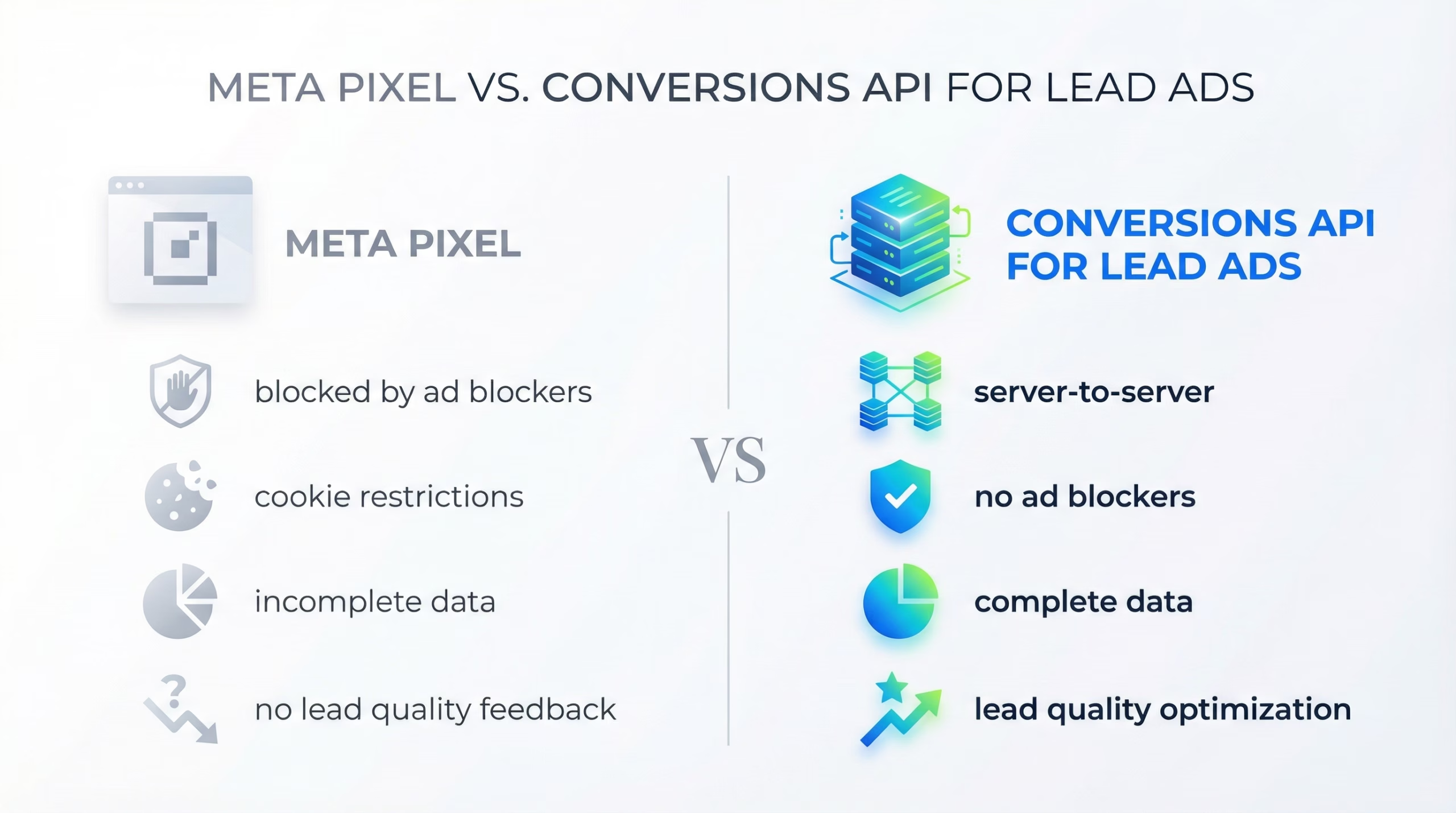
If you already run the Meta Pixel on your website, you might wonder why you need CAPI at all. The short answer: the Pixel tracks website behaviour, and it cannot see anything that happens after a lead enters your CRM.
| Meta Pixel | Conversions API (CAPI) | |
|---|---|---|
| Where it runs | User’s browser | Your server, or a tool like LeadSync |
| Ad blockers | Blocked for a large share of users | Unaffected |
| Cookie and iOS restrictions | Affected | Unaffected |
| What it can track | Page views and on-site actions | Any downstream data, including CRM status and sales outcomes |
| Lead quality signals | Cannot send them | Core purpose |
| Use for lead ads | Limited | Essential |
For lead ads the Pixel is close to useless for quality optimisation, because the conversion event, the form fill, happens inside Meta’s own platform rather than on your website. The value only appears after the lead reaches your CRM, and that is CAPI’s territory.
Meta still recommends running both together for website tracking, which it calls redundant event setup. The two are complements, not alternatives.
How Does the CAPI Lead Quality Feedback Loop Work?
The power of CAPI for lead ads is the loop it creates:
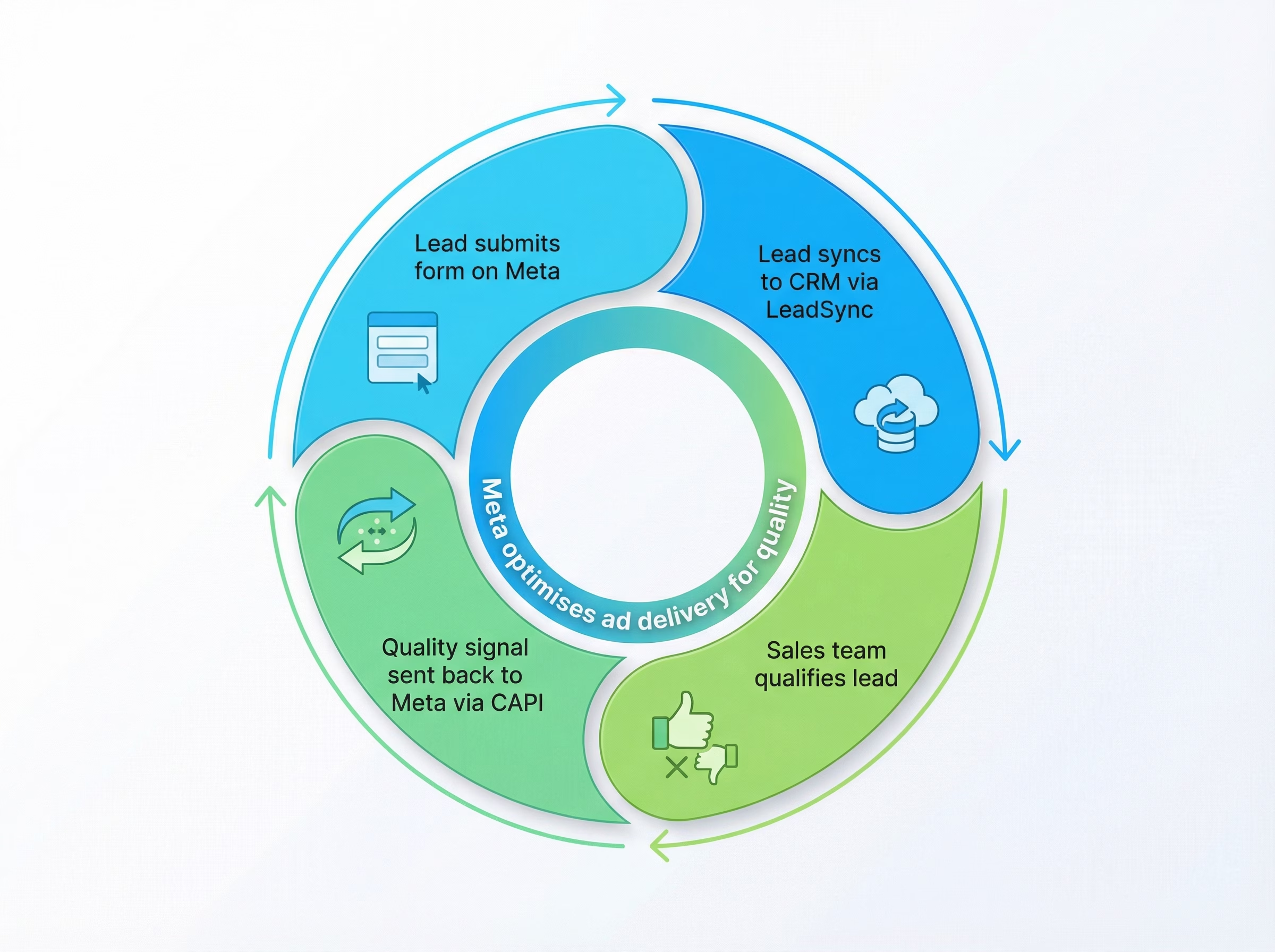
- A prospect fills out your lead form on Facebook or Instagram.
- LeadSync delivers the lead to your CRM in under 60 seconds, with all form fields intact.
- Your sales team works the lead and marks it qualified or unqualified in your CRM.
- LeadSync sends a quality event back to Meta via CAPI, telling the algorithm this was a good or bad lead.
- Meta’s algorithm learns and starts showing your ads to more people who match the profile of your qualified leads.
Over time the loop compounds. The more quality signals you send, the better Meta gets at finding people who are genuinely interested, rather than people who are merely willing to tap a form.
The loop only works if step 2 is fast and reliable. If leads sit in a queue for hours, your team marks them qualified late, the events arrive outside Meta’s attribution window, and the signal is wasted. This is why speed to lead matters for delivery as well as for closing.
What Is the Conversion Leads Performance Goal?
CAPI on its own sends data. The Conversion Leads performance goal is what makes Meta act on it.
To use it you need (Meta, 2026):
- A lead campaign with an instant form ad set. The goal is not compatible with website form campaigns.
- Conversion leads selected as the performance goal, paired with your CRM dataset.
- At least 200 leads per month, so the algorithm has enough events to learn from.
Once it is running, three new metrics appear in Ads Manager: conversion leads, cost per conversion lead, and conversion lead rate. Those are the numbers to judge the change on, not cost per lead.
The 200-leads-per-month floor is the one that catches people out. If you generate 40 leads a month, CAPI will still improve your reporting and your audience data, but you should not expect the delivery optimisation to move. Get volume up first, or accept that you are using CAPI for measurement rather than optimisation.
Which Events Should You Send Back to Meta?
Meta’s developer documentation asks you to send all stages of leads as they update, with a minimum of two stages including the initial raw lead, and three or more preferred (Meta for Developers).
The stages most lead-gen businesses use:
- Lead: the raw form fill, straight from Meta.
- Qualified: the lead met your basic criteria, such as correct contact details and inside your service area.
- Contacted: someone answered a call or replied to an email.
- Scheduled: the lead booked an appointment or consultation.
- Converted: the lead became a paying customer.
You do not need all five. Even a single “qualified lead” event gives Meta far more to work with than nothing. But two stages is the floor, because Meta needs both a positive and a baseline to compare against. Lead and Contact are Meta standard events; the other stages go by the names in your CRM, and our Facebook standard events reference lists all 17 standard events and when each one fits.
Deciding what counts as qualified is the genuinely hard part, and it is a business question rather than a technical one. Our guides to qualifying leads from Facebook lead ads and lead scoring walk through how to draw that line, including the scoring models themselves.
What Is Event Match Quality (EMQ) and Why Does It Decide Whether CAPI Works?
This is the part most CAPI guides skip, and it is the reason plenty of correctly-configured setups deliver nothing.
Event Match Quality is a score from 0 to 10 that Meta assigns to each of your events in Events Manager. It measures how confidently Meta can match the event you sent to a real Meta user profile. If Meta cannot work out who the event belongs to, the event is worthless no matter how correctly you formatted it.
Meta’s benchmark sits around 6 out of 10, and above 8 is considered excellent.
What moves the score:
- Hashed email address. The single largest lever, typically worth several points on its own.
- Hashed phone number. Close behind, and lead forms usually capture it.
- The Meta lead ID. For lead ads this is the strongest identifier of all, because it maps directly to a lead Meta already knows about. Meta’s documentation asks for the 15 to 17 digit lead ID stored against each lead in your CRM.
- Name, city, state, postcode and country. Small individual contributions that add up.
There is a catch worth knowing. If you send lead_id, Meta requires at least one additional valid customer parameter alongside it, or the event is rejected outright. A lead ID on its own will not do.
Setting up CAPI does not automatically give you a good EMQ. It is entirely determined by what you put in the payload. If your lead forms only collect a first name and a phone number, your ceiling is lower than someone collecting email and full address, and no amount of configuration changes that. This is a good reason to revisit what fields your lead form asks for.
You can read your EMQ per dataset in Events Manager, or ask for it through Meta’s Ads AI Connectors if you would rather query it from Claude or ChatGPT.
How Do You Set Up CAPI With LeadSync (No Developer Required)?
Traditionally, setting up the Conversions API meant a developer building a server-side integration against Meta’s API: authentication, event formatting, deduplication, error handling, retries.
LeadSync’s CAPI integration removes that:
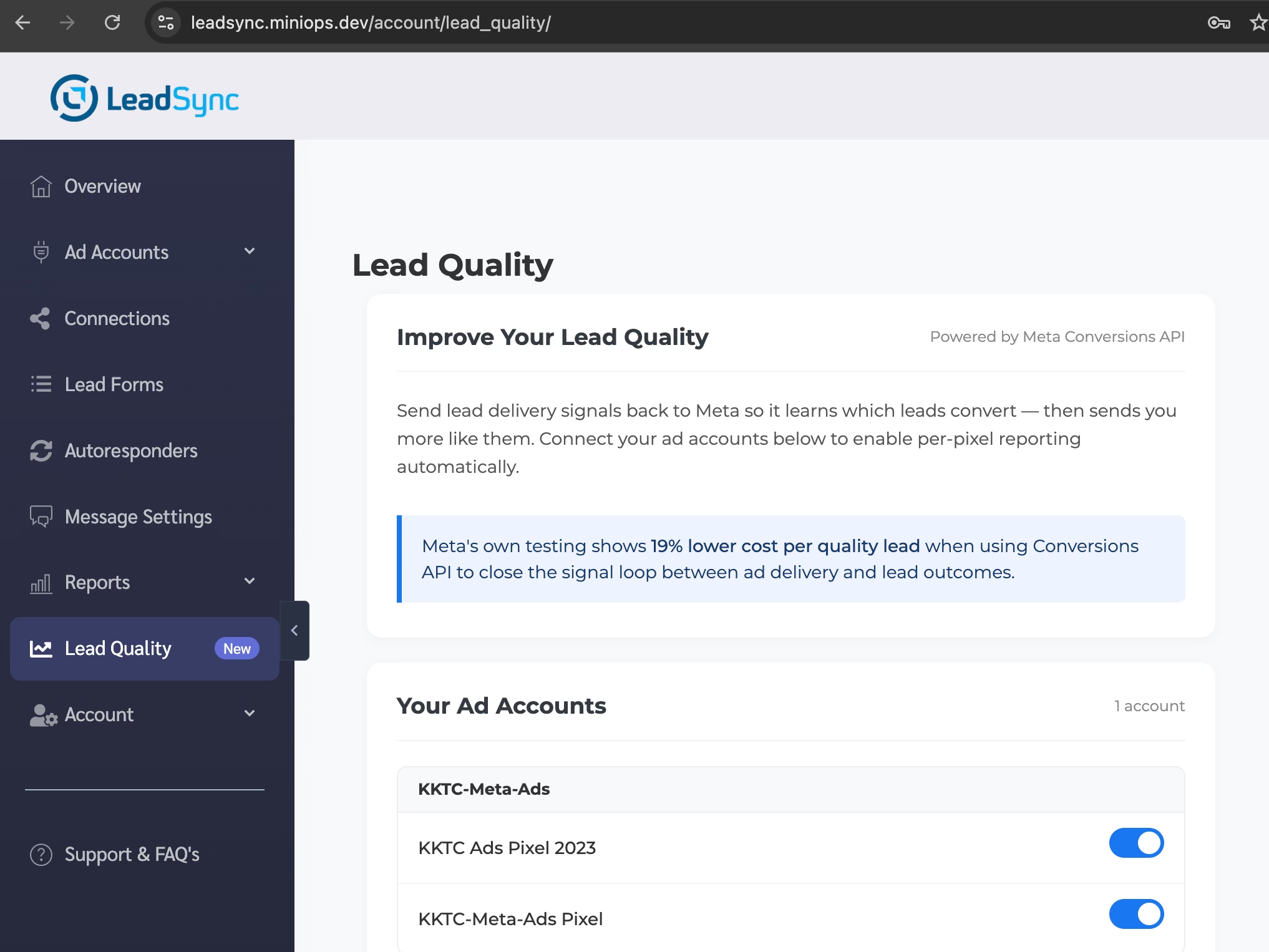
- Enable Lead Quality in your LeadSync account settings. It is a toggle.
- Connect your Meta dataset. LeadSync runs a pre-flight check before you go live, so a misconfigured pixel fails loudly at setup instead of silently three weeks later.
- Share your pixel with the LeadSync Business Manager. Meta requires the pixel owner to do this, and no partner can grant itself access. LeadSync shows you the exact request to approve.
- Map your quality signal. Tell LeadSync which CRM field or lead status marks a lead as qualified.
From then on, LeadSync sends the matching event to Meta whenever a lead changes status. Deduplication is handled with a stable event ID per lead, so re-sends do not double-count against you.
Step 3 is the one people get stuck on, and it is worth being clear about why. Meta deliberately makes pixel sharing a customer-side action. It is the one step no integration can automate away.
What Are Sequenced Events and Preferred Lead Answers?
Meta is currently testing two new lead quality controls that build directly on the CAPI feedback loop, first spotted in August 2026 (Jon Loomer, 2026).
Sequenced events let you define an order that events must occur in for the ad to get credit. It applies to lead campaigns using the instant forms conversion location with the “maximise number of qualified leads” performance goal. Rather than crediting the ad for any qualifying event, Meta credits it only when both events fire in the sequence you specified. In practice this is a stricter definition of a good lead: not just “this person eventually booked”, but “this person qualified and then booked, in that order”.
Preferred lead answers works inside the form itself. On multiple-choice questions, you tick the answers that indicate a good lead, and Meta learns from whether people give those answers. It is a quality signal that fires at form-fill time, before your CRM has seen the lead at all.
Both are in test as of August 2026 and rollout is uneven, so check whether they have appeared in your account rather than assuming. Neither replaces CAPI. They give Meta additional in-platform signals to combine with the downstream truth that only your CRM has, and the accounts that will benefit most are the ones already sending clean CAPI events.
Does CAPI Work With Google Ads, TikTok and LinkedIn?
No, and this trips people up because the concept is universal while the implementations are not.
The Conversions API is Meta-specific, covering Facebook and Instagram. Every major platform has its own version of the same idea:
| Platform | Equivalent | Notes |
|---|---|---|
| Meta | Conversions API (CAPI) | Covers Facebook and Instagram |
| Google Ads | Enhanced Conversions and offline conversion imports | Two separate mechanisms depending on the source |
| TikTok | Events API | Similar server-side model |
| Conversions API | Same name, entirely different integration |
Each needs its own setup, its own credentials and its own event mapping. There is no shared standard. LeadSync currently supports Meta CAPI, and syncs leads from Google, TikTok and LinkedIn lead forms into your CRM regardless of platform.
Who Should Use CAPI for Lead Ads?
CAPI is most valuable if you:
- Get a lot of low-quality leads: fake emails, wrong numbers, no-shows.
- Generate at least 200 leads per month: below Meta’s threshold, the optimisation will not have data to learn from.
- Have someone working leads: the loop needs a human marking leads good or bad, whether that is a sales team or you.
- Run lead ads for clients: agencies can demonstrate measurable quality improvement rather than arguing about it.
- Operate in high-value niches: real estate, automotive, home services, financial services, anywhere a single customer is worth many leads.
It is worth less if you are running small budgets, have no CRM, or have no process for marking lead outcomes. CAPI is a feedback mechanism, and feedback requires someone to give it.
What Results Should You Expect?
CAPI is not instant. Meta’s algorithm needs events to learn from:
- Weeks 1 to 2: you are feeding initial signals. Meta is learning. Lead quality will not change noticeably yet.
- Weeks 3 to 4: delivery starts adjusting. Expect fewer obvious junk leads.
- Month 2 onward: full optimisation. Meta’s benchmarks put the average at 19% lower cost per quality lead by this stage.
Consistency matters more than volume here. Send events for every lead, good and bad, so Meta gets the complete picture rather than a highlight reel. An account that only reports its wins teaches the algorithm nothing about what to avoid.
Common CAPI Problems and How to Fix Them
No events arriving at all. Nine times out of ten this is pixel sharing. Meta requires the dataset owner to share it with the sending partner’s Business Manager, and that permission can lapse silently if Business Manager settings change. Check Events Manager for recent server events before debugging anything else.
Error #270. The access token being used lacks ads_management access for that ad account. Despite the wording, this is a per-token problem rather than a platform-wide one. It usually means a manually pasted token came from a user who is not an admin of the ad account.
Error #100, missing permission. The sending system can no longer see your pixel. Almost always a share that lapsed rather than a token that expired, so reconnecting the account will not fix it. The pixel needs re-sharing.
Events arriving but EMQ is low. Your payload is thin. Check you are sending the lead ID plus at least one hashed customer parameter, and prioritise email and phone.
Events arriving, EMQ fine, but delivery unchanged. Check your monthly lead volume against the 200 floor, and confirm the ad set actually uses the Conversion Leads performance goal. Sending events without selecting the goal means Meta stores the data but does not optimise against it.
Leads not reaching your CRM in the first place. Nothing downstream works if the sync is broken. See why Facebook leads stop syncing for the usual causes.
Frequently Asked Questions
What does CAPI stand for?
CAPI stands for Conversions API. It is Meta’s server-to-server API for sending conversion and lead quality data directly from your systems to Meta, without going through the user’s browser.
Do I need a developer to set up CAPI?
Not if you use a tool like LeadSync, where it is a toggle plus a pixel-sharing approval and takes about 5 minutes. Building a custom integration directly against Meta’s API does require a developer to handle authentication, event formatting, deduplication and error handling.
Does CAPI replace the Meta Pixel?
No. Meta recommends running both together for website tracking, which it calls redundant event setup. For lead ads specifically, CAPI handles the quality feedback that the Pixel structurally cannot, because the form fill happens inside Meta rather than on your site.
How many leads do I need before CAPI makes a difference?
Meta specifies at least 200 leads per month for the Conversion Leads performance goal. Below that, the algorithm does not get enough signal to learn from and you are unlikely to see the quality improvement.
Is CAPI free?
The Conversions API itself is free from Meta. You only pay for a way to send the data, either a developer building a custom server-side integration or a tool like LeadSync that handles it for you.
What is a good EMQ score?
Event Match Quality is scored 0 to 10 in Meta Events Manager. Meta’s benchmark sits around 6, and anything above 8 is considered excellent. Adding a hashed email address to your events is the single biggest lever, typically worth up to 4 points.
Does CAPI work with Google Ads, TikTok and LinkedIn?
The Conversions API is Meta-specific, covering Facebook and Instagram. The equivalents are TikTok Events API, Google Enhanced Conversions and offline conversion imports, and LinkedIn Conversions API. They are separate integrations with separate setup, not one shared standard.
What is the difference between CAPI and a CRM integration?
A CRM integration sends leads from Meta into your CRM. CAPI sends quality data from your CRM back to Meta. They run in opposite directions and you need both for the feedback loop to close. LeadSync does both: it syncs leads to your CRM in real time, and sends quality events back to Meta via CAPI.
Why is my CAPI showing errors or no events?
The most common cause is pixel sharing. Meta requires you, the pixel owner, to share your dataset with your partner’s Business Manager, and a partner cannot grant itself that access. Error #270 usually means a token lacks ads_management access, and error #100 usually means the sending system can no longer see your pixel.
Can I check CAPI signal health from AI tools like Claude or ChatGPT?
Yes. Meta’s Ads AI Connectors and MCP server support signal diagnostics, so you can ask Claude or ChatGPT to surface event match quality, deduplication issues and signal coverage gaps without leaving the chat.
Start Improving Your Lead Quality Today
If you are tired of paying for junk leads, LeadSync’s CAPI integration is the fastest way to start sending quality signals back to Meta. No developer, no server to maintain.
Still deciding which tool to use? We compared the options in real-time Meta lead sync tools, and if you have not picked a CRM yet, start with the best CRMs for Facebook leads.
Start your free 7-day trial and enable Lead Quality in your dashboard. No credit card required. Most accounts see measurable quality improvement within 3 to 4 weeks.
Already using LeadSync? Sign in and enable it from your integration settings.