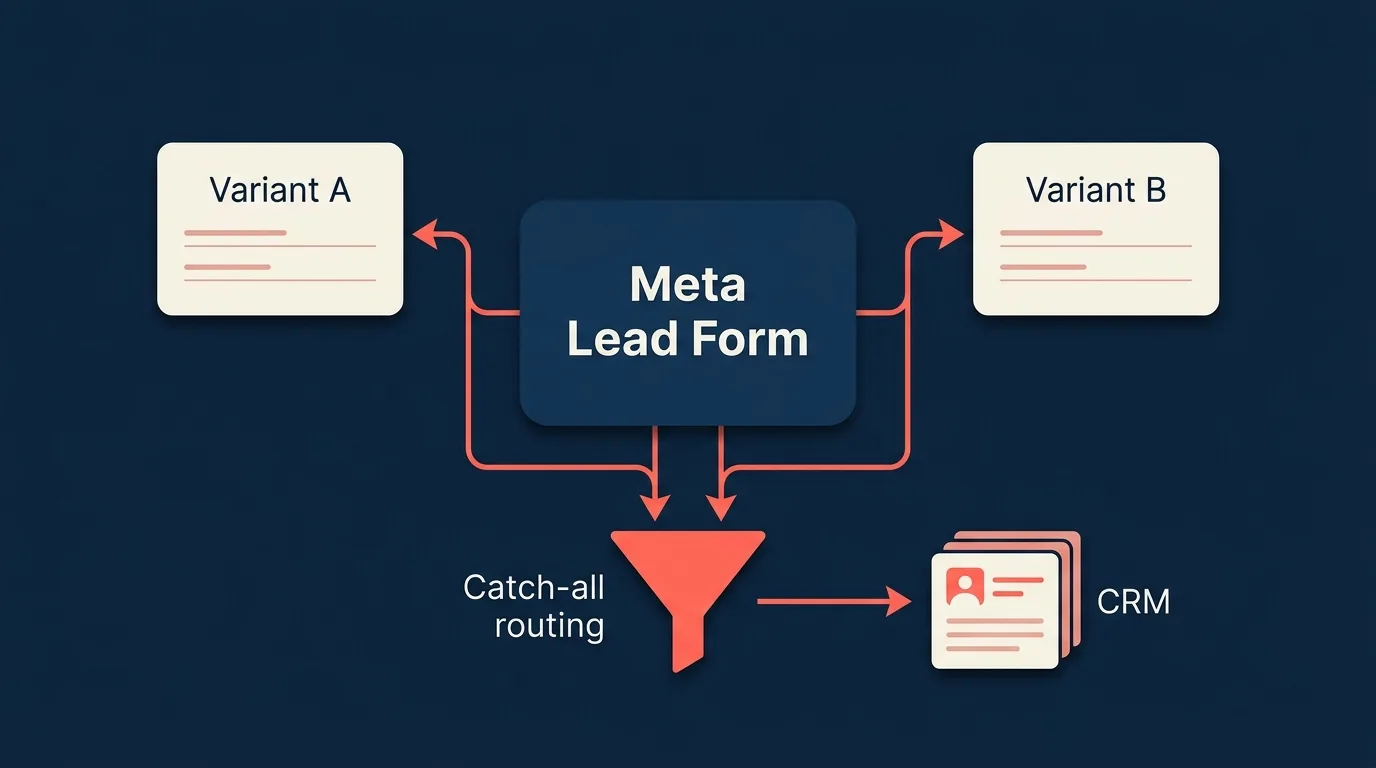
Meta has shipped a Form testing feature inside Ads Manager that lets advertisers compare 2 to 5 lead forms head to head. The button sits at the ad level. Click it, set the budget split, pick a metric, choose forms to compare, and Meta creates the test ads for you. Hidden behind that helpful button: each test ad is a copy of the original with a new form, and every new form gets a new form_id. Most CRM integrations route leads by form_id. Run a Meta form test without preparing for it, and the leads from your variants quietly fall on the floor.
This guide covers how to use Meta’s Form testing feature without breaking your lead flow, what’s worth testing inside it, and how to keep every lead routed correctly when form IDs change underneath you. Campaign-level A/B testing (creatives, audiences, copy) is covered further down.
Key takeaways
- Meta’s new Form testing feature (in Ads Manager) lets you compare 2 to 5 lead forms head to head, with budget split and a primary metric you choose.
- Each test ad is a copy of the original with its own form, and every form has its own
form_id.- CRM integrations mapped by form ID alone, including most Zapier zaps and native CRM hookups, will silently miss leads from the variants.
- The cleanest defence is a Page-level catch-all rule that routes any unmapped form to a default destination, regardless of how many variants Meta spins up.
- Treat a form test like any controlled experiment: one variable, at least 100 conversions per variant, at least 7 days, at least 95% confidence on the primary metric.
What “Split Testing a Meta Lead Form” Actually Means
There are now three different things you might mean by “A/B testing” in the Meta ecosystem, and most articles still conflate them.
Campaign-level A/B Test is the longstanding Ads Manager feature. It compares two ads, ad sets, or campaigns and varies one factor: creative, audience, placement, or delivery method. It’s well documented and well instrumented. The lead form is not one of the variables you can choose.
Form testing is the newer, much narrower feature that’s the focus of this post. It lives inside an individual ad’s settings, not at the campaign level. It compares 2 to 5 lead forms head to head, automatically copies the ad once per variant, splits your daily budget across the copies, and reports performance against the metric you pick (cost per lead by default). Meta does the variant ad creation for you, which is the whole point.
Manual split testing is the historical workaround that still works. You duplicate forms by hand from the Forms Library, run them across parallel ad sets you control, allocate budget yourself, and read the numbers yourself. Useful when you want more control over rollout than the Form testing UI offers, or when you want to test something the UI doesn’t cover (like variants of the thank-you screen across different ad sets).
Every Instant Form Meta creates has a unique form_id. Whether Meta duplicates a form for you inside the Form testing flow or you duplicate one yourself, the duplicate gets a fresh form_id. This matters more than it sounds, because most CRM integrations route leads by form_id. We come back to this in The Hidden Cost of Form Variants.
What’s Worth Split Testing on a Meta Lead Form
Not all form variables move the needle. Here are the ones worth your time, with the hypothesis worth testing and the primary metric to read.
| Variable | Hypothesis | Primary metric |
|---|---|---|
| Form length (short vs long) | Shorter forms increase completion rate but may lower lead quality. | Completion rate, then downstream conversion rate. |
| Single-step vs multi-step | Multi-step forms feel lighter on mobile and lift completion. | Completion rate. |
| Intro screen (on / off) | An intro screen filters tyre-kickers but adds a click. | Submissions per dollar (CPL). |
| Custom qualifying questions | One extra question filters intent without killing volume. | Downstream qualified-lead rate. |
| Conditional logic | Branching by answer reduces irrelevant fields and lifts completion. See conditional answers. | Completion rate. |
| Privacy disclaimer wording | Plain-language disclaimers reduce abandonment vs legalese. | Completion rate. |
| Thank-you screen | A call to action on the thank-you screen lifts secondary actions (call, download). | Secondary-action rate. |
| Prefill confirmation | Requiring users to confirm prefilled fields reduces low-intent leads. | Downstream qualified-lead rate. |
If you’re starting from zero, test form length first. It has the largest measured effect on completion rate in practice, and the result usually transfers across products. Save qualifying-question tests for later: they’re high leverage for lead quality, but you need real volume to read them confidently. Single-step vs multi-step is the other one worth running early, especially if your form has more than five fields, because the multi-step pattern often lifts mobile completion materially. For background on the pattern itself, see our guide to multi-step lead forms.
How to Run a Meta Form Test (Using the New Ads Manager Feature)
The Form testing feature lives at the ad level inside Ads Manager. Open an existing lead ad, scroll past the form generator options, and you’ll see a “Form testing” section with a “Set up test” button.
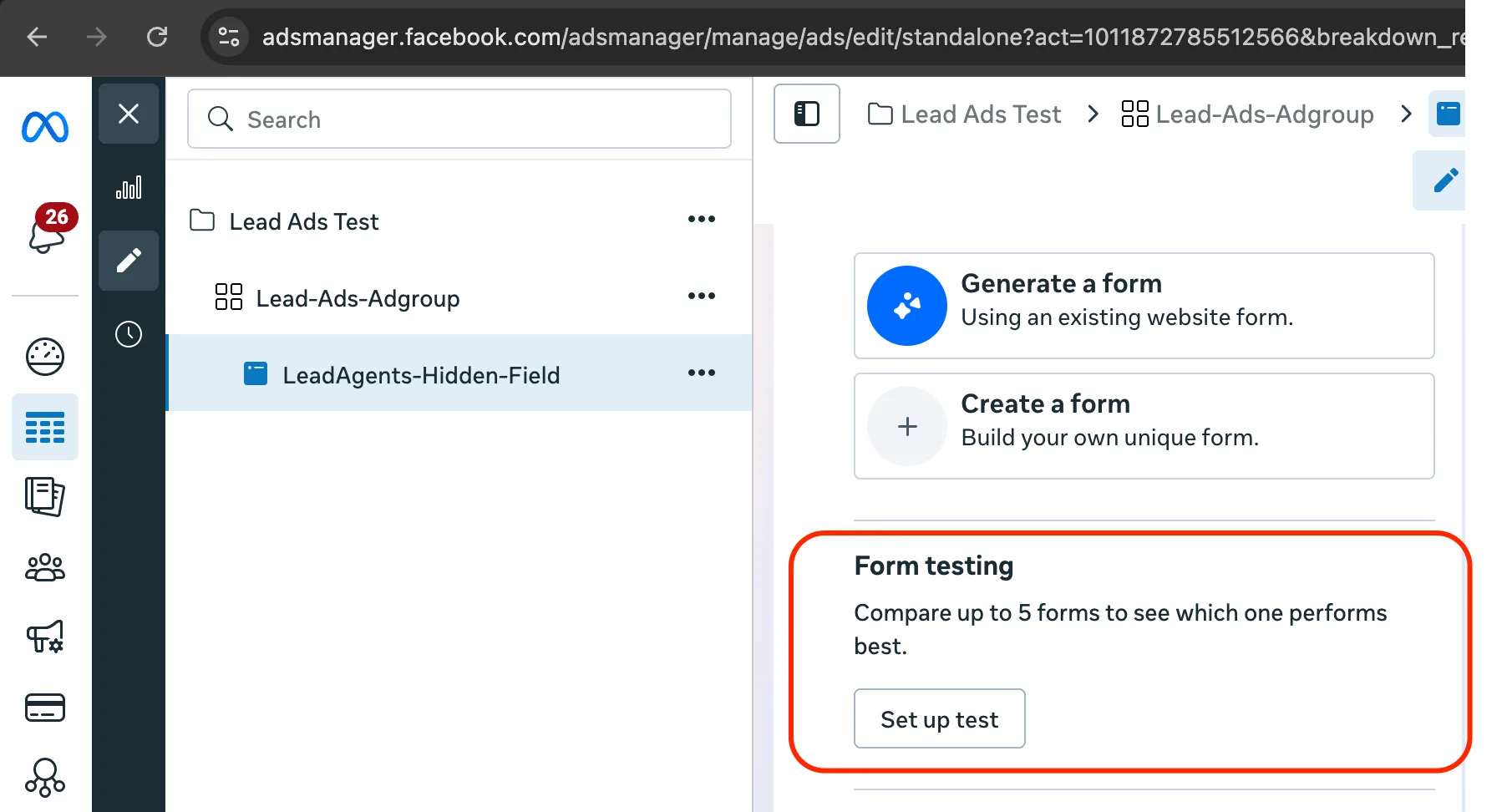
Click it and Meta opens a single modal that handles the whole test setup.
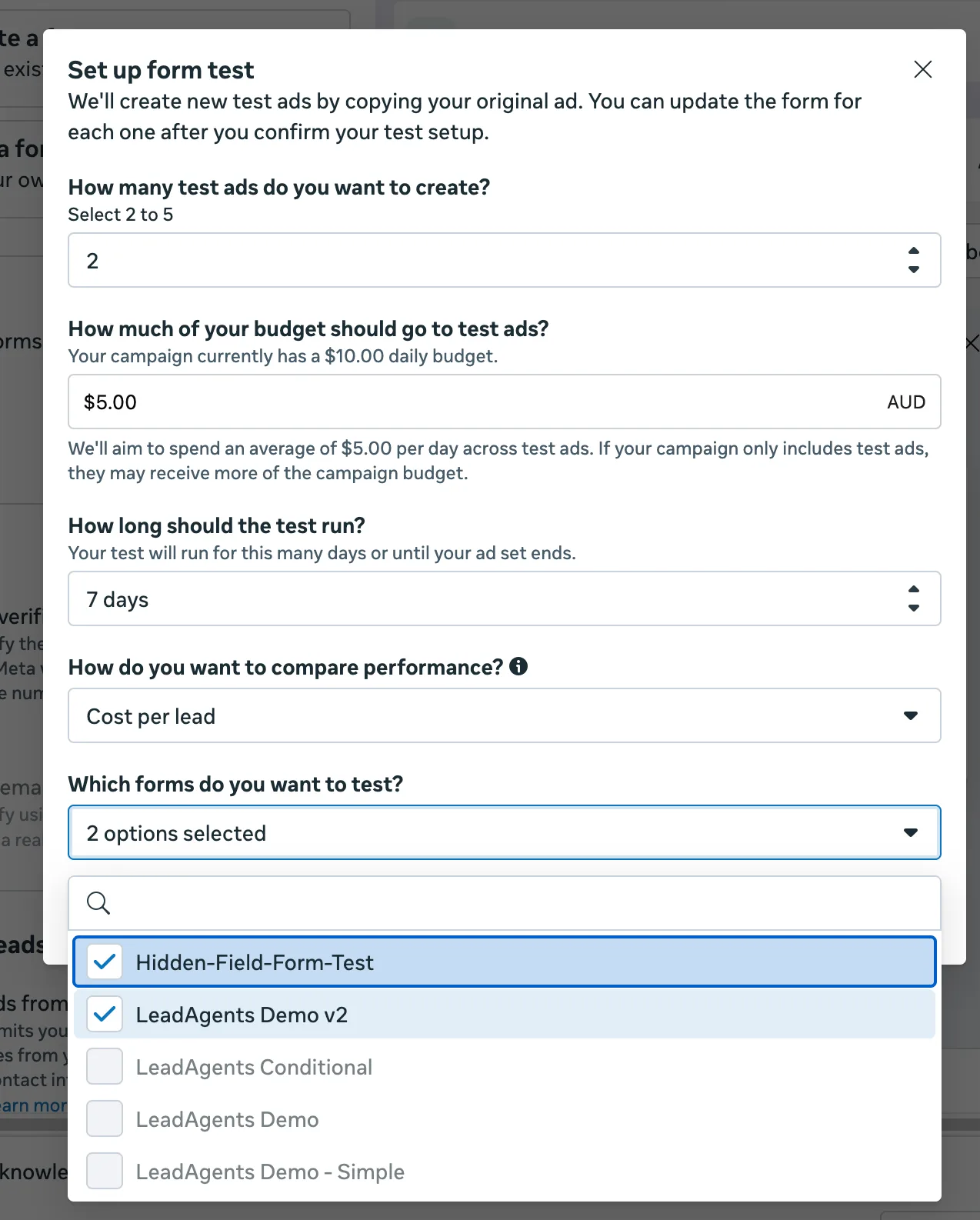
Here’s what each option does, and what we recommend:
- How many test ads do you want to create? Range is 2 to 5. Default is 2. For early reads, keep it to 2 or 3. More variants means thinner sample per variant, which means longer runtime to call the test, which means more spend before you have a decision.
- How much of your budget should go to test ads? The default suggestion is a small slice of your existing daily budget. Bump it up if you want a faster read, but keep enough on the control to maintain campaign performance while the test runs.
- How long should the test run? Default is 7 days. Treat that as a floor, not a target. Run longer if you haven’t hit 100 conversions per variant by day 7.
- How do you want to compare performance? Defaults to cost per lead. That’s fine as a primary, but pair it with quality signals from your CRM after the test ends. A variant can win on CPL and lose on closed-won.
- Which forms do you want to test? Pick the forms you want included. This is where you tell Meta which variants to allocate budget against.
Click Confirm and Meta builds the test ads automatically. Each is a copy of the original ad with one of the forms you selected.
There’s one thing you need to do before you click Confirm: prepare your CRM integration for the new forms. Each variant will have its own form_id. If your integration only knows about your original form, the variants will look like volume that just never arrived. See the next section.
It’s also worth sending a fake lead through each variant form using Meta’s lead testing tool before the test goes live, just to confirm your routing actually works end to end on each form.
The Hidden Cost of Form Variants
Most articles on Meta form testing stop at “test these variables.” Here’s the part they skip.
Meta’s own modal copy is explicit about what happens when you set up a Form test:
We’ll create new test ads by copying your original ad. You can update the form for each one after you confirm your test setup.
Read that one more time. New test ads. Copy of the original. New form for each one. That means every variant has its own form_id. Meta’s webhook subscription sits one layer up: a single subscription on the Facebook Page covers every form on that Page, and each lead payload carries the form_id it came from. The webhook fires for the variants. The break is one layer down, inside your CRM integration’s routing rules, which usually match by form_id. The variant’s payload arrives with an unknown form ID, no rule matches, and the lead lands in the integration with nowhere to go. Your original form keeps working perfectly. The variants quietly disappear.
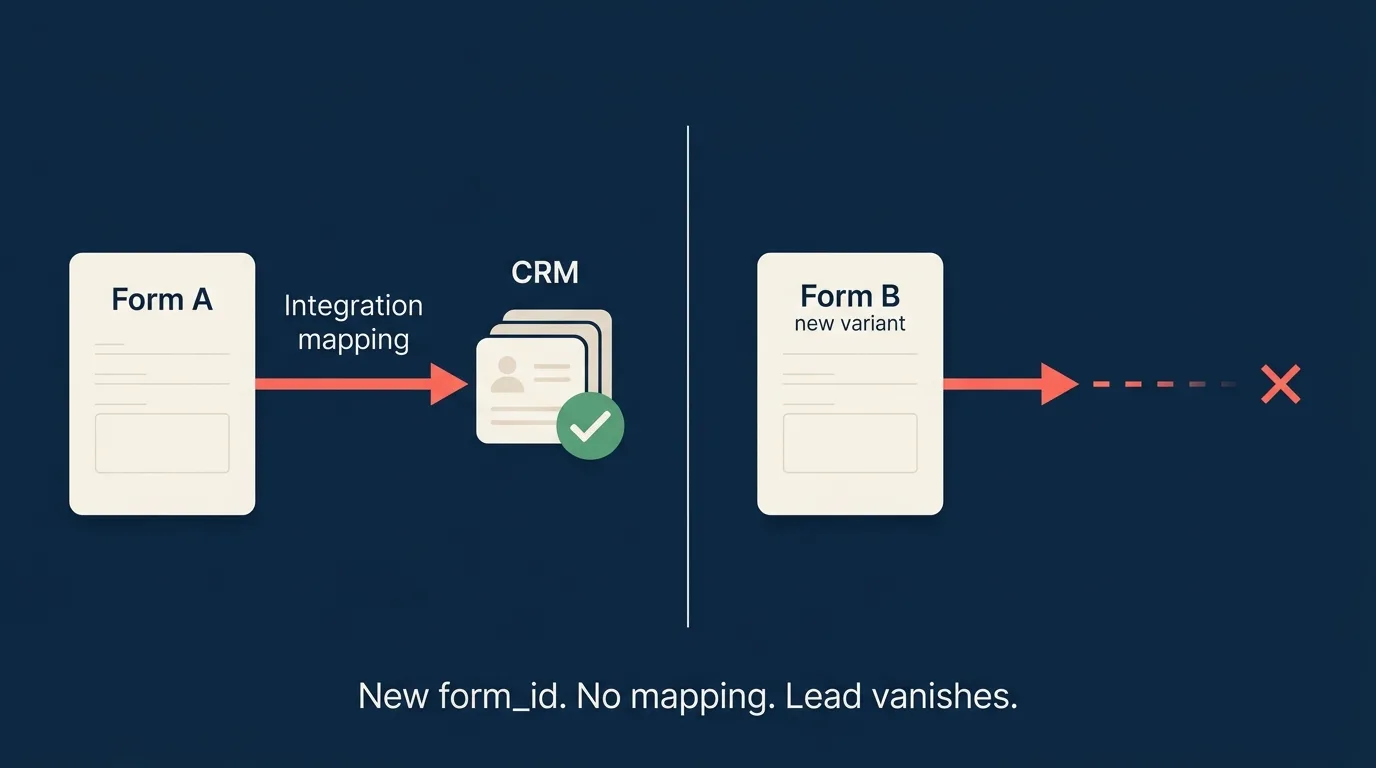
This is the single most common cause of “my Facebook lead ads stopped sending leads” support tickets. Not a broken integration, not a permissions issue: a new form_id, never mapped. The advertiser sees lead volume on one variant and nothing on the other, and concludes the variant is just under-performing. It might be. More often, the variant is fine, the leads just aren’t reaching the destination.
Meta’s new Form testing flow multiplies the surface area for this bug. Before, you had to know about A/B testing and go duplicate forms yourself, which limited the blast radius to advertisers who already understood form IDs. Now there’s a one-click button that creates up to five new forms automatically. The advertiser who clicks it has no reason to know they just orphaned four lead destinations.
The same thing can happen without a split test. We’ve seen support tickets where a form that’s been working for months suddenly starts routing under a different form_id, usually after a Business Manager edit. Meta doesn’t document the behaviour, so the safe operating assumption is that any form ID you map could become an orphan tomorrow.
How LeadSync Handles It (Two Layers)
LeadSync defends against this in two layers. Both run automatically when a webhook arrives carrying an unrecognised form_id.
Layer 1: variation auto-mapping. When a webhook arrives for a form LeadSync hasn’t seen before, the system pulls the ad creative from Meta and looks for sibling form IDs in the same Advantage+ asset feed. Advantage+ is Meta’s term for placing multiple creative variants (including form variants) inside a single asset bundle that Meta can rotate. If exactly one of those siblings is already mapped to a LeadSync list, we auto-create a new list entry for the variant, inheriting the destination and field mapping from the parent. The variant’s leads then route through normally.
This is the cleanest path when it works. The catch is that it only works when Meta exposes the sibling relationship via the Advantage+ asset feed structure. Meta’s new ad-level Form testing flow may or may not surface variants that way (the implementation detail is on Meta’s side and outside our control). Auto-mapping handles the cases where Meta plays ball; we need a floor for the cases where it doesn’t.
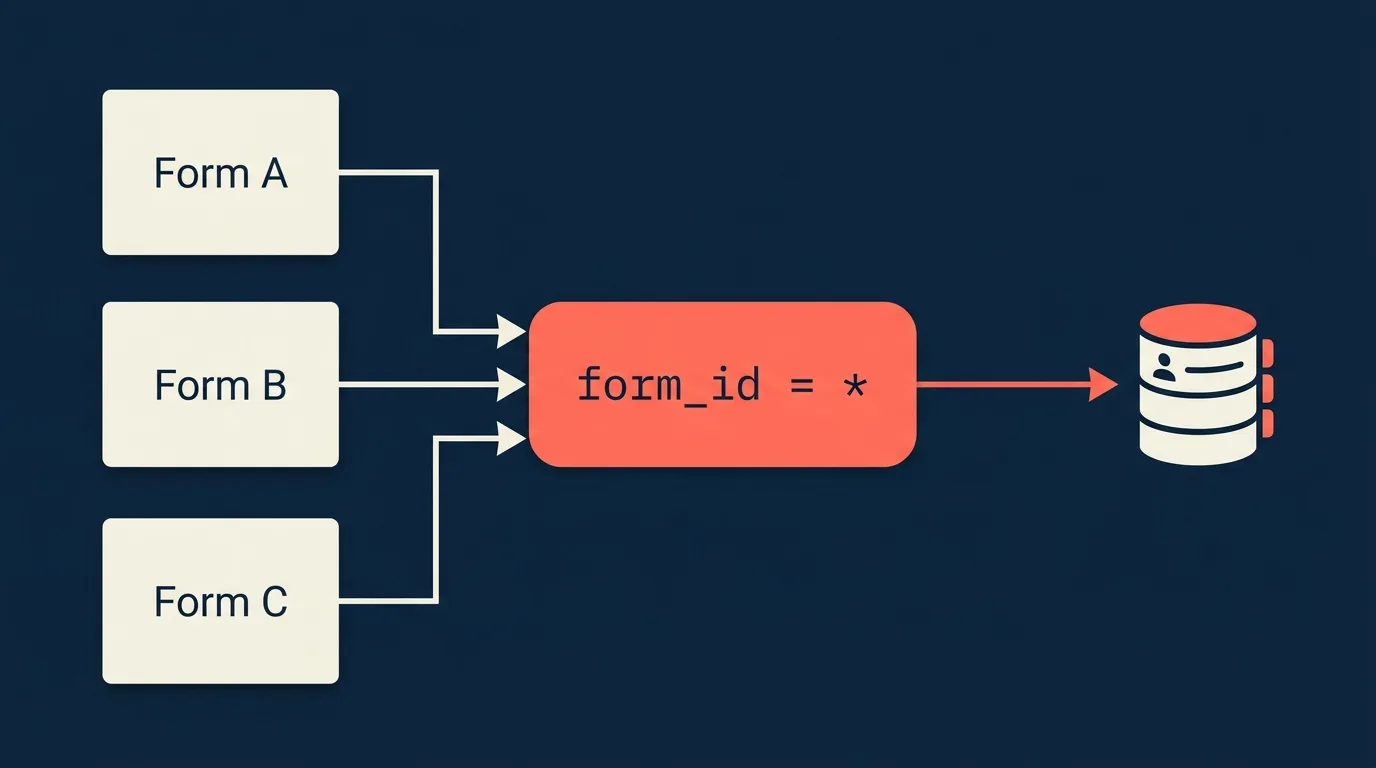
Layer 2: Page-level catch-all. A single mapping per Facebook Page where form_id is set to wildcard. Any lead from any form on that Page, including forms that don’t exist yet, falls through to the catch-all’s destination and field mapping when no specific mapping exists. In the LeadSync form dropdown, this is labelled “All forms on this page (catch-all)”.
A few practical notes on catch-all:
- The catch-all only fires for forms that aren’t specifically mapped. If you’ve already wired Form A to one destination, that specific mapping wins. The catch-all picks up everything else.
- The field mapping on the catch-all rule needs to handle any field that might appear on any of your forms. A safe default is
email,full_name,phone_number, and a free-form note field if your destination supports one. - Catch-all is also the cleanest defence against silent form re-IDs from Meta, because it removes form ID from the routing decision entirely.
If your integration tool doesn’t offer catch-all routing (most don’t, as of 2026), the workaround is to map every new form variant manually in your CRM integration before you push the ad live. It’s tedious, especially with the Form testing feature creating up to 5 variants at once, but it’s the equivalent operation. For more on the integration layer in general, see our complete integration guide.
How to Measure a Meta Lead Form Split Test
The primary metric for a form test is completion rate: form opens divided by form submissions. It isolates the thing you actually changed (the form), as opposed to the ad that drove people to the form.
Secondary metrics:
- Cost per lead (CPL). Meta’s Form testing UI defaults the comparison to this metric. It tells you whether the completion-rate lift is worth the trade-off, against a baseline. See Facebook lead ads cost per lead for benchmarks.
- Downstream conversion rate. A shorter form might double your completion rate and halve your qualified-lead rate. If your sales team can tag a lead’s downstream outcome (booked call, demo’d, paid), this is the metric that actually pays the bills.
The metric that’s easy to reach for but doesn’t tell you anything about the form is click-through rate (CTR). CTR is an ad-level signal. It measures the ad’s pull, not the form’s performance. If your variants share the same ad creative (and inside Meta’s Form testing flow they do, by design), CTR shouldn’t differ between them. If it does, your randomisation broke.
A rule of thumb on significance: at least 100 conversions per variant, at least 7 days of runtime, at least 95% confidence on the primary metric. The 100 conversion floor isn’t statistical, it’s a practical floor below which day-of-week effects and audience-mix noise swamp the signal. The 7-day floor is the same idea, in time rather than volume. Meta’s default 7-day duration is exactly that floor, not a target.
What About A/B Testing the Ad Itself, Not the Form?
Form testing only compares forms. Everything upstream of the tap, the creative, the copy, the audience, is held constant by design. That is what makes the result readable, but it also means a form test can never tell you whether the ad was the problem.
Those tests run separately, in Meta’s own A/B test tool at campaign level. The variables worth isolating, roughly in order of how much they usually move CPL:
- Creative. Imagery and format shift performance more than anything else in most lead-gen accounts. Test one clear hypothesis at a time, such as people-led imagery against product-led, rather than swapping five things and learning nothing. Use the right dimensions for each placement: see the lead ad sizes and formats guide.
- Audience. Advantage+ against a manual saved audience is the single most common test, and the one most likely to surprise you. Our targeting guide covers what is still manually targetable in 2026.
- Ad copy and CTA. Primary text length and CTA button wording (“Learn More” against “Get Quote”) are cheap to test and occasionally worth several points of click-through.
- Timing and frequency. Worth testing only once the first three are settled, and only at volume. Below a few hundred conversions a week this is noise.
Two rules carry over from form testing and are worth repeating, because they are where most ad tests go wrong. Change one variable per test, or you cannot attribute the result. And judge on cost per qualified lead rather than CPL, or you will systematically pick the variant that attracts the cheapest, least serious respondents. Closing that loop is what CAPI is for.
Common Mistakes When Split Testing Meta Lead Forms
The mistakes that show up most often in practice, in rough order of damage done:
- Changing more than one variable at once. You can’t attribute the result. If you change form length and the intro screen, you don’t know which one moved the metric. Run them sequentially, or run a proper multivariate, but don’t pretend you ran a clean A/B if you didn’t.
- Stopping the test early on a hunch. Early variance is enormous. The variant that’s “obviously winning” on day two is often a coin-flip away from losing on day seven. Pre-commit to the sample size and run time, and don’t move the goalposts.
- Forgetting to map new form variants before going live. The leaky-variant problem from earlier. If you can use catch-all routing, do. If you can’t, build the mapping first, push the ad second. With Meta’s new Form testing flow this matters more than ever, because one click creates up to 5 unmapped forms.
- Comparing variants that ran against different audiences. If you ran the variants as separate ad sets with different targeting (a manual split test gone wrong), you have an audience test wearing the costume of a form test. Match the targeting on both ad sets, or use Meta’s built-in Form testing flow which holds targeting constant for you.
- Treating a form test as one-and-done. A winning form variant is the new control. Test against it again. Form-level lifts compound: a 10% lift in completion rate, sustained over a year, dwarfs almost any single creative win.
The cleanest split tests are the ones where the operator decided what they were testing, what they were measuring, and what they’d do with each possible result before the test went live. Everything else is interpretation.
Frequently Asked Questions
Does Meta have a native A/B test feature for lead forms?
Yes. Meta’s Form testing feature in Ads Manager, accessed at the ad level, lets you compare 2 to 5 lead forms head to head. The system creates copies of your ad (one per form), splits the budget across them, and reports performance over a window you set (default 7 days). Each variant ad has its own form, and every form has its own form_id.
Can I duplicate a Facebook lead form to split test it?
Yes, either through Meta’s Form testing feature (which does the duplication for you) or by hand from the Forms Library. Either way, each new form gets a new form_id, so update your CRM mapping or set up a catch-all routing rule before you run ads against it.
How long should a Meta lead form split test run?
Long enough to collect at least 100 conversions per variant with at least 7 days of runtime. Both thresholds matter because day-of-week effects can swamp small samples. Meta’s Form testing UI defaults to 7 days, which is a floor, not a target.
Why did my new lead form variant stop sending leads to my CRM?
Almost always because the variant has a new form_id that was never mapped in the integration. The original form keeps routing fine, the variant silently fails. A catch-all routing rule, one mapping per Facebook Page, prevents this entirely.
What should I split test first on a Meta lead form?
Form length and the intro screen. They have the largest measured effect on completion rate. Custom qualifying questions are higher leverage for lead quality but harder to read at low volume.
Can I use Meta’s A/B Test tool to test lead forms?
Sort of. Meta has two distinct testing features. The classic A/B Test tool (campaign level) tests creative, audience, placement, and delivery, not the form. The newer Form testing feature (ad level) tests 2 to 5 lead forms head to head and is the one you want for form-level comparisons.
How do I avoid losing leads when running a form split test?
Map every variant’s form_id in your integration before the test goes live, or configure a Page-level catch-all rule that routes any unmapped form to a default destination. LeadSync’s variation auto-mapper also handles this automatically when Meta exposes the sibling relationship via Advantage+ asset feeds.