A Special Ad Category is a label Meta requires on any campaign that promotes housing, employment, financial products and services, or social issues, elections or politics. Declare one of the first three and Ads Manager strips out the targeting that could be used to discriminate: age, gender, postcode, lookalikes and most demographic options. Declare the fourth and you need to verify your identity before the ads run.
This guide was rewritten in October 2026. The version we published in February 2025 still described a Credit category, and Meta retired that category months before. Everything below is checked against Meta’s Business Help Centre and its Marketing API documentation as of this month.
What is a Special Ad Category on Facebook?
It is a campaign-level setting in Meta Ads Manager. Every campaign has to answer the question, and most answer “no”. If your ads promote a job, a home, a loan, an insurance policy or a political cause, the answer is “yes”, and you pick which category applies.
The categories exist because of lawsuits. In March 2019, Facebook settled discrimination claims brought by the National Fair Housing Alliance, the ACLU and others over housing, job and credit ads that could be shown only to men, only to younger users, or only to certain postcodes. The categories became mandatory for US advertisers on 4 December 2019. A 2022 settlement with the US Department of Justice went further and led Meta to build a delivery system that checks who actually sees housing ads, not just who was targeted (Meta, 2023).
The rules are not optional and they are not only about your audience settings. Meta’s Advertising Standards prohibit discriminatory ads from every advertiser, everywhere. The category is how Meta enforces that for the four areas where the law is most specific.
What are the four Special Ad Categories?
There used to be four with Credit among them. Since October 2024 the list is:
| Category | What it covers (examples) | What it changes |
|---|---|---|
| Housing | Homes or apartments for sale or rent, homeowners insurance, mortgage insurance, mortgage loans, housing repairs, home equity, appraisals | Restricted audience options |
| Employment | Full-time and part-time jobs, internships, professional certification programs, job fairs, job boards | Restricted audience options |
| Financial products and services | Credit cards, auto, personal and business loans, mortgages, long-term financing, insurance, bank accounts, investment and payment services | Restricted audience options |
| Social issues, elections or politics | Ads about candidates, parties, elections, ballot measures, regulated political ads, and heavily debated social issues | Identity authorisation, “Paid for by” disclaimer, seven years in the public Ad Library |
Examples are drawn from Meta’s help pages and from Jon Loomer’s category breakdown. Meta says its own list “is not comprehensive and does not constitute legal advice”, so if you are unsure, declare.
Housing
Housing is the category most of our real estate customers live in. It applies to anything offering a specific chance to buy, rent or sell a home, and to the transactions around it: mortgages, homeowners insurance, appraisals and repairs. The full playbook for agents, including the offers that still work under these limits, is in our Facebook lead ads guide for real estate.
Financial products and services (this replaced Credit)
This is the change most older guides miss. Meta introduced Financial products and services in October 2024 to replace the Credit category, and widened it. Credit only covered ads for credit cards, loans and financing. The new category adds insurance, bank accounts, investment services and payment services (Meta Business Help Centre).
From 21 January 2025 the category has been required for advertisers based in the US, or showing ads to people in the US. If you sell insurance and your ads were running uncategorised in 2024, that changed. Credit offers keep their earlier scope, so they still need the category when they reach Canada or parts of Europe as well.
A mortgage ad sits in two places at once: Meta lists mortgage loans as a Housing example and as a financial product. The category field accepts more than one value, so declare both. Our mortgage lead generation guide covers what that means for broker offers.
Employment
Any ad that promotes a job opportunity, whether it is a single vacancy, a job board or a certification course, needs the Employment category. It is based on the content of the ad, not on what kind of business you are. A plumbing company advertising for an apprentice is running an employment ad. If you recruit through lead ads, our guide to Facebook lead ads for recruitment covers form design and follow-up.
Social issues, elections or politics
This one works differently. It does not restrict your audience. Instead, you have to get authorised in each country you advertise in by confirming your identity and organisation, attach a “Paid for by” disclaimer, and accept that the ads are stored in the public Ad Library for seven years.
One major exception: since October 2025, Meta does not allow ads about social issues, elections or politics in the European Union at all. Meta stopped them rather than comply with the EU’s new Transparency and Targeting of Political Advertising regulation.
What targeting can you still use under a Special Ad Category?
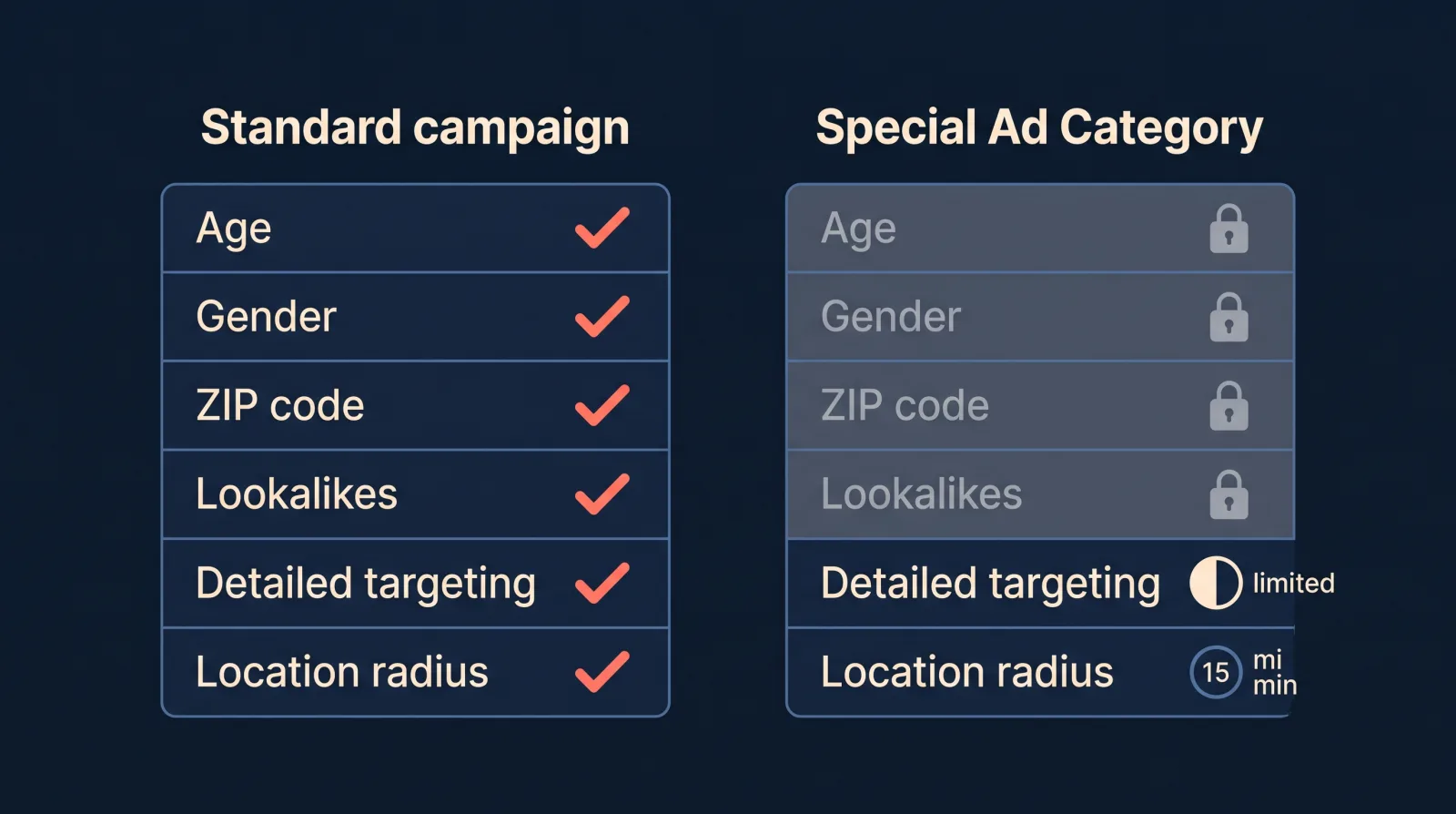
This is where most of the confusion sits. Here is what changes for Housing, Employment, and Financial products and services campaigns, taken from Meta’s Special Ad Categories developer documentation:
| Targeting option | Standard campaign | Housing, employment, financial |
|---|---|---|
| Age | Any range | Fixed at 18 to 65+ (some credit ads in Europe excepted) |
| Gender | Choose | All genders only |
| Location | Country to postcode | City, address or pin with a minimum radius of 15 miles (25 km) in the US and Canada, 15 km in Europe |
| ZIP / postcode, neighbourhood, metro area | Yes | No |
| Location exclusions | Yes | No |
| Detailed targeting | Full list | Approved interests only, no behaviours or demographics |
| Detailed targeting exclusions | Yes | No |
| Custom Audiences | Include and exclude | Include and exclude (must not discriminate) |
| Lookalike Audiences | Yes | No |
| Saved audiences | Yes | No |
| Advantage+ Audience | Yes | Yes |
Two rows deserve a note.
Advantage+ Audience is available. Plenty of guides, including an earlier version of our own targeting guide, said Special Ad Category campaigns had to use manual targeting. Meta’s developer documentation lists Advantage+ Audience as a supported feature in these categories. For most lead advertisers it is the better default anyway, because the levers you would have pulled manually are gone. Our guide to Meta Advantage+ audiences for lead generation covers how to set it up.
Custom Audiences still work, with a duty attached. You can upload a customer list or retarget website visitors. What you cannot do is build that list in a way that screens people by a protected trait, because the targeting would then discriminate even though Ads Manager allowed it.
The same limits also apply to Advantage+ catalog ads that use a home listing catalog. Those campaigns must be declared as Housing.
Do Special Ad Categories apply outside the US?
Partly. For Housing, Employment, and Financial products and services, the targeting limits apply when either of these is true:
- Your business is based in the US, wherever you advertise.
- Your ads reach people in the US, Canada or certain countries in Europe. Canada has been covered since 3 December 2020 and Europe since 7 December 2021 for housing, employment and credit ads. Meta’s documentation says “Europe” and “certain countries in Europe” without listing them, so assume the UK and EU are included.
The January 2025 requirement for the wider Financial products and services category was written for US advertisers and US audiences. Credit offers keep their earlier rules in Canada and Europe.
That leaves a gap. An Australian mortgage broker or recruiter advertising only to Australians is not currently required to declare Housing, Employment or Financial products and services, and keeps full targeting. Meta’s anti-discrimination standards still apply to them. The personal attributes policy still applies to the copy too. Social issue and political ads are a separate matter: they need authorisation in many countries, Australia included.
How do you choose a Special Ad Category in Ads Manager?
Meta’s own steps, from the Business Help Centre:
1. Open the campaign
Create a new campaign in Meta Ads Manager, or open an existing one at campaign level. The category is set on the campaign, not the ad set.
2. Turn on Special Ad Categories
Find the Special Ad Categories section and declare that you are creating a campaign for ads in a special ad category.
3. Pick the category or categories
Under Categories, choose the one that applies. A campaign can carry more than one. Mortgage campaigns are the usual case for two.
4. Choose the countries
Under Countries, select every country the campaign will run in. For social issue ads, these must be countries where you are authorised.
5. Rebuild the audience
At ad set level, Ads Manager removes anything the category does not allow and widens any location to the minimum radius. Check what is left before you publish. Interest and location choices you made before declaring may have been removed without much warning.
If you edit an existing campaign into a category, expect the learning phase to start again. The audience has changed underneath it.
What happens if you don’t declare one?
The ad gets rejected. Meta’s review checks the content, and an employment, housing or financial ad without the matching category is turned down. For social issue and political ads, Meta disapproves the whole campaign if it finds an undeclared ad in it.
Rejections are fixable. Edit the campaign, add the category, accept the audience changes and resubmit. If you think an ad was wrongly classified, you can request another review from Account Quality. What does not work is trying to slip a lending or job ad through uncategorised by softening the copy. Meta reads the landing page and the form too, and repeat rejections count against your ad account.
How do lead ads work under a Special Ad Category?
Instant forms work normally in all three restricted categories, and they are the most common way our customers run housing, finance and recruitment ads. There are two things to plan for.
The form has limits too. Jon Loomer’s guide to the categories notes that instant forms in these categories cannot collect personal details such as age, gender, relationship status and some location information. Ask about the need instead of the person: “When are you looking to move?”, “What size loan?”, “Which role are you applying for?”.
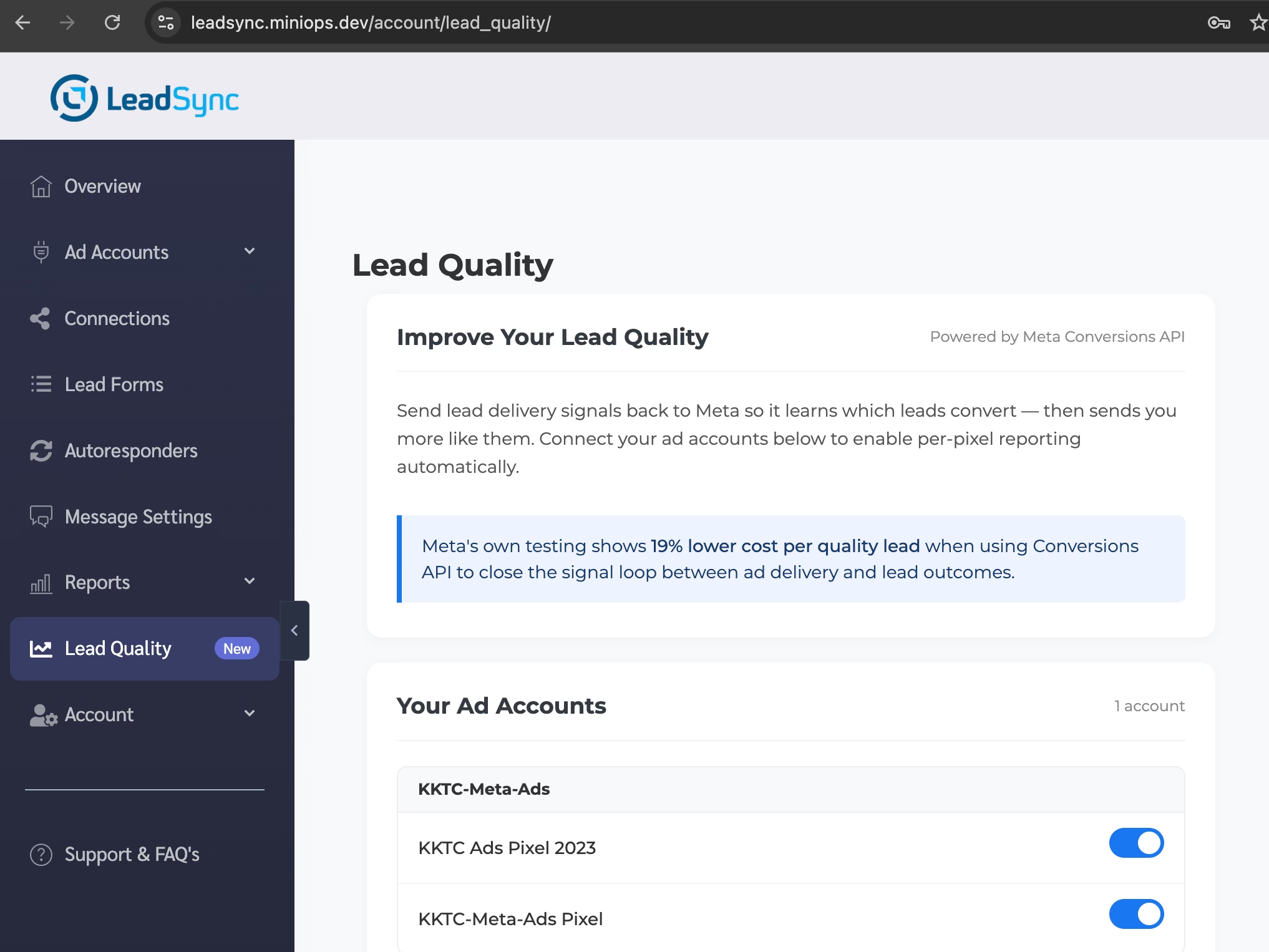
Your targeting signal now lives in your CRM. When Meta takes away age, gender, postcode and lookalikes, the algorithm has less to go on at the start. What it can still learn from is which leads turned into customers. That is the job of the Conversions API for lead ads: you send Meta the stage each lead reached, and it optimises toward people who look like your good leads rather than people who simply fill in forms. Our guide to Facebook standard events covers which events to send.
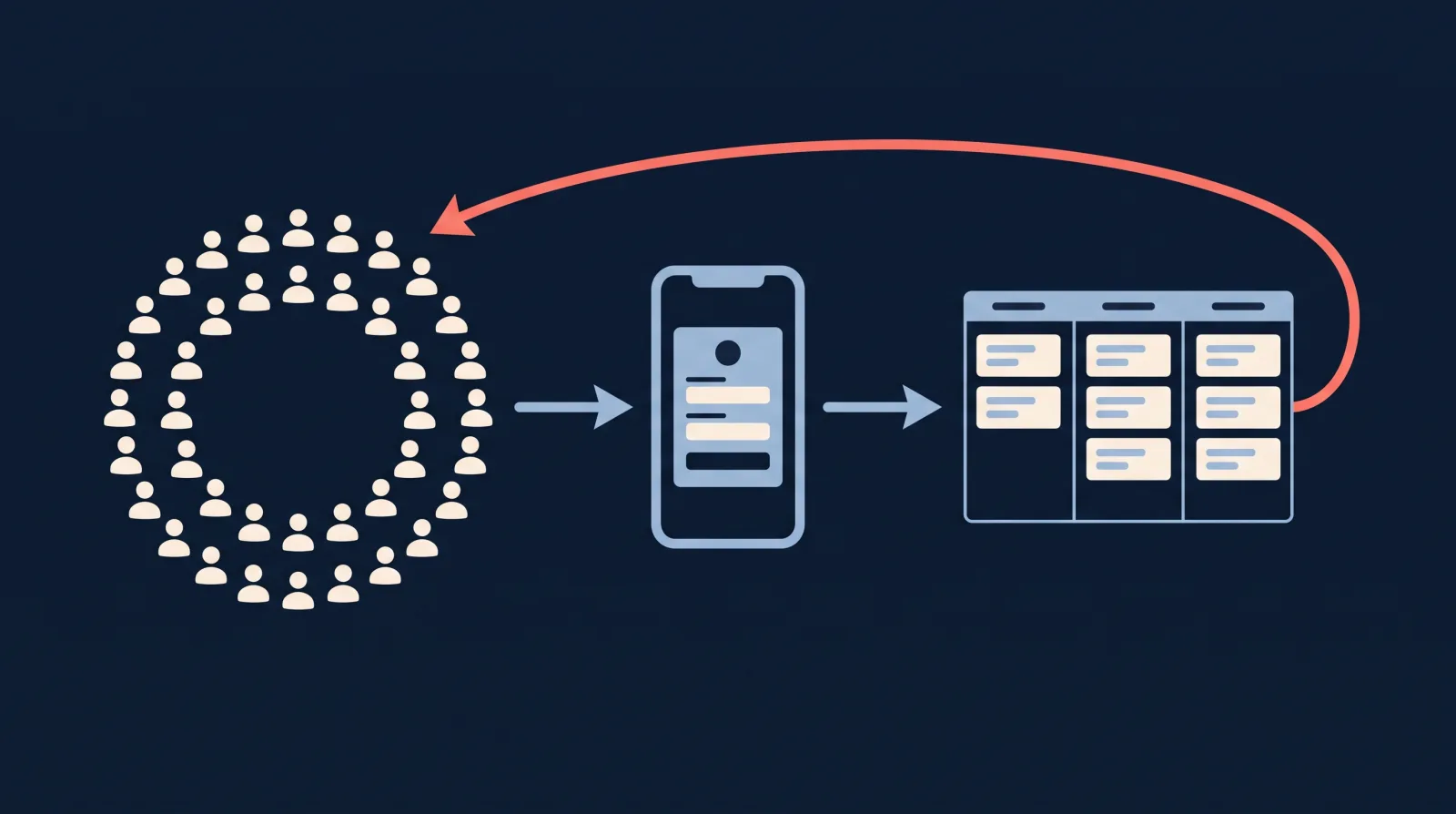
LeadSync handles both halves. It delivers every instant form lead to your CRM, inbox or phone within seconds, so you can call while the person still remembers filling in the form (the case for that is in our piece on speed to lead). And when you mark a lead as qualified or converted, it can send that result back to Meta. Our post on improving Facebook lead quality with CAPI explains how that works.
How do you get good results with restricted targeting?
The advertisers who do well inside these categories stop trying to rebuild the old audience and let other parts of the campaign do the filtering:
- Let the offer pick the audience. “Free home valuation for owners in Springfield” attracts sellers. “Pre-approval in 24 hours” attracts buyers who are ready. The copy filters people in a way targeting no longer can.
- Go broad on purpose. Use Advantage+ Audience or a wide radius with no interests, and give the algorithm enough budget and conversions to learn from.
- Use your own data. Customer lists and website visitors are still allowed as Custom Audiences. Build them from behaviour, such as past enquiries, not from protected traits.
- Qualify inside the form. One or two custom questions about timing, budget or role screen out tyre-kickers better than a hidden age band ever did.
- Feed conversions back. Send qualified and converted stages through the Conversions API so the delivery system learns which leads matter.
Frequently Asked Questions
What is a Special Ad Category on Facebook?
A Special Ad Category is a campaign-level declaration Meta requires for ads about housing, employment, financial products and services, or social issues, elections or politics. Declaring housing, employment or financial products limits your audience options to prevent discrimination. Declaring social issues requires identity authorisation and a Paid for by disclaimer. Undeclared ads in these areas are rejected.
What replaced the Credit special ad category?
Financial products and services replaced Credit in October 2024. It covers everything Credit did (credit cards, auto, personal and business loans, mortgages, long-term financing) plus insurance, bank accounts, investment services and payment services. It became mandatory on 21 January 2025 for advertisers based in the US or showing ads to US audiences.
Can you use Advantage+ Audience with a Special Ad Category?
Yes. Meta’s Marketing API documentation lists Advantage+ Audience, Custom Audience inclusion and exclusion, Custom Audience expansion and detailed targeting expansion as supported features for housing, employment and financial products and services campaigns. Saved audiences and lookalike audiences are the two audience types removed.
Can a campaign have more than one Special Ad Category?
Yes. The special ad category field accepts one or more values, so a campaign can be declared as both Housing and Financial products and services, or combine a category with Social issues, elections or politics. A mortgage campaign often belongs in both Housing and Financial products and services, because Meta lists mortgage loans as an example under each.
Do Special Ad Categories apply in Australia or the UK?
The housing, employment and financial targeting limits apply to advertisers based in the US and to ads reaching the US, Canada and certain countries in Europe. Meta does not publish that list, so treat the UK and EU as covered. An Australian business advertising only to Australians is not currently required to declare those three. Social issue and political ads need authorisation in many countries, including Australia.
Does the Special Ad Category apply to Instagram ads?
Yes. The declaration is made on the campaign in Meta Ads Manager, so it applies to every placement the campaign runs on, including Facebook, Instagram, Messenger and the Audience Network. There is no separate Instagram setting.
What happens if I don’t choose a Special Ad Category?
Meta reviews the ad and rejects it if it promotes housing, employment or financial products and services without the right category. Campaigns with undeclared social issue, election or political ads are disapproved. Fixing it means editing the campaign, selecting the category, and accepting the audience changes Meta applies.
Get every lead to your team in seconds
Restricted targeting makes every lead you do get more valuable. LeadSync sends Facebook and Instagram lead ads to more than 30 CRMs, email and SMS the moment they arrive, and can feed lead quality back to Meta through the Conversions API. Plans start at $19 a month with a 7-day free trial, no credit card required.