Click-to-WhatsApp ads are very good at starting conversations and very bad at finishing them. Someone taps your ad, the chat opens, they send the pre-filled “I’m interested” message, and then… silence. You reply with questions, they answer some of them, the thread stalls, and your “lead” is a half-finished conversation with no email address.
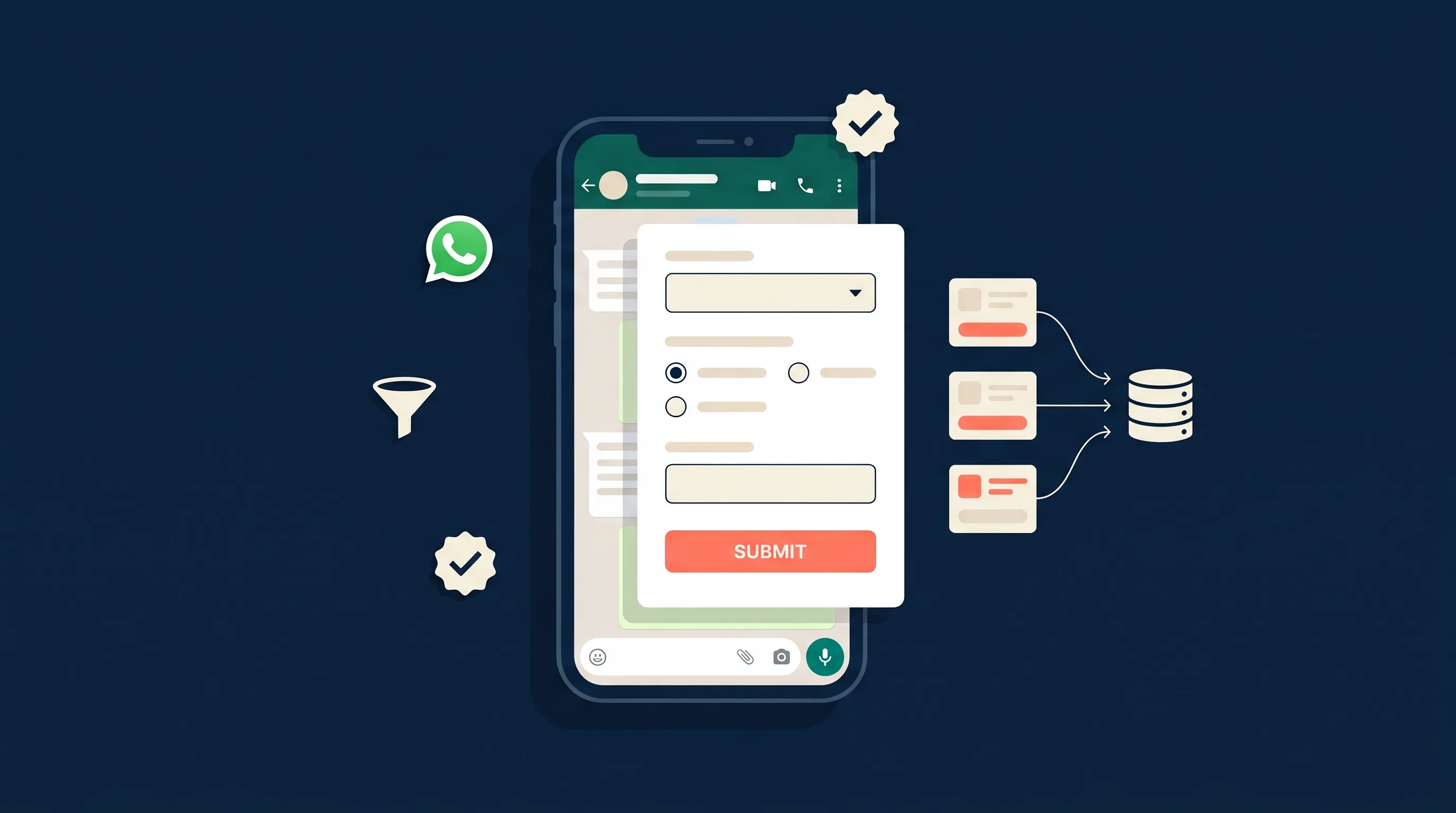
WhatsApp Flows fix this. A Flow is a structured, multi-screen form that opens right inside the chat: the prospect taps through your qualifying questions in under a minute, and you get back clean, complete data instead of a transcript you have to decode.
This guide covers what WhatsApp Flows are, why they have become one of the most interesting lead qualification tools on Meta’s platform, real flow examples by industry, how to build one without code, and how to get the qualified leads where they actually belong: in front of your sales team.
What Are WhatsApp Flows?
WhatsApp Flows are interactive experiences that run inside a WhatsApp conversation. Think of them as native WhatsApp forms: multi-screen, tap-friendly, with dropdowns, radio buttons, date pickers, and text fields. Meta launched them on the WhatsApp Business Platform and has been steadily expanding them since.
A Flow can be as simple as three screens:
- What service do you need? (dropdown)
- When do you want to start, and what is your budget? (date picker + radio buttons)
- Where should we send your quote? (name, email, suburb)
The prospect never leaves WhatsApp. No landing page load, no pinch-zooming a web form on mobile, no re-typing a phone number into a field (WhatsApp already has it). When they hit submit, the structured responses are delivered back to the business.
There are two flavors. Static flows (Meta calls them “endpoint-less”) collect answers and deliver them when the form is completed; these cover almost every lead generation use case. Dynamic flows connect to a developer-built endpoint for things like live appointment slots. For lead qualification, the static kind is all you need, and it requires no code.
Why WhatsApp Is Becoming a Serious Lead Channel
If WhatsApp is not part of your lead generation thinking yet, the numbers suggest it should at least be on the radar.
Meta reported that paid messaging on WhatsApp passed a $2 billion annual run rate in late 2025, and that people now open more than 1 billion conversation threads with businesses every day across its messaging apps. Click-to-WhatsApp ads, the ad format that drops a prospect straight into a chat with your business, have become one of Meta’s fastest-growing ad products.
The behavior driving this is regional but massive: in markets like Brazil, India, Indonesia, Mexico, and much of Europe and the Middle East, WhatsApp is the default way customers contact a business. And message-based channels carry open rates around 98%, which is why so many advertisers already use WhatsApp for lead notifications even when they capture the lead elsewhere.
The catch has always been what happens after the chat opens. Which is exactly the problem Flows solve.
How WhatsApp Flows Work for Lead Generation
The full journey looks like this:
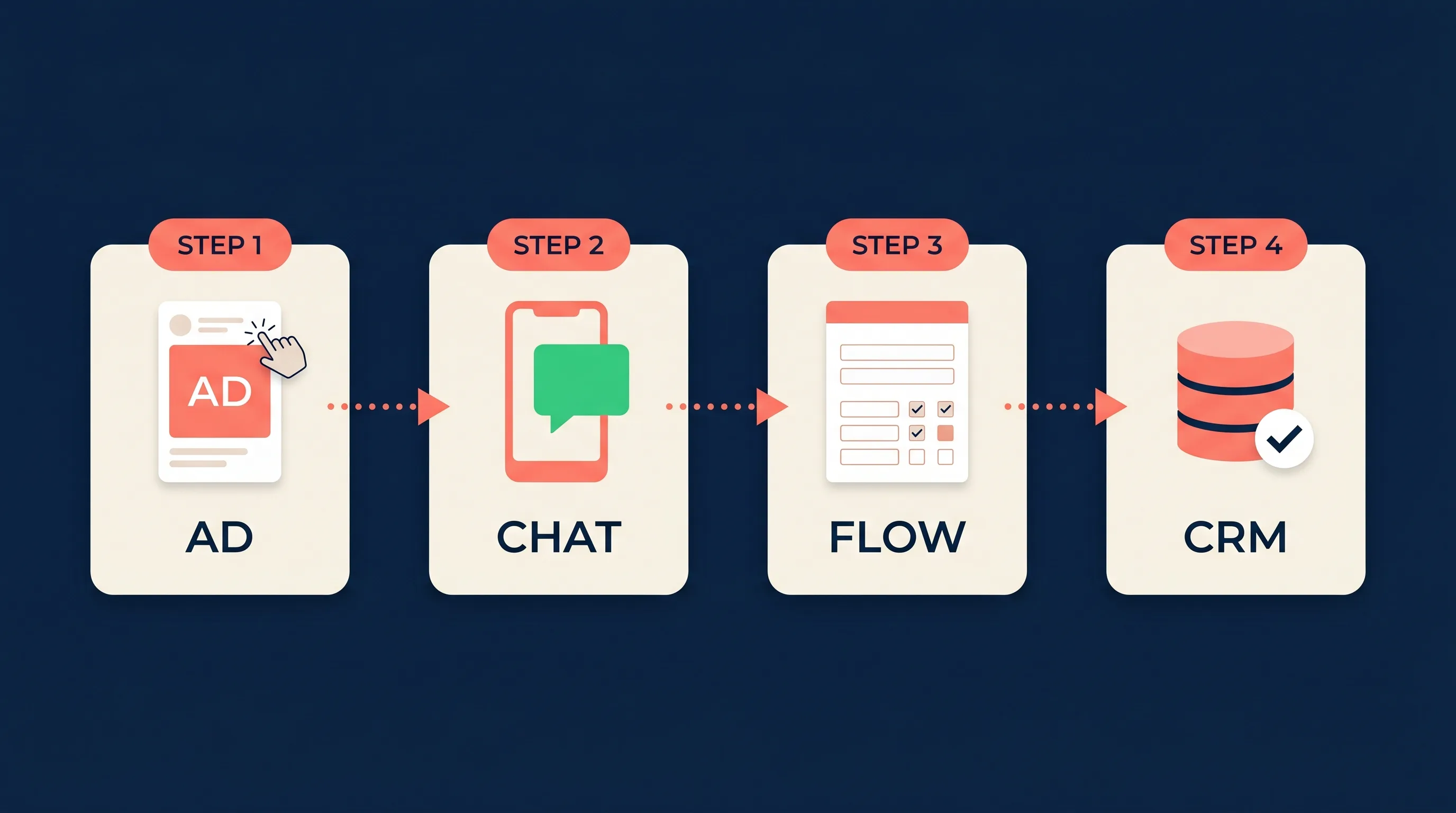
- Entry point. A prospect taps a click-to-WhatsApp ad on Facebook or Instagram (or scans a QR code, or taps a website chat button). A WhatsApp conversation opens with your business.
- The Flow is sent. Your business replies with a message containing a button like “Get your quote”. Speed matters here: prospects who clicked an ad expect an instant response, so this message should be automated, not typed by a human twenty minutes later. The same logic behind the 5-minute rule for lead follow-up applies inside WhatsApp, just compressed.
- The prospect completes the form. The Flow opens as a sheet over the chat. They tap through your questions: service, budget, timeline, contact details. Because the inputs are structured (dropdowns and pickers, not free text), completion is fast and the data comes back consistent.
- You receive structured responses. On submit, WhatsApp delivers the answers to the business as structured data. This is the part most guides gloss over: those responses land via webhook, and unless something routes them onward, they sit in a developer console. Getting them into a CRM, a spreadsheet, or your inbox is what turns a completed form into a workable lead.
One important framing: a completed Flow is the WhatsApp equivalent of a Meta lead ad submission, with one big difference. The prospect is already inside an open conversation with you. There is no cold follow-up email hoping for a reply; you can simply continue the chat they started.
5 WhatsApp Flow Examples for Lead Qualification
The qualification logic you would run in a discovery call works compressed into a Flow. Here are five field-tested patterns.
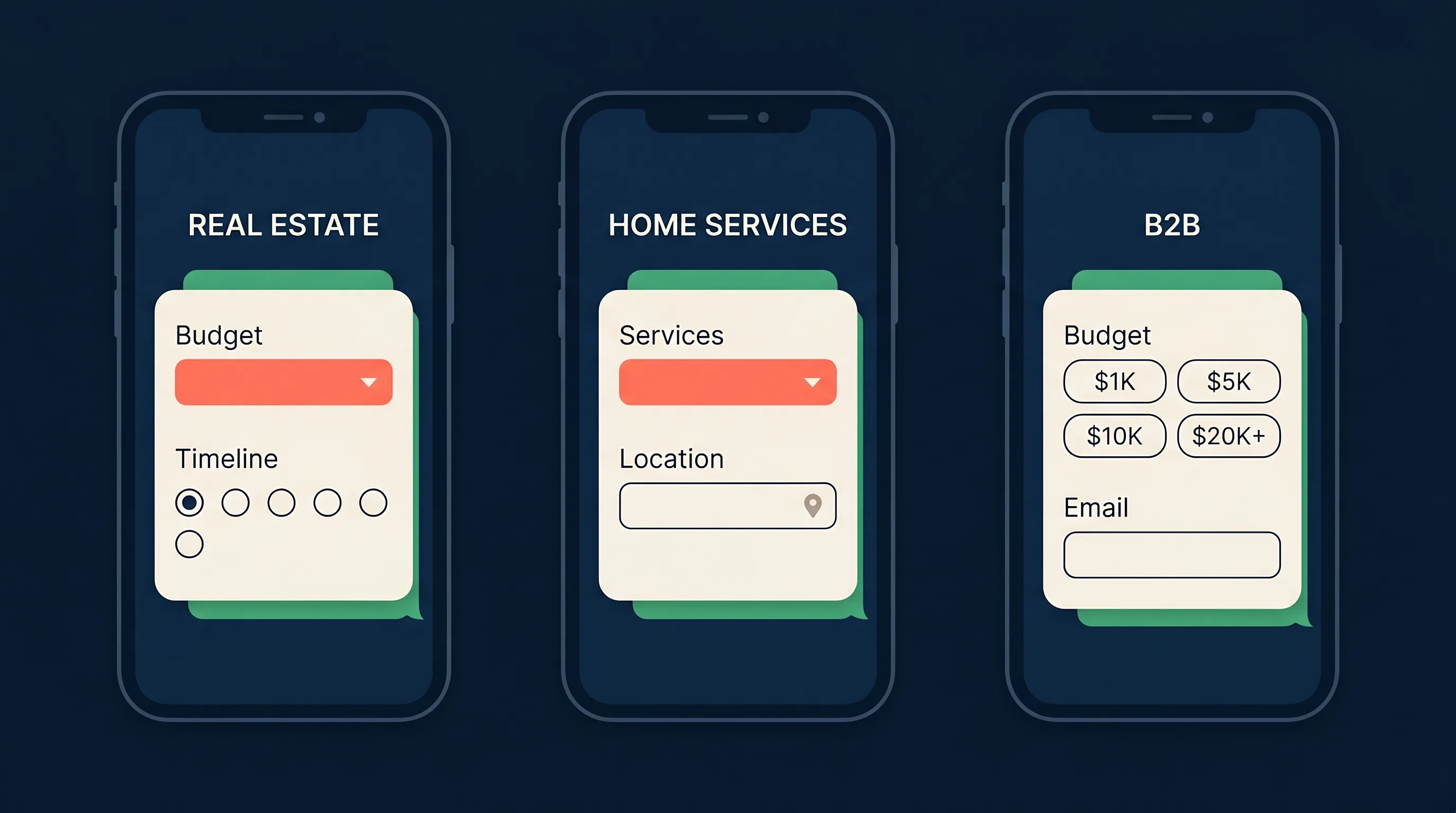
1. Real estate: buyer qualification
Ask: buying, selling, or renting? Suburb or area. Budget range (dropdown of brackets). Pre-approved for finance? (yes / no / not yet). Timeline (now, 1-3 months, 6+ months).
A buyer with finance approved and a 30-day timeline goes straight to an agent’s phone. A “just browsing, 6+ months” lead goes into the nurture list. Same ad spend, very different handling.
2. Home services: job scoping
Ask: service needed (dropdown of your actual services). Property type. Photos requested later in chat. Preferred date window. Postcode.
The postcode question alone pays for the setup: out-of-area requests get a polite automated decline instead of a wasted callout quote.
3. Insurance and finance: quote pre-qualification
Ask: cover type. Who is it for (individual, couple, family)? Age bracket. Current provider (dropdown + “none”). Best time for a licensed adviser to call.
Compliance-sensitive industries like this benefit from fixed answer options; there is no risky free-text in the qualifying step.
4. Education and courses: enrollment screening
Ask: course of interest. Study mode (online, on-campus, evening). Earliest start date. Highest qualification completed. Email for the course guide.
The qualification answer routes the lead to the right admissions track, and the email field feeds your nurture sequence.
5. Agencies and B2B services: budget-fit check
Ask: what does your business do (short text)? Monthly marketing budget (brackets). Main goal (leads, sales, brand). Decision timeframe. Work email.
Budget brackets in a dropdown do the awkward money conversation for you, before anyone books a call. If you are already scoring your Meta ad leads, the same scoring rules apply here: the Flow just gathers the inputs earlier in the journey.
WhatsApp Flows vs Chatbots vs Native Lead Forms
These three get lumped together, but they solve different problems.
| WhatsApp Flows | WhatsApp chatbots | Native lead forms (Meta, Google, TikTok) | |
|---|---|---|---|
| Format | Structured multi-screen form inside the chat | Open-ended conversation, free text | Form inside the ad platform |
| Where qualification happens | In the chat, before any human time is spent | In the chat, but depends on the bot handling replies | In the form, limited to a few fields before drop-off rises |
| Data quality | High: fixed fields, consistent answers | Variable: free text needs interpreting | High, but usually shallow (name, email, phone) |
| Conversation after submit | Already open, continue in the same thread | Already open | None: follow-up starts cold via email or phone |
| Build effort | No-code in Flow Builder | Bot platform setup and training | Minutes inside Ads Manager |
| Best for | Qualifying high-intent chat leads | Support, FAQs, open-ended discovery | Top-of-funnel volume at lowest cost per lead |
The honest summary: native lead forms are still the volume workhorse, and if you run them, AI chatbot tools still have a place for open-ended conversations. Flows sit in between: chat-native like a bot, structured like a form. For advertisers already spending on click-to-WhatsApp ads, they are the missing qualification layer.
How to Set Up a WhatsApp Flow (No Code Required)
You will need a WhatsApp Business Platform account (the API-backed kind, not just the free WhatsApp Business app) connected to your Meta Business Manager. Most businesses get this through a business solution provider or a messaging tool; once it exists, Flows are included.
- Open Flow Builder. In WhatsApp Manager, go to Account tools, then Flows, and click Create Flow.
- Start from a template. Meta ships lead generation templates (“Get a quote”, “Sign up”, “Book an appointment”). Pick the closest one rather than starting blank; see Meta’s Flows documentation for the full template list.
- Edit the screens. Keep it to 2-4 screens and 4-6 questions. Every screen you add costs completions, the same way extra form fields do. Lead with the question that does the most qualifying work (usually budget, service type, or location).
- Use structured inputs everywhere you can. Dropdowns, radio buttons, and date pickers beat free text: faster for the prospect, cleaner for your CRM.
- Preview and test. The builder includes an interactive preview, and you can send test Flows to your own number before publishing.
- Publish the Flow. Once published, the Flow gets an ID you can attach to messages.
- Connect it to your entry point. The two common patterns: attach the Flow to the automated welcome/ice-breaker reply on conversations that start from your click-to-WhatsApp ads, or include it in a template message sent when someone messages you first.
What it costs
Building and publishing Flows is free. Sending them uses WhatsApp’s standard conversation pricing, with one big carve-out: conversations started from a click-to-WhatsApp ad get a free 72-hour messaging window (see Meta’s pricing docs). In practice, a Flow triggered from your ad traffic usually rides free inside that window. You are already paying for the click; the qualification layer costs nothing extra.
Getting Qualified WhatsApp Leads into Your CRM
Here is the unglamorous truth about every lead capture channel: the capture is the easy half. A completed Flow that nobody follows up is exactly as valuable as no lead at all.
Flow responses arrive as structured webhook data on the WhatsApp Business Platform. If you have a developer, they can receive that webhook and push leads into your CRM directly. If you are using a messaging platform, check whether it exports Flow responses anywhere useful (some only show them in their own inbox, which recreates the original problem one tool further downstream).
Whatever the plumbing, hold it to the same standard you would hold Meta lead ad delivery: the lead should be in your CRM, inbox, or phone within seconds of submission, with every field mapped, and the follow-up should happen while the chat is still warm. Responding inside the first few minutes is the single highest-leverage thing you can do with any lead, and a WhatsApp lead literally has the conversation already open.
Full disclosure on where LeadSync fits today: we sync leads from Meta, Google, LinkedIn, and TikTok lead forms to 100+ CRMs and email tools, and we deliver lead notifications via WhatsApp so sales teams hear about new leads where they actually look. Ingesting WhatsApp Flow responses as a lead source is something we are actively exploring. If that is the missing piece in your stack, tell us at support@leadsync.me; the volume of interest directly shapes whether and how fast we build it.
FAQs
What are WhatsApp Flows?
WhatsApp Flows are interactive, form-like experiences that open inside a WhatsApp chat. Businesses use them to collect structured information (name, email, budget, timeline) through multi-screen forms with dropdowns, date pickers, and text inputs, without sending the prospect to an external landing page.
Are WhatsApp Flows free to use?
Building and publishing a Flow in Meta’s Flow Builder is free. You pay WhatsApp’s standard conversation-based messaging fees when you send one, but conversations that start from a click-to-WhatsApp ad include a free 72-hour messaging window, so Flows triggered from ads often cost nothing extra.
How do I qualify leads with WhatsApp?
Ask a small set of high-signal questions early: budget, timeline, location, and the service needed. A WhatsApp Flow makes this automatic by presenting the questions as a short structured form inside the chat, so you get clean answers to score and route instead of a manual back-and-forth.
What is the difference between a WhatsApp Flow and a WhatsApp chatbot?
A chatbot holds an open-ended conversation and interprets free-text replies, which makes it flexible but unpredictable. A Flow is a structured form with fixed screens and input types, so every completion returns the same clean data fields. Many businesses use both: a Flow for qualification, then a bot or human for follow-up.
Do I need a developer to build a WhatsApp Flow?
Not for lead capture. Meta’s Flow Builder includes lead generation templates you can customize with no code. Developer work is only needed for advanced dynamic flows, such as live appointment availability or calculators.
Can WhatsApp Flow responses go to my CRM?
Yes. Completed Flow responses are delivered back to the business as structured webhook data, which can be routed into a CRM, email platform, or spreadsheet through a custom integration or a lead sync tool.
Wrapping Up
WhatsApp Flows close the gap that has always made click-to-WhatsApp advertising feel half-finished: plenty of conversations, not enough qualified, structured leads. A short in-chat form, built without code and attached to the ads you may already be running, turns those open threads into scored, routable leads with the conversation still warm.
If you are generating leads from Meta, Google, LinkedIn, or TikTok lead forms today, LeadSync gets them to your CRM and your phone in seconds, with a 7-day free trial. And if WhatsApp Flows are where your leads are heading next, we want to hear about it.