The Problem: Not All Facebook Leads Are Created Equal
If you run Facebook Lead Ads, you know the frustration. Some leads are gold — they pick up the phone, reply to emails, and become paying customers. Others? They entered a fake email, forgot they filled out the form, or were never really interested in the first place.
The thing is, Meta doesn’t know the difference. Its algorithm optimizes for volume — getting you the most leads at the lowest cost per lead. But more leads doesn’t mean better leads.
Until now.
Introducing Lead Quality: Teach Meta Which Leads Actually Convert
LeadSync’s new Lead Quality feature uses Meta’s Conversions API (CAPI) to send conversion signals back to Meta. When a lead comes in, LeadSync tells Meta: “This lead was delivered successfully.” And when you rate a lead as Good, we send an additional quality signal that says: “This one actually converted.”
Over time, Meta’s algorithm learns from these signals. It figures out which types of people — based on demographics, interests, and behaviors — actually become your customers. Then it optimizes your ad delivery to find more people like them.
The result? Meta’s own testing shows 19% lower cost per quality lead when using the Conversions API.
How It Works
1. Automatic CAPI Events on Every Lead
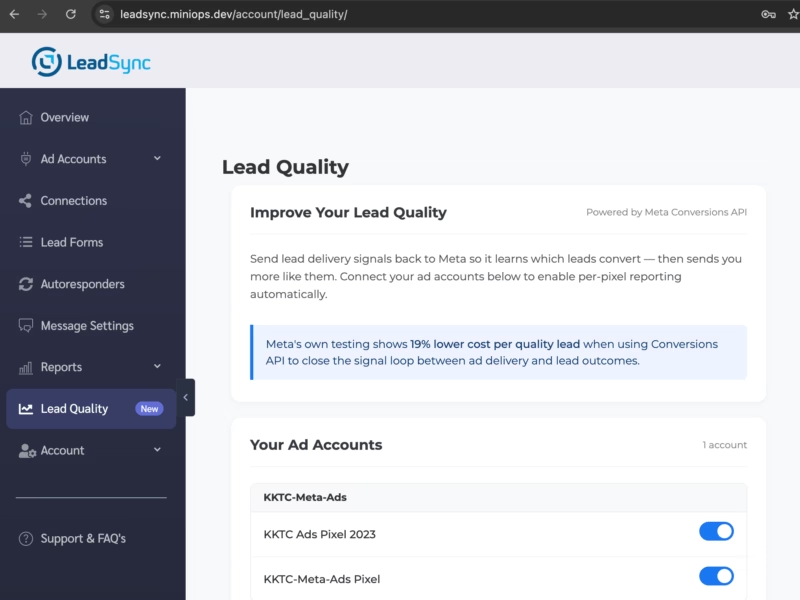
When Lead Quality is enabled, LeadSync automatically sends a hashed conversion event to Meta every time a lead is delivered. This happens in the background — there’s nothing extra you need to do, and it doesn’t slow down your lead notifications.
Your data is SHA-256 hashed before sending. We never share raw personal information with Meta.
2. Rate Your Leads with One Tap
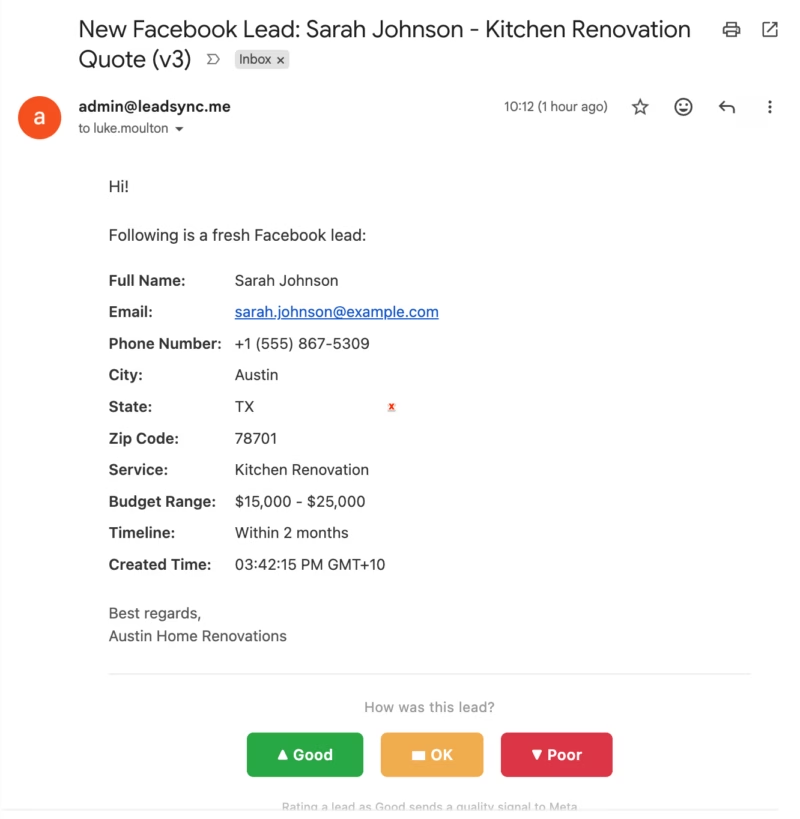
Every lead notification email now includes three buttons at the bottom:
- Good — High quality, likely to convert
- OK — Average quality
- Poor — Low quality, unlikely to convert
Just tap the button right from your email. No login required — the links are securely signed with HMAC so they can’t be tampered with.
When you rate a lead as Good, LeadSync sends a quality signal to Meta. Over time, this teaches the algorithm what a good lead looks like for your business.
3. Auto-Discovery of Your Ad Accounts & Pixels
If you’re connected via Meta Business Manager (which most agencies and businesses are), LeadSync automatically discovers your ad accounts and pixels. Just toggle the ones you want to enable — no copying and pasting Pixel IDs or access tokens.
Not using Business Manager? No problem. There’s a manual setup option where you can enter your Pixel ID and CAPI Access Token directly.
Getting Started
- Log in to LeadSync — You’ll see a prompt on your dashboard asking if you want to improve your lead quality. Click Set Up Now.
- Enable your pixels — On the Lead Quality page, toggle on the pixels for the ad accounts you want to optimize.
- Start rating leads — As leads come in, use the Good / OK / Poor buttons in your notification emails.
That’s it. LeadSync handles the rest — sending the right events to Meta at the right time.
Per-Form Control
Want scoring buttons on some forms but not others? No problem. In your Lead Forms settings, each form has a “Lead scoring buttons” toggle. It’s on by default for all forms, but you can turn it off for any individual form.
Why This Matters
Most lead sync tools just forward your leads and call it a day. LeadSync now closes the loop — sending performance data back to Meta so your ads get smarter over time.
This is the same Conversions API that enterprise advertisers have been using for years, but without the engineering team or custom code. LeadSync makes it accessible to any business running Facebook Lead Ads.
Key Benefits
- Better lead quality — Meta learns which leads convert and optimizes for more like them
- Lower cost per quality lead — Meta reports 19% improvement with CAPI
- Zero extra work — CAPI events fire automatically; rating leads takes one tap
- Privacy-first — All data is SHA-256 hashed before sending
- Per-form control — Enable or disable scoring buttons per lead form
- Autoresponder signals — When a lead clicks your autoresponder email, LeadSync automatically sends an additional quality signal to Meta
Available Now
Lead Quality is available now for all LeadSync plans. Log in to your account and look for the Lead Quality item in the sidebar, or wait for the prompt on your dashboard.
Need help setting it up? Check out our Lead Quality setup guide or get in touch.