If you run a social media marketing agency, you already know the drill. A client launches a Facebook Lead Ad campaign at 9 AM. By noon, 47 leads are sitting in Meta’s native downloads tab. Nobody on the client’s sales team has seen them. By the time someone manually exports the CSV and forwards it that evening, those leads have gone cold—and your client is questioning why their ad spend isn’t converting.
Now multiply that across 10, 20, or 50 client accounts.
This is the lead delivery gap that kills agency performance. And it’s entirely fixable with automation.
In this guide, you’ll learn exactly how to automate lead generation and delivery workflows across every client account your agency manages—so leads flow from ad platforms to CRMs in real-time, your clients see results faster, and your agency becomes the indispensable speed layer in their sales stack.
Why Lead Generation Automation Is Non-Negotiable for Agencies
Marketing agencies have a unique problem that solo advertisers don’t: scale. You’re not managing one ad account and one CRM. You’re managing dozens of ad accounts, each connected to different CRMs, email tools, and sales processes. Manual lead handling doesn’t just slow things down—it breaks at scale.
Here’s what manual lead management actually costs your agency:
- Lost revenue for clients. Research shows that responding to a lead within 5 minutes makes you 391% more likely to convert them. Most manual CSV export workflows take hours, not minutes.
- Staff time burned on exports. If a team member spends 15 minutes per client per day downloading and forwarding leads, that’s 5+ hours daily across a 20-client roster. That’s a full-time salary devoted to copy-paste work.
- Client churn. When leads don’t convert, clients blame the agency—not their own slow follow-up. Automating delivery shifts the bottleneck away from your team and puts the ball in your client’s court.
- Error and data loss. Manual CSV handling introduces typos, duplicate entries, and missed leads. One dropped lead from a high-value campaign can cost more than a year of automation tooling.
Automation eliminates every one of these problems. And the agencies that figure this out first gain a serious competitive advantage.
The Agency Lead Automation Stack: What You Actually Need
You don’t need a dozen tools to automate lead generation for your agency clients. You need the right stack with three layers:
Layer 1: Lead Capture (Ad Platforms)
This is where leads originate. For social media agencies, the primary sources are:
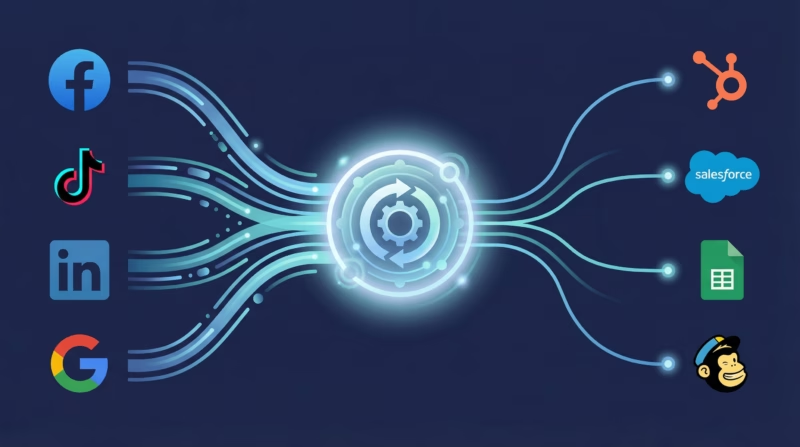
- Facebook and Instagram Lead Ads — Still the highest-volume lead source for most agencies
- TikTok Lead Generation Ads — Growing rapidly, especially for younger demographics
- LinkedIn Lead Gen Forms — Essential for B2B-focused client campaigns
- Google Ads Lead Form Extensions — Captures search intent leads directly in Google
The challenge: each platform stores leads in its own walled garden with different export methods, APIs, and data formats. Without a connector layer, you’re stuck logging into each platform individually for each client.
Layer 2: Lead Sync (The Connector)
This is the automation layer—the tool that bridges the gap between where leads are captured and where your clients need them. The connector pulls leads from ad platforms in real-time and pushes them to the destination your client uses.
This is where a purpose-built tool like LeadSync fits into your agency stack. Unlike general-purpose automation platforms like Zapier or Make, LeadSync is built specifically for ad platform lead syncing—which means faster delivery (under 60 seconds), native integrations with every major ad platform, and a multi-account architecture designed for agencies managing multiple clients.
Layer 3: Lead Destination (CRMs and Sales Tools)
Every client is different. One uses HubSpot. Another uses Salesforce. A third just wants leads in a Google Sheet. Your automation layer needs to deliver leads wherever your client’s sales team already works:
- CRMs: HubSpot, Salesforce, Pipedrive, Follow Up Boss, Zoho, Jobber, HouseCall Pro
- Email marketing: Mailchimp, ActiveCampaign, Constant Contact, ConvertKit
- Spreadsheets: Google Sheets (surprisingly popular and effective for smaller clients)
- Notifications: Email, SMS, Slack — for instant lead alerts to sales teams
- Custom destinations: Webhooks for any proprietary system or app
Step-by-Step: Setting Up Lead Automation Across Client Accounts
Here’s the practical playbook for automating lead delivery across your agency’s client portfolio.
Step 1: Audit Your Client’s Lead Flow
Before you automate anything, map out each client’s current lead flow:
- Which ad platforms are they running lead campaigns on?
- Where does their sales team currently access leads?
- What’s their current speed to lead? (Time from form submission to first contact)
- What CRM or tool does the sales team use daily?
- Are there any data fields that need custom mapping (e.g., lead source tags, UTM parameters)?
Document this for every client. It takes 10 minutes per client and saves hours of misconfiguration later.
Step 2: Connect Ad Platform Accounts
Using your lead sync tool, connect each client’s ad accounts. With LeadSync, you can manage multiple Facebook Pages, Instagram accounts, TikTok accounts, LinkedIn Company Pages, and Google Ads accounts from a single agency dashboard.
Pro tip: Use a Business Manager structure where your agency has partner access to client ad accounts. This lets you set up and manage automations without needing client login credentials.
Step 3: Map Lead Fields to Destinations
This is where most agencies make mistakes. Each ad platform captures slightly different data fields, and each CRM expects data in a specific format. Proper field mapping ensures:
- First name, last name, and email land in the correct CRM fields
- Phone numbers are formatted correctly for the destination system
- Custom questions from lead forms map to custom fields in the CRM
- Lead source tags are applied automatically so clients can track which platform and campaign generated each lead
Step 4: Set Up Instant Notifications
Even with CRM syncing in place, many clients want instant lead alerts. Configure email notifications, SMS alerts, or Slack messages so the sales team knows the moment a new lead comes in. This is the single most impactful speed-to-lead improvement you can make for a client.
Step 5: Enable Conversions API (CAPI) for Better Ad Performance
Here’s an automation step most agencies overlook: connecting the Conversions API. When you sync lead events back to Meta via CAPI, you’re giving the ad algorithm better conversion data—which means better optimization, lower cost per lead, and higher quality leads over time.
This is a direct way to improve your client’s return on ad spend (ROAS) through better data plumbing, not just better creative.
Step 6: Test Everything Before Going Live
Always test your lead sync before a campaign goes live. Use Facebook’s Lead Ads Testing Tool to send test leads through the pipeline and verify:
- The lead arrives in the CRM within 60 seconds
- All fields are mapped correctly
- Notifications are firing to the right people
- Lead source tags are being applied
- CAPI events are registering in Events Manager
One test lead per client before launch prevents a dozen “where are my leads?” support tickets later.
5 Lead Automation Workflows Every Agency Should Run
Once your basic sync is running, layer in these workflows to deliver even more value to clients:
1. Instant Lead-to-CRM with Auto-Assignment
New lead comes in from a Facebook Lead Ad → synced to HubSpot (or the client’s CRM) in under 60 seconds → automatically assigned to the next available sales rep based on round-robin or territory rules. The sales rep gets a push notification and can call within minutes.
2. Multi-Platform Lead Consolidation
Client runs ads on Facebook, TikTok, and Google simultaneously. All three platforms’ leads sync into a single CRM pipeline with platform-specific source tags. The client gets one unified view of all their leads regardless of which ad platform generated them.
3. Lead Qualification + Nurture Sequence
Leads sync to the CRM and immediately enter a qualification workflow. High-intent leads (based on form responses) get routed to the sales team. Lower-intent leads enter an automated email nurture sequence that warms them up before a sales call. This is especially powerful when combined with AI-powered lead qualification agents that can call and qualify leads automatically.
4. Real-Time Reporting Dashboard
Leads flow into a shared Google Sheet (in addition to the CRM) that powers a live dashboard for the client. They can see leads coming in throughout the day, track conversion status, and measure speed to lead—all without asking your team for a report.
5. Cross-Channel Attribution Tracking
With proper source tagging on every synced lead, you can build attribution reports showing exactly which platform, campaign, and ad set generated each lead. This lets you optimize budget allocation across platforms and prove ROI to your clients with hard data.
Why Speed to Lead Is Your Agency’s Secret Weapon
Speed to lead isn’t just a nice-to-have metric—it’s the single biggest predictor of whether a lead converts into a paying customer. The data is overwhelming:
- 391% higher conversion rate when you respond within 1 minute vs. waiting longer
- 78% of customers buy from the first company to respond to their inquiry
- 5-minute window: After 5 minutes, the odds of qualifying a lead drop by 80%
For agencies, this is a massive selling point. When you can tell a prospective client “every lead from your Facebook ads will be in your CRM within 60 seconds and your sales team will get an instant alert,” you’re making a promise that most competitors can’t match.
Speed to lead also directly impacts ad performance. Faster follow-up means more conversions from the same ad spend, which means a better cost per acquisition, which means your client stays with your agency longer.
Choosing the Right Lead Sync Tool for Your Agency
Not all automation tools are built for agency workflows. Here’s what to evaluate:
| Feature | Why It Matters for Agencies |
|---|---|
| Multi-account management | Manage all client ad accounts from one dashboard without switching logins |
| Real-time sync speed | Sub-60-second delivery ensures speed-to-lead commitments to clients |
| Multi-platform support | Facebook, Instagram, TikTok, LinkedIn, Google—all from one tool |
| Native CRM integrations | Direct connections (not via Zapier) mean fewer failure points and faster delivery |
| Custom field mapping | Every client’s CRM is configured differently—flexible mapping is essential |
| Conversions API support | Improve client ad performance through better conversion data feedback |
| Affordable per-client pricing | The tool cost should scale with your client count, not eat into margins |
LeadSync checks every box for agency use. It connects to Facebook, Instagram, TikTok, LinkedIn, and Google Ads and syncs leads to 30+ destinations including HubSpot, Salesforce, Mailchimp, ActiveCampaign, Google Sheets, Pipedrive, Follow Up Boss, Jobber, HouseCall Pro, and more. Pricing starts at $39/month, and the multi-account architecture means you can manage every client from a single login.
For a detailed comparison, see our LeadSync vs. Zapier breakdown to understand why a purpose-built lead sync tool outperforms general automation platforms for this use case.
Common Mistakes Agencies Make with Lead Automation
Even with the right tools, agencies stumble on these common pitfalls:
Mistake 1: Setting It and Forgetting It
Automation isn’t a one-time setup. Ad campaigns change, form fields get updated, CRM configurations evolve. Schedule a monthly check per client to verify all syncs are still running correctly and field mappings are current.
Mistake 2: Not Tagging Lead Sources
If every lead just shows up as “Facebook” in the CRM, you can’t tell which campaign or ad set generated it. Use source tags, UTM parameters, and custom hidden fields in your lead forms to capture granular attribution data. This lets you prove which campaigns are driving real results.
Mistake 3: Automating Delivery but Not Follow-Up
Getting leads into the CRM in 60 seconds is pointless if the sales team doesn’t act on them for 3 hours. Pair your lead sync with instant notifications (email, SMS, or Slack alerts) and help your clients set up response time SLAs.
Mistake 4: Ignoring Lead Quality in Favor of Volume
Automation makes it easy to pump a lot of leads into a CRM. But if those leads aren’t qualified, your client’s sales team will burn out. Use form design best practices (qualifying questions, multi-step forms) and consider adding an automated qualification layer before leads hit the CRM.
Mistake 5: Using Too Many Tools
Some agencies piece together 5 different tools (one for each ad platform, plus Zapier, plus a notification service). This creates a fragile stack with multiple points of failure. Consolidate into a single tool that handles all platforms and destinations natively.
How to Sell Lead Automation as an Agency Service
Lead automation isn’t just an internal efficiency play—it’s a revenue opportunity. Here’s how to position it:
- Bundle it into your ad management retainer. Include “real-time lead delivery and CRM integration” as part of your standard service. It costs you $39/month in tooling and adds perceived value worth hundreds.
- Offer it as an upsell. Clients currently getting leads via email or CSV export can upgrade to real-time CRM sync with instant notifications for an additional monthly fee.
- Use speed to lead in your pitch. When pitching new clients, show them the speed-to-lead data and demonstrate how your agency delivers leads in under 60 seconds vs. the industry average of hours (or days).
- Create a case study. Measure a client’s speed to lead and conversion rate before and after implementing automation. A “3x conversion improvement from lead automation” case study is a powerful new business tool.
Frequently Asked Questions
What is lead generation automation for marketing agencies?
Lead generation automation for marketing agencies is the process of using software to automatically capture, sync, and deliver leads from advertising platforms (like Facebook Lead Ads, TikTok, LinkedIn, and Google Ads) to clients’ CRMs and sales tools in real-time—eliminating manual CSV downloads and reducing lead response time from hours to seconds.
How fast should leads be delivered to a client’s CRM?
Ideally, leads should arrive in the client’s CRM within 60 seconds of form submission. Research shows a 391% higher conversion rate when leads are contacted within the first minute. Tools like LeadSync deliver leads in under 60 seconds, and often within 5–10 seconds.
Can I manage multiple client ad accounts from one tool?
Yes. Agency-focused lead sync tools like LeadSync allow you to connect and manage multiple Facebook Pages, TikTok accounts, LinkedIn Company Pages, and Google Ads accounts from a single dashboard. This means one login to manage lead automation across your entire client roster.
What’s the difference between LeadSync and Zapier for lead syncing?
Zapier is a general-purpose automation tool, while LeadSync is purpose-built for syncing leads from ad platforms. The key differences: LeadSync delivers leads faster (under 60 seconds vs. Zapier’s 1–15 minute polling intervals), offers native integrations with Facebook, TikTok, LinkedIn, and Google Ads, and includes a multi-account dashboard designed for agencies. See our full LeadSync vs. Zapier comparison.
Do I need a separate automation tool for each ad platform?
No. A comprehensive lead sync tool connects to all major ad platforms—Facebook and Instagram Lead Ads, TikTok Lead Generation, LinkedIn Lead Gen Forms, and Google Ads Lead Form Extensions—from a single account. This eliminates the need for multiple tools and reduces points of failure.
How does Conversions API (CAPI) improve lead ad performance?
Conversions API sends lead event data from your server directly back to Meta, bypassing browser limitations and ad blockers. This gives Meta’s algorithm more accurate conversion data, resulting in better ad optimization, lower cost per lead, and higher quality leads over time. It’s particularly valuable for agencies because it directly improves your clients’ return on ad spend.
How much does lead automation cost for an agency?
Purpose-built lead sync tools like LeadSync start at $39/month and can handle multiple client accounts. Compared to the staff time spent on manual CSV exports (5+ hours daily across a 20-client roster), the ROI is immediate. General automation tools like Zapier charge per-task pricing that can scale to hundreds per month for high-volume agencies.