If you’re running Facebook lead ads, every minute counts. Research shows that leads contacted within 5 minutes are 21x more likely to convert — yet only 23% of companies respond that fast. The solution? Instant lead notifications delivered to your email, phone, or team chat the moment someone fills out your form.
LeadSync sends Facebook lead notifications via email, SMS, and Slack in under 60 seconds — with no coding required. We’ve been delivering lead notifications since Facebook first launched lead ads in 2016, and we’ve processed millions of leads for over 20,000 Facebook Pages.
This guide covers all three notification methods so you can pick the right one for your team (or use all three). Whether you run Facebook Lead Ads, Instagram lead forms, or even TikTok lead ads, the principles are the same.
Key Takeaways
- Facebook doesn’t send reliable lead notifications natively — Meta’s built-in Leads Center is delayed and easy to miss, so you need a third-party tool to get instant facebook email alerts when new leads come in
- Speed to lead is everything — leads contacted within 5 minutes are 21x more likely to convert, and 78% of buyers choose the first company to respond
- LeadSync delivers in under 60 seconds — set up email, SMS, or Slack notifications in 3 minutes with no coding required
- Works for Facebook and Instagram lead ads — the same setup handles both platforms since they use the same Meta lead forms infrastructure
- Best practice: combine channels — use email as your record, SMS for urgent alerts, and Slack for team visibility
Why Facebook Lead Ads Are So Effective for Lead Generation
Facebook (Meta) lead ads are one of the most cost-effective ways to generate leads online. Unlike traditional landing pages where users click through to your website, lead ads keep the user on Facebook and auto-fill their contact information. As a result, they deliver dramatically higher conversion rates.
Want to verify your lead emails are being delivered? Check out our Email Log feature to see exactly what happens to every lead notification.
Speed matters when following up leads. Learn how real-time lead notifications can increase your Facebook Lead Ad conversions.
Here’s why advertisers are investing heavily in Facebook lead ads:
- Higher completion rates — Meta lead forms consistently achieve completion rates above 80%, compared to 3-5% for traditional landing page forms (WordStream)
- Lower cost per lead — the average cost per lead on Facebook is $5-$15 across most industries, with some verticals like real estate and home services seeing CPLs under $10 (Madgicx, 2026)
- Pre-filled data — Facebook auto-populates name, email, and phone from the user’s profile, reducing friction and typos
- Mobile-first experience — 98.5% of Facebook users access the platform via mobile (Statista), and lead forms are designed for thumb-friendly completion
The catch? Facebook doesn’t make it easy to act on those leads quickly. Lead data sits inside Ads Manager until you manually download it or set up an integration.
That’s where facebook lead email notifications become critical. They turn a passive lead collection tool into an active sales pipeline — and the difference in response time can make or break your ROI.
Why Speed Matters: The Real Cost of Slow Lead Response
Here’s the problem: Facebook doesn’t send instant notifications when someone fills out your lead form. The default “Leads Center” in Meta Business Suite is delayed and easy to miss. By the time you check, your lead has already moved on to a competitor.
The data is clear:
- 21x more likely to convert — leads contacted within 5 minutes vs. 30 minutes (InsideSales.com/Kellogg)
- 391% improvement in conversion when responding within 1 minute (Velocify)
- Only 23% of companies respond to leads within 5 minutes (Drift)
- 78% of buyers purchase from the first company that responds (Lead Connect)
- 82% of consumers expect a response within 10 minutes of reaching out (HubSpot)
- The average business takes 42 hours to respond to a new lead — by which point most leads have gone cold (Harvard Business Review)
Real-World Example: How a Home Services Company Cut Response Time from Hours to Seconds
We’ve seen this play out hundreds of times with LeadSync customers. One home services company was downloading their Facebook leads manually every morning — by then, most leads had already called a competitor.
After switching to LeadSync email notifications, their average response time dropped from 4+ hours to under 2 minutes. The result? Their lead-to-appointment conversion rate jumped from 12% to 31% within the first month. That’s the difference instant notifications make.
In other words, setting up instant Facebook lead ads notifications isn’t just convenient — it’s the single highest-ROI change you can make to your lead ads setup.
Can You Get Facebook Email Alerts Natively (Without a Third-Party Tool)?
Before we dive into setup, let’s address the question many advertisers ask: can you get Facebook email alerts for new leads without any additional tools?
Meta offers two built-in options for receiving lead notifications:
Option 1: Meta Business Suite Leads Center
The Leads Center in Meta Business Suite shows new leads from your forms. You can enable push notifications on the Meta Business Suite mobile app to get alerted when new leads arrive.
However, in our experience (and based on widespread advertiser feedback), these notifications are:
- Frequently delayed — notifications can arrive 15 minutes to several hours after submission
- Unreliable — many advertisers report not receiving them at all, especially on iOS
- Limited to the app — you must have the Meta Business Suite app installed and notifications enabled
- No email delivery — Meta does not send lead data to your email inbox natively
- No SMS or Slack — limited to in-app notifications only
Option 2: CRM Integration via Meta (Limited)
Meta allows some CRMs to connect directly through their Conversions API. However, this requires technical setup, and it still doesn’t send you email notifications. Instead, the leads simply appear in your CRM — which means you still need to check it manually.
Bottom line: If you want reliable, instant Facebook email alerts delivered to your inbox, SMS, or Slack the moment a lead comes in, you need a dedicated notification tool. That’s exactly what LeadSync was built for.
Quick Start Guide
Ready to get started? Here’s our 3-minute walkthrough video showing you how to send Facebook leads to email.
- Sign up to a free LeadSync 14 day trial
- Connect your Meta Business Manager Account, Facebook Page and Facebook Ads account
- Add your notification destination — Email, SMS, or Slack
- Pair your Facebook Lead Forms with your connection
- Test and launch
Method 1: Email Notifications (Step-by-Step)
Email is the most common way to receive Facebook lead notifications. In our testing, LeadSync delivers lead emails within 30 seconds of submission, including all form data. That makes it the fastest and most reliable way to get facebook leads to email.
1. Create a LeadSync Account
LeadSync connects to your Facebook Ads account and Page, watching your Lead Ads 24/7 and forwarding new leads to your email the moment they arrive.
2. Authorize Meta Business Manager
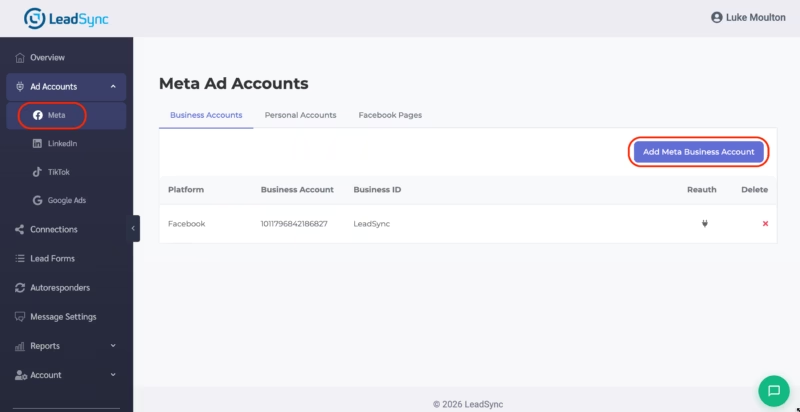
- In LeadSync, choose Meta Accounts → Add Account.
- Click Add Meta Business Account
- Log in to Facebook (you must log in to Facebook to continue)
- Select the Business Portfolio you want to work with
- Add the Facebook Page you’re using in your lead ad campaigns
- Select the Meta Ad account you’re using
3. Add an Email Address to Forward Meta Leads To
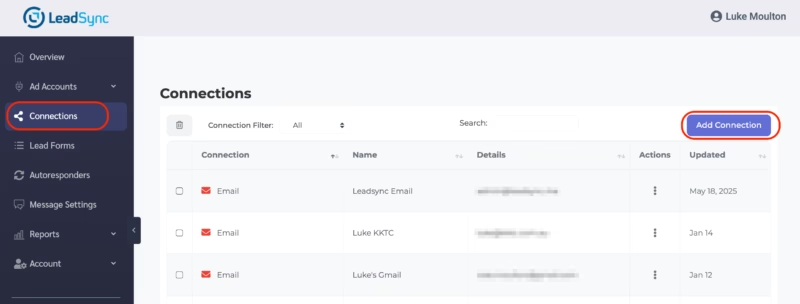
- Navigate to Connections → Add Connection → Email.
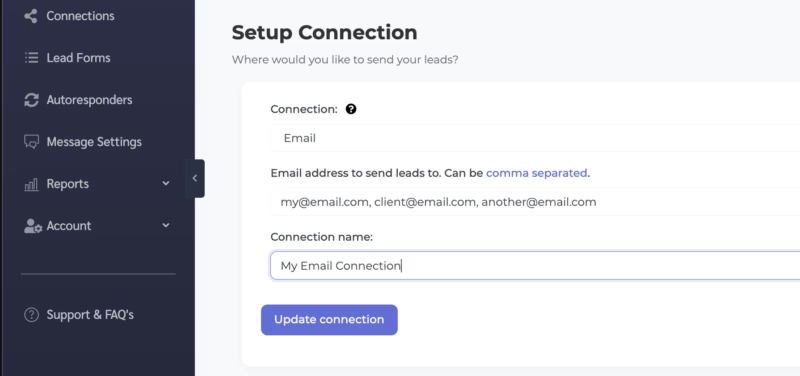
- Enter one or more recipient addresses, separated by commas.
- Give the connection an internal name (e.g., “Sales Team – AU”).
- Click Update Connection.
4. Pair Your Facebook Lead Ads Forms with Your Email Connection
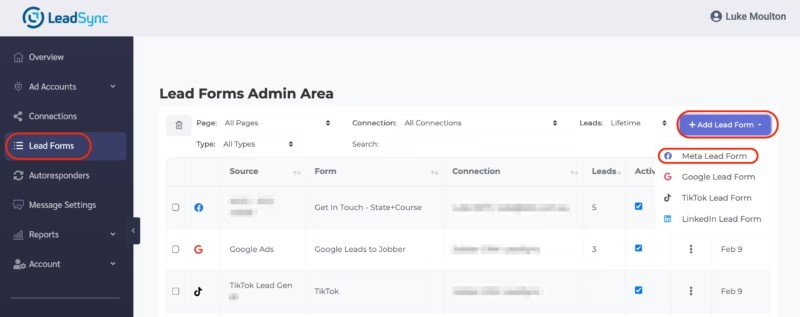
- Go to Lead Forms → Add Facebook Lead Ads Form.
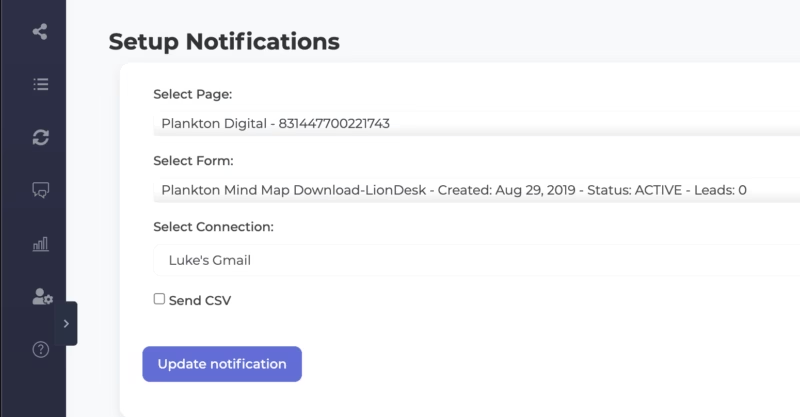
- Select your Facebook Page and the exact lead form used in your ad (double-check the form ID if you have duplicates).
- Map Facebook lead ads form fields (e.g., full_name, email, phone) to the LeadSync email fields.
- Hit Update.
5. Test and Launch Your Facebook Lead to Email Connection
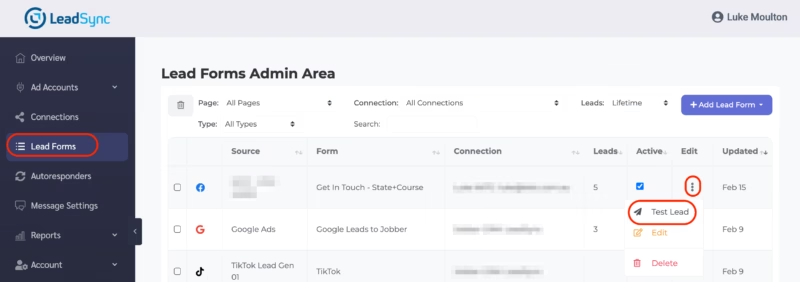
Meta provides a built-in testing tool that we recommend you use, or you can use our built-in lead testing tool (pictured above).
Submit a test entry and confirm the email lands in your inbox within 30 seconds.
Not receiving a Facebook lead email? Re-visit the permissions step — Business Admin privileges are mandatory. Follow our testing guide here.
Customizing Your Facebook Lead Email Notifications
The lead notification email contains all the data captured in your Facebook or Instagram lead form. Here’s an example of a lead form along with the email notification that gets sent after it’s submitted.
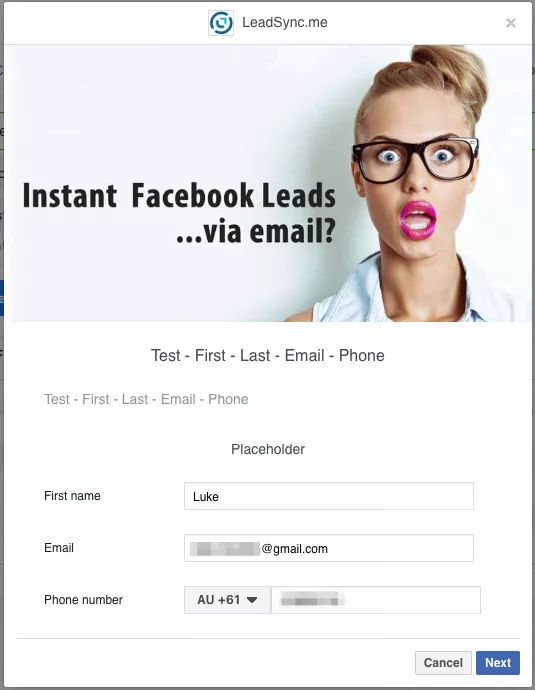
The email notification that LeadSync sends contains all the form data plus:
- Full Name
- Contact: Email and Phone Number
- Form/Page Name, Date, and Time of Submission
What Does the Facebook Email Notification Include?
Here’s an example of the lead notification email.
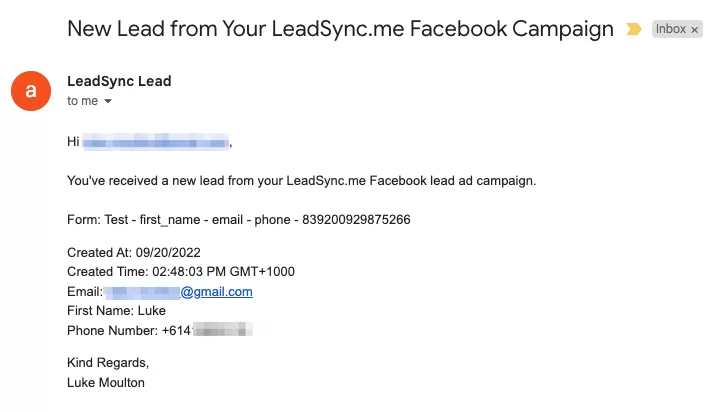
Formatting Facebook Lead Email Notifications
You can customize the lead email alerts you receive in the Message Settings area in your LeadSync account. There are a number of tokens you can use to customise your email subject line, body text, and formatting.
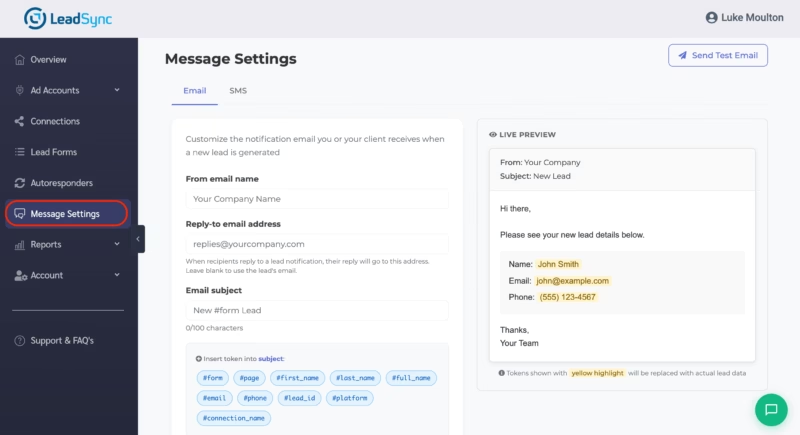
Tailor your email notifications to include the lead’s name, email address, and other relevant information. This personalization makes your follow-up more effective. If you’re an agency, you can also white-label the email notifications for your clients.
Method 2: SMS Notifications for Instant Lead Alerts
Email is great for detailed lead data, but SMS cuts through the noise. Text messages have a 98% open rate compared to 21% for email — and most are read within 3 minutes. For sales teams that need to respond immediately, Facebook lead ads SMS notifications are a game-changer.
Why Use SMS for Facebook Lead Notifications?
- Impossible to miss — SMS alerts go straight to your phone’s lock screen
- Fastest response time — no need to check email or open an app
- Works anywhere — SMS works even without Wi-Fi or mobile data
- Ideal for field teams — contractors, real estate agents, and mobile sales reps get alerts on-the-go
How to Set Up Facebook Lead Ads SMS Notifications
- Create a LeadSync account and connect your Meta Business Manager (same steps as email above).
- Navigate to Connections → Add Connection → SMS.
- Enter the mobile phone number where you want to receive lead alerts.
- Name your connection (e.g., “Sales Manager – SMS Alerts”).
- Pair your lead form with the SMS connection — map the fields you want included in the text message.
- Send a test lead and confirm the SMS arrives on your phone.
The SMS notification includes the lead’s name, contact details, and form name — everything you need to call back immediately.
SMS Best Practices for Lead Notifications
- Use SMS for high-value leads — create a separate lead form with qualifying questions and route only qualified leads to SMS.
- Combine with email — use SMS as the alert, then reference the detailed email notification for full lead data before calling.
- Set up SMS autoresponders — LeadSync can also send an automatic SMS reply to the lead, acknowledging their enquiry while you prepare to call.
For the full SMS setup walkthrough, see our dedicated Facebook Lead Ads SMS Notifications guide.
Method 3: Slack Notifications for Team Collaboration
If your team lives in Slack, sending Facebook lead notifications to a Slack channel keeps everyone in the loop without clogging email inboxes. Every new lead becomes a team conversation — assign follow-ups, share context, and close deals faster.
Why Use Slack for Facebook Lead Notifications?
- Team visibility — the whole team sees new leads in real time, not just one inbox
- Instant assignment — @mention a team member to assign follow-up right in the Slack thread
- Context sharing — discuss lead quality, add notes, or flag duplicates before calling
- No app switching — your team already has Slack open all day
- Channel organization — route leads from different campaigns to different Slack channels
How to Set Up Facebook Leads to Slack Notifications
- Create a LeadSync account and connect your Meta Business Manager (same steps as email above).
- Navigate to Connections → Add Connection → Slack.
- Authorize your Slack workspace — you’ll be redirected to Slack to grant LeadSync permission to post to your channels.
- Select the Slack channel where you want leads posted (e.g., #new-leads or #facebook-leads).
- Pair your lead form with the Slack connection and map the fields you want displayed in the Slack message.
- Send a test lead and confirm it appears in your Slack channel.
Each Slack notification includes the lead’s name, contact info, form name, and submission time — formatted cleanly for quick scanning.
Slack Best Practices for Lead Notifications
- Create a dedicated #leads channel — keep lead notifications separate from general team chat.
- Use channel-per-campaign — for agencies or multi-location businesses, create separate channels for each campaign or location.
- Set Slack notifications to “All messages” on your leads channel so you don’t miss alerts.
- Combine with email or SMS — use Slack for team visibility and email/SMS for personal alerts.
For the full walkthrough, see our dedicated Facebook Leads to Slack integration guide.
Email vs SMS vs Slack: Which Notification Method Should You Use?
Each notification channel has different strengths. To help you decide, here’s how they compare side by side:
| SMS | Slack | ||
|---|---|---|---|
| Delivery Speed | Under 30 seconds | Under 60 seconds | Under 30 seconds |
| Open Rate | ~21% | ~98% | ~80% (active users) |
| Best For | Detailed lead data, record-keeping | Urgent alerts, field teams | Team coordination, assignment |
| Multiple Recipients | Yes (comma-separated) | One number per connection | Entire channel sees it |
| Works Without Internet | No | Yes | No |
| Lead Data Included | All fields + customizable | Key fields (name, phone, email) | All fields + customizable |
| Setup Time | 3 minutes | 3 minutes | 5 minutes |
| Ideal User | Solo operators, managers | Sales reps, contractors, agents | Sales teams, agencies |
Our Recommended Multi-Channel Strategy
For maximum coverage, we recommend combining channels:
- Email (always-on) — your permanent record with complete lead data
- SMS (high-value leads) — create a separate qualifying lead form and route only hot leads to SMS for immediate callback
- Slack (team visibility) — keep your sales team coordinated and accountable
- Autoresponder — send an automatic email or SMS reply to the lead to acknowledge their enquiry
You can set up multiple connections in LeadSync — one lead form can trigger email, SMS, and Slack notifications simultaneously.
Instagram Lead Ads Notifications
If you’re running lead ads on Instagram, the good news is that Instagram lead forms use the exact same Meta infrastructure as Facebook lead forms. This means the setup process for receiving Instagram lead ad notifications is identical — no extra configuration required.
When you connect your Meta Business Manager to LeadSync, all lead forms across both Facebook and Instagram are accessible. If you’re already receiving Facebook lead email notifications through LeadSync, your Instagram lead forms will work the same way.
Simply pair the Instagram form with your email, SMS, or Slack connection — no additional configuration needed.
Key Differences Between Facebook and Instagram Lead Ads
- Same lead form builder — both platforms use Meta’s Instant Forms, managed in Ads Manager
- Same notification setup — one LeadSync connection handles both Facebook and Instagram leads
- Different audience behavior — Instagram users tend to be younger and more mobile-first, so SMS notifications may be particularly effective for Instagram lead follow-up
- Same speed — LeadSync delivers Instagram lead notifications within 30-60 seconds, just like Facebook
If you’re running campaigns across both platforms, we recommend using the same notification setup — LeadSync handles both seamlessly through a single connection.
Facebook Lead Notification Tools Compared
There are several tools that can send you facebook lead email notifications. We’ve tested the most popular options so you can make an informed decision. Here’s how they stack up:
| LeadSync | Zapier | LeadsBridge | Meta (Native) | |
|---|---|---|---|---|
| Email Notifications | Yes | Yes (via Gmail/Email action) | Yes | No (app only) |
| SMS Notifications | Yes (built-in) | Via Twilio add-on | No | No |
| Slack Notifications | Yes (built-in) | Yes | Yes | No |
| Delivery Speed | Under 60 seconds | 1-5 minutes | 1-3 minutes | 15+ minutes (unreliable) |
| Setup Time | 3 minutes | 10-15 minutes | 5-10 minutes | N/A |
| Email Autoresponder | Yes (built-in) | Requires extra Zap | No | No |
| Custom Email Templates | Yes | Yes | Limited | No |
| CRM Integrations | 30+ | 6,000+ (all apps) | 380+ | Limited |
| Starting Price | $9/month | $20/month | $22/month | Free |
| Free Trial | 14 days | 14 days (limited) | 14 days | N/A |
| Built for Lead Ads | Yes (dedicated) | No (general automation) | Yes (dedicated) | Yes |
| Instagram Lead Ads | Yes | Yes | Yes | Yes |
| TikTok Lead Ads | Yes | Yes | Yes | No |
Which Tool Should You Choose?
Choose LeadSync if you want the fastest delivery, built-in SMS and email autoresponders, and a simple setup specifically designed for lead ad notifications. LeadSync is purpose-built for this use case and offers the best value at $9/month.
Choose Zapier if you need to connect Facebook leads to hundreds of different apps beyond just notifications. Zapier is a general-purpose automation tool — more powerful for complex workflows, but more expensive and slower for simple lead notifications.
Choose LeadsBridge if you need a large library of CRM-specific integrations and don’t need SMS notifications. LeadsBridge offers 380+ integrations but lacks built-in SMS and autoresponder features.
Use Meta’s native tools if you’re on a very tight budget and can tolerate delayed, unreliable notifications. The free option works for low-volume advertisers who check Ads Manager regularly — but for any serious lead generation campaign, the cost of missed leads far outweighs the $9/month for a dedicated tool.
Sending Leads to CRMs and Email Marketing Platforms
Beyond notifications, LeadSync also syncs leads directly to your CRM or email marketing platform. This means you can automate your entire lead workflow — from instant alerts to CRM entry — without any manual steps.
Send Facebook Leads to CRMs
Syncing new contacts from Facebook Lead Ads into your CRM ensures leads are instantly available for your sales team. LeadSync integrates with popular CRM platforms including:
- ActiveCampaign
- AgileCRM
- Autopilot
- Copper
- Follow Up Boss
- Google Sheets
- HubSpot
- Keap (Infusionsoft)
- Ontraport
- Zoho CRM
LeadSync also supports Facebook Lead Ads to CRM connections for platforms like Google Ads lead forms, LinkedIn Lead Gen Forms, and TikTok lead ads. See our full integrations page for the complete list of 30+ supported platforms.
Email Marketing Platform Integrations
Need to add leads to an email marketing list automatically? LeadSync sends Meta leads to:
- Mailchimp
- Constant Contact
- Kit (Formerly ConvertKit)
- GetResponse
- Campaign Monitor
- MailerLite
- Brevo
Send Automated Responses to Facebook Leads
Of course, you’re not always in a position to respond to a new lead with a phone call. That’s where autoresponders come in. LeadSync can send an automatic email autoresponder or SMS autoresponder to acknowledge the lead’s enquiry — so long as you’ve asked for an email or mobile phone number in your lead form.
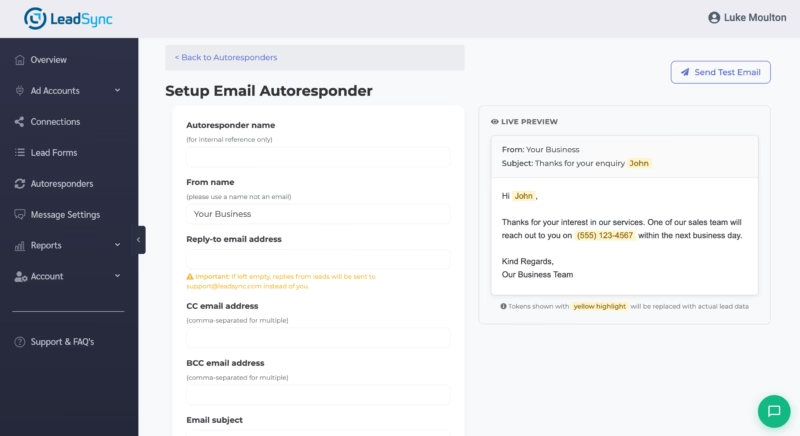
Autoresponders bridge the gap between lead submission and your first personal contact. Even a simple “Thanks for your enquiry — we’ll call you within 5 minutes” dramatically improves the lead’s perception of your business.
FAQs
Why am I not receiving Facebook lead ad email notifications?
The most common issue is selecting the wrong Facebook lead form. If you’ve recently created a new form, make sure the form connected to LeadSync matches the one used in your ad.
Here’s how to check what lead form your ad is using. Also, check your spam folder — lead notification emails occasionally land there, especially with stricter email filters.
Why should I set up notifications for Facebook lead ads?
Real-time notifications ensure you can follow up with leads quickly — often while they’re still thinking about your offer. Research shows that leads contacted within 5 minutes are 21x more likely to convert, and responding within 1 minute improves conversion rates by 391%.
How quickly does LeadSync send notifications?
Email and Slack notifications are typically delivered within 30 seconds of lead submission. SMS notifications arrive within 60 seconds. LeadSync is built for speed so you can follow up immediately.
Can I receive Facebook lead notifications via SMS?
Yes. LeadSync sends SMS notifications to any mobile number. You’ll receive a text message with the lead’s name, contact details, and form name within 60 seconds of submission. This is ideal for sales reps, contractors, and real estate agents who need instant alerts on their phone.
Can I send Facebook lead notifications to Slack?
Yes. LeadSync integrates directly with Slack — authorize your workspace, select a channel, and every new lead is posted automatically. This is perfect for sales teams who want shared visibility into incoming leads.
Can I use email, SMS, and Slack at the same time?
Absolutely. LeadSync lets you create multiple connections for the same lead form. A single lead submission can trigger an email to your inbox, an SMS to your phone, and a Slack message to your team — all simultaneously.
Can I send lead notifications to multiple recipients?
Yes. For email, comma-separate the addresses. For Slack, everyone in the channel sees the notification. For SMS, create one connection per phone number.
Do I need coding knowledge to set this up?
Not at all. LeadSync is a no-code solution. Email, SMS, and Slack notifications all take 3-5 minutes to set up with a visual interface.
What if I’m not receiving notifications?
First, check your spam folder. Then verify your LeadSync connection is active and your Facebook Page permissions are correct. Make sure your email address or phone number is entered correctly — and for SMS, ensure your mobile number includes the country code.
Still stuck? Check our “Not getting leads?” FAQ on the LeadSync support center for step-by-step troubleshooting.
Does Facebook send lead notifications natively?
Facebook’s built-in Leads Center in Meta Business Suite can show new leads, but notifications are delayed and unreliable. Many advertisers report not receiving Facebook’s native notifications at all, or receiving them hours later. That’s why tools like LeadSync exist — to guarantee instant delivery via email, SMS, or Slack.
Do Instagram lead ads notifications work the same way?
Yes. Instagram lead forms use the same Meta Instant Forms infrastructure as Facebook. If you’ve set up LeadSync for Facebook lead notifications, your Instagram lead forms work automatically — no additional setup needed. The same email, SMS, and Slack connections handle both platforms.
How much does it cost to set up Facebook lead email notifications?
LeadSync starts at $9/month after a free 14-day trial — making it the most affordable dedicated lead notification tool. By comparison, Zapier starts at $20/month and LeadsBridge at $22/month. Meta’s native Leads Center is free, but it doesn’t send email notifications and is unreliable for real-time alerts.
Which Facebook Lead Notification Method Is Right for You?
After helping thousands of advertisers set up Facebook lead notifications since 2016, here’s what we recommend based on your situation:
- Solo business owner or freelancer? Start with email notifications. It’s the simplest setup and gives you a complete record of every lead. Add an email autoresponder to acknowledge leads instantly while you prepare to call back.
- Field-based sales rep, contractor, or real estate agent? Use SMS notifications. When you’re on the road, SMS cuts through — 98% open rate means you’ll never miss a hot lead.
- Sales team or agency? Set up Slack notifications for team visibility, plus email for individual records. This way the whole team sees new leads and can assign follow-ups instantly.
- High-volume lead generation? Use all three channels plus a CRM integration to build a complete lead management pipeline. LeadSync handles the notification layer while your CRM manages the sales process.
LeadSync is a dedicated solution for making Meta leads available where you need them. We handle over 120,000 email notifications per month for more than 20,000 Facebook Pages. Since Meta introduced lead ads in 2016, businesses of all sizes have trusted LeadSync to deliver their leads fast.
Whether you’re a solo consultant or a 50-seat sales floor, LeadSync delivers your leads in under 60 seconds — so you can be the first to respond.
Ready to capture every lead the moment it lands? Start your free 14-day trial today — setup takes just 3 minutes and no credit card is required. Stop losing leads to slow response times and never miss another Facebook lead again.